
Press, hold, wait: a thermostat
The second bigger machine. The music player was built from clicks and events. Thermostat (folder Interactive examples) adds the rest of what a machine can listen to and do:
- press and hold: pointer down and pointer up;
- pointer move over the whole animation;
- a timer: sleep after 4 s without movement;
- a text input compared with is not;
- Multiply and Reset;
- a dial parked on a frame chosen by an input (Jump to a frame with
$temp), redrawn whenever the input changes; - a state that plays faster, one that ends the machine, and why the way back gets its own segment;
- themes switched straight from a click. Their rules include an animated one, a position and a scale.
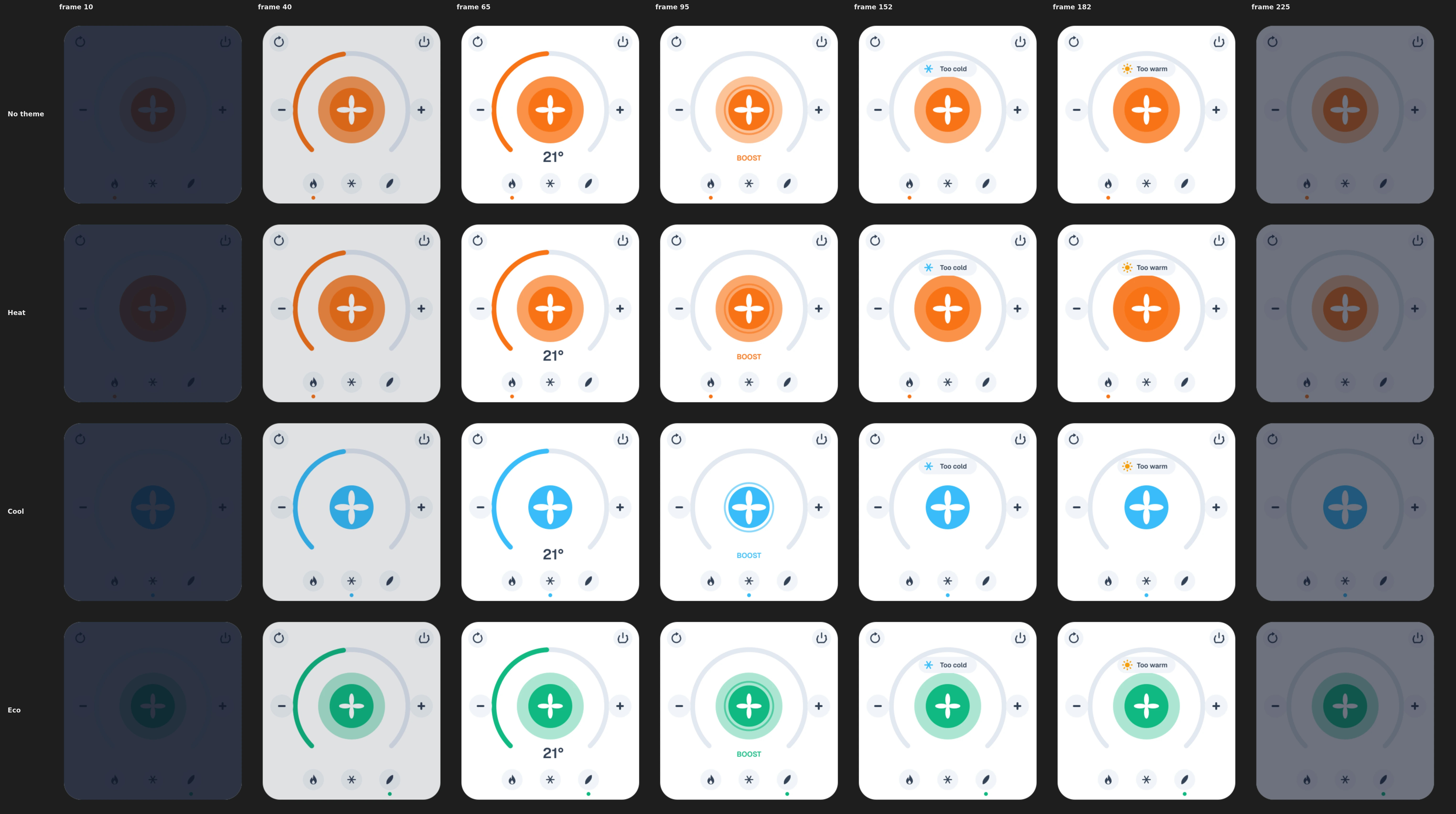
What it does:
- It powers on (the arc draws in and the reading fades in), then rests on the dial: the arc and the number show the set temperature.
- Hold the centre to boost. The fan spins at double speed until you let go.
- + / − change the temperature, 16–28: the arc and the number follow at once. Past 24 a Too warm plate pops up, unless you are cooling. Below 18 a Too cold one, unless you are heating.
- Heat / Cool / Eco switch the look: colour, the glow, the dot under the chip, the fan's size. Eco also takes 10 % off the temperature, but not below 16.
- Reset (top left) goes back to 21 °C and Heat. Power (top right) switches it off for good.
- With 4 s without movement the screen dims. Any movement over it brings it back.
Try it: Press + and −, hold Boost, pick Heat / Cool / Eco, then leave the pointer still. How it works: + and − change temp, and the resting state jumps to the frame that draws that temperature; past 24 (or under 18) a warm (cold) alert plays once. Holding Boost loops boost until you let go. The chips set mode and the theme. With no movement for a while it goes to sleep; moving the pointer wakes it. Power ends in the final off state (Restart brings it back). The file is the .lottie the panel wrote, played by dotlottie-web, the player a web page uses.
Loading the player…
In After Effects
| Segment | Frames | What it shows |
|---|---|---|
off | 0–19 | Screen dark. |
power-on | 20–59 | The arc draws in to 21° and the reading fades in. |
dial | 60–72 | One frame per degree: frame 60 draws 16°, frame 65 draws 21°, frame 72 draws 28° — the arc's length and the number. Never played, only parked on. |
boost | 80–139 | The fan turns a full circle; the button sinks and glows; BOOST where the number was. |
cold | 140–169 | A Too cold plate pops up. |
warm | 170–199 | A Too warm plate pops up. |
sleep | 200–229 | The screen dims and stays dim. |
wake | 230–259 | The screen undims. |
The number and the arc appear only on the dial frames. A .lottie has one playhead: while boost plays, the playhead is in boost, and no frame there knows which temperature is set, so those frames don't draw one. (The same rule shapes the music player.)
Each control is its own layer: Boost button, Plus button, Minus button, Heat chip, Cool chip, Eco chip, Reset button, Power button.
A click is caught by the layer's whole box
A layer's box encloses everything inside it. A ring layer around the Boost button would catch the button's clicks too. Keep every control a layer of its own, and don't make a clickable layer that surrounds another one.
Exposed in Essential Graphics, so themes can change them: accent (colour), flame (the glow's opacity, animated: a slow pulse over the whole timeline), modeAt (the dot's position) and fanSize (the fan's scale).
The machine
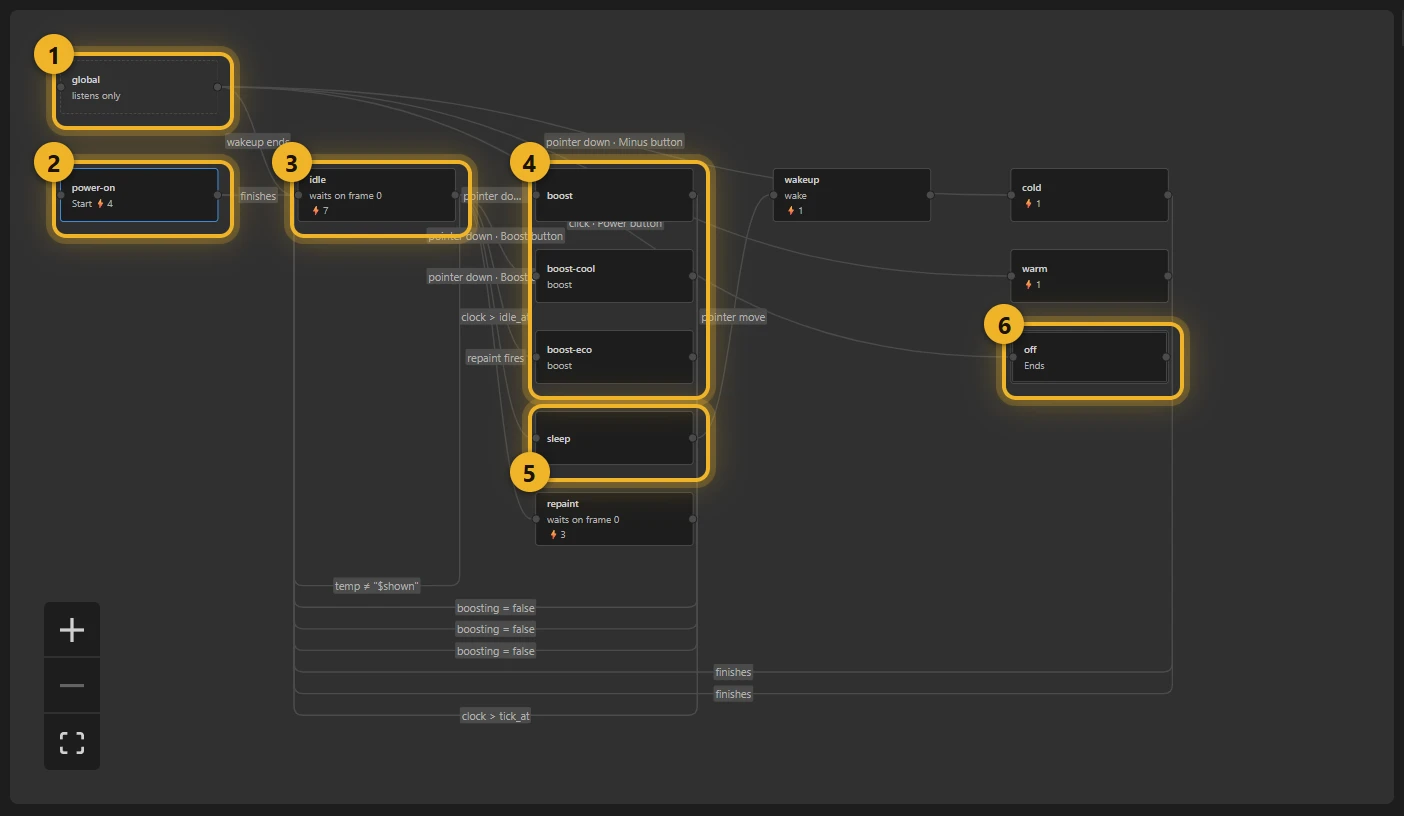
- global 1 listens from anywhere: the temperature alerts and the power switch.
- power-on 2 is where it starts. On entering it sets
tempto 21,modetoheatand switches to the Heat theme, so every start looks the same. When it finishes, it goes to idle 3, the dial at rest. - boost, boost-cool, boost-eco 4 run while the centre is held, one per mode, so the glow matches it.
- sleep 5 dims the screen after the timer runs out. wakeup undims it.
- off 6 ends the machine.
- repaint holds for one tick after a theme click, so the parked dial is drawn again (below).
Inputs
| Input | Kind | Start | For |
|---|---|---|---|
temp | number | 21 | The set temperature. |
shown | number | 0 | The temperature the dial shows now. |
dial_frame | number | 65 | The frame that draws it: temp + 44. |
mode | text | heat | heat, cool or eco. |
boosting | true/false | false | Is the centre held? |
idle_at | number | 0 | When to fall asleep, in seconds on the machine's clock. |
tick_at | number | 0 | When repaint was entered, so it can leave on the next tick. |
plus, minus, wake, stepDone, woke, powerOff, repaint | event | — | Signals. |
A dial that shows the temperature
The resting state plays nothing. It parks the playhead on the dial frame of the current temperature:
- Entering sets
shownto$temp(a value that starts with$reads another input) anddial_frameto$temp, then adds 44, so 21° gives frame 65. - Then Jump to a frame 0 and Jump to a frame
$dial_frame. The state does not autoplay, so the playhead stays on that frame. The jump to 0 is never seen (both jumps happen before the player draws), but it makes the frame change, and a parked player draws only when its frame changes (below). - Its rule temp is not
$shownleads back to idle itself. It fires as soon as + or − changestemp; entering again runs the entering actions again, which park on the new frame. So every change redraws the dial without an event.
The page needs nothing for this: stateMachineSetNumericInput("temp", 25) from your own code moves the dial too.
The parked dial is a still picture. The fan turns only in boost, and the Heat theme's flicker (below) shows while something plays. The clock keeps running while the dial is parked, so the sleep timer still works.
Press and hold
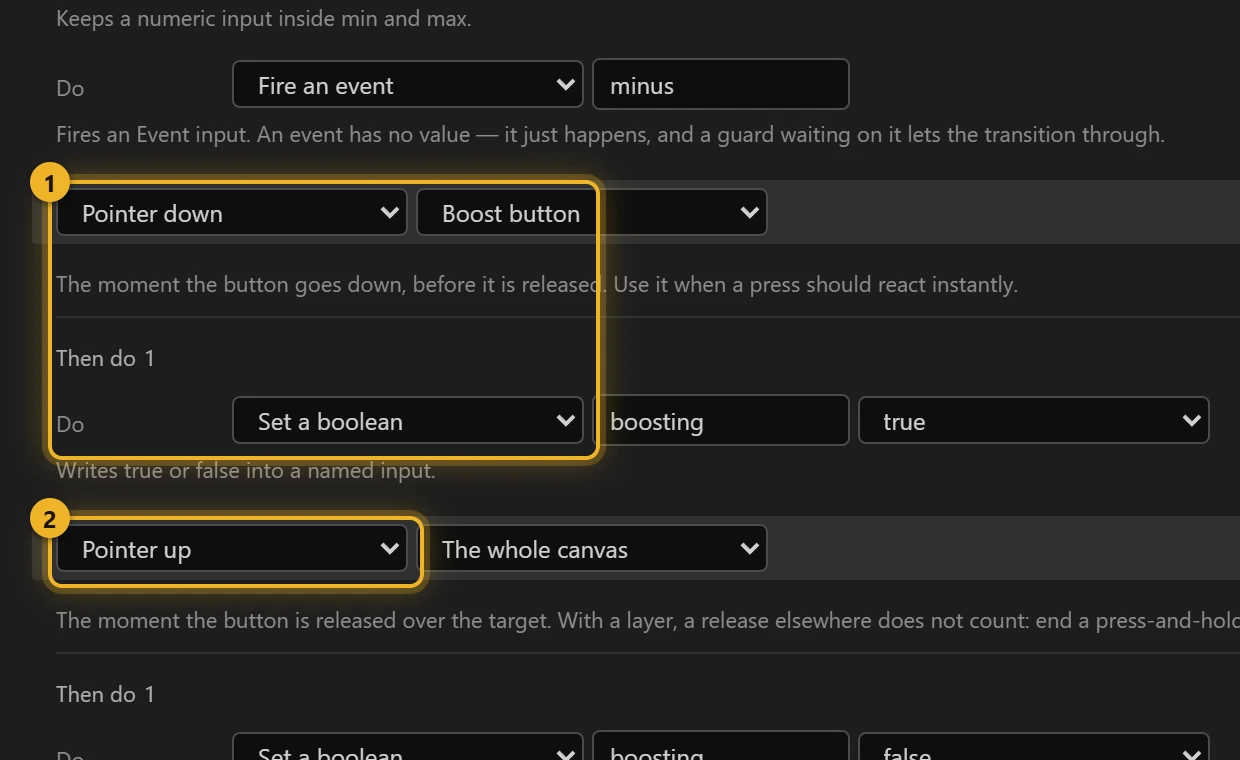
Pointer down on Boost button sets boosting to true 1. Pointer up sets it back to false 2, and it is given no layer. A pointer up on a layer fires only when the button is released over that layer. Press, drag off and let go, and the boost would never end. Without a layer it fires wherever the pointer is released. A third interaction, pointer exit (no layer), ends the boost too when the pointer leaves the animation while held.
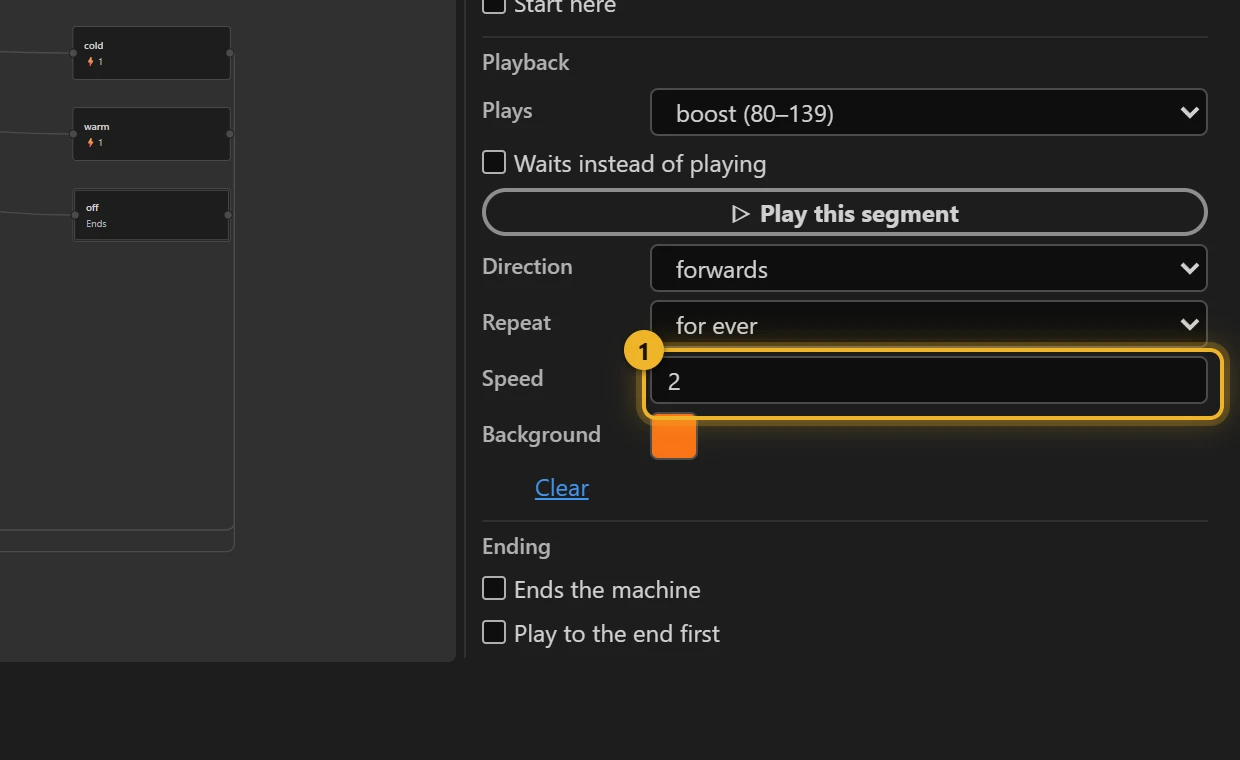
idle → boost waits for boosting is true, and boost → idle for boosting is false. Both cut, they don't blend: a blend plays the timeline between the two frames, and between the dial and boost lie the other degrees: the arc would sweep up to 28° on the way. The boost state plays at speed 2 1, and has a Background: while it runs, the player paints the canvas around the card a soft glow, and clears it when boost ends. A Background is a fixed colour of the state (a theme does not reach it), so there are three boost states, one per mode: idle → boost (orange) when mode is heat, idle → boost-cool (blue) when it is cool, idle → boost-eco (green) when it is eco. All three play the same boost segment:
Rules with two conditions on text and numbers
- and − are pointer down on their layers: add or subtract 1, Clamp to 16–28, Fire
plusorminus. The listener turns that into an alert:
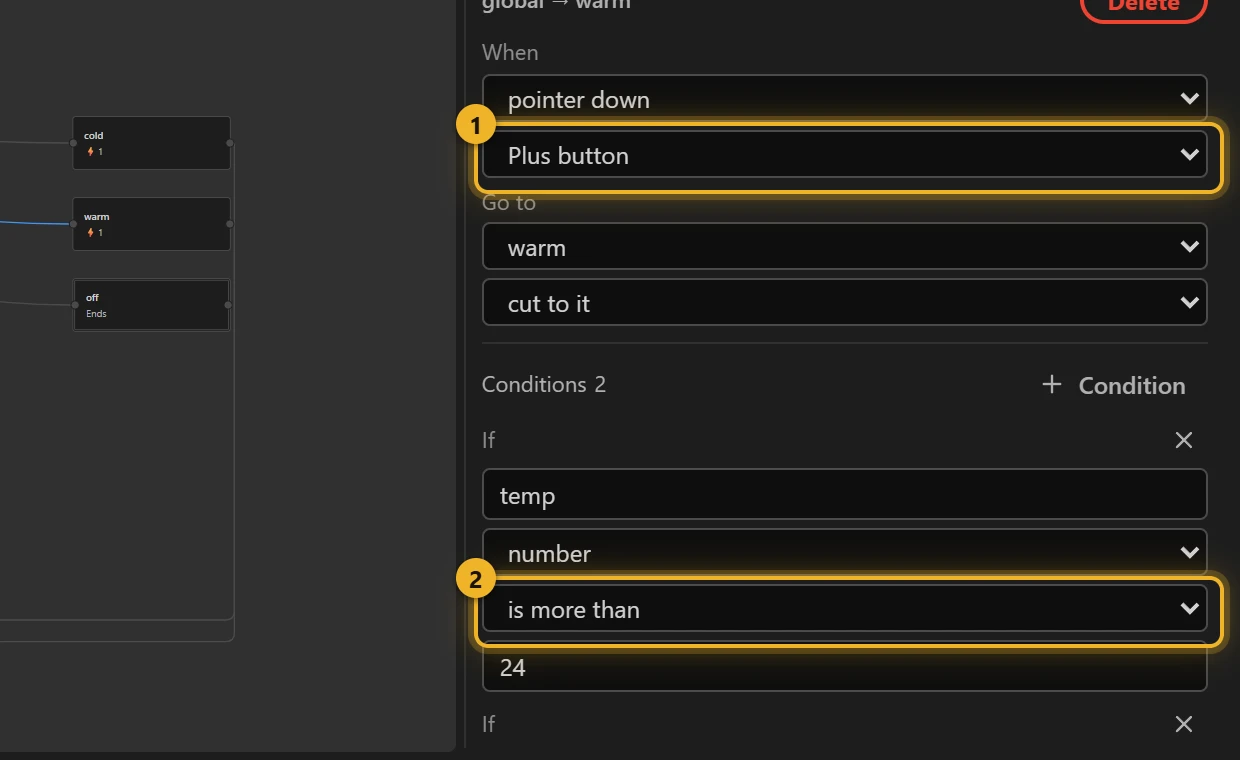
On pointer down on the Plus button 1, if temp is more than 24 2 and mode is not cool (the third condition, below). The cold alert mirrors it: Minus button, temp is less than 18, mode is not heat. is not works on text as well as numbers. Text supports only is and is not, while numbers also have more than, at least, less than and at most.
Themes from a click
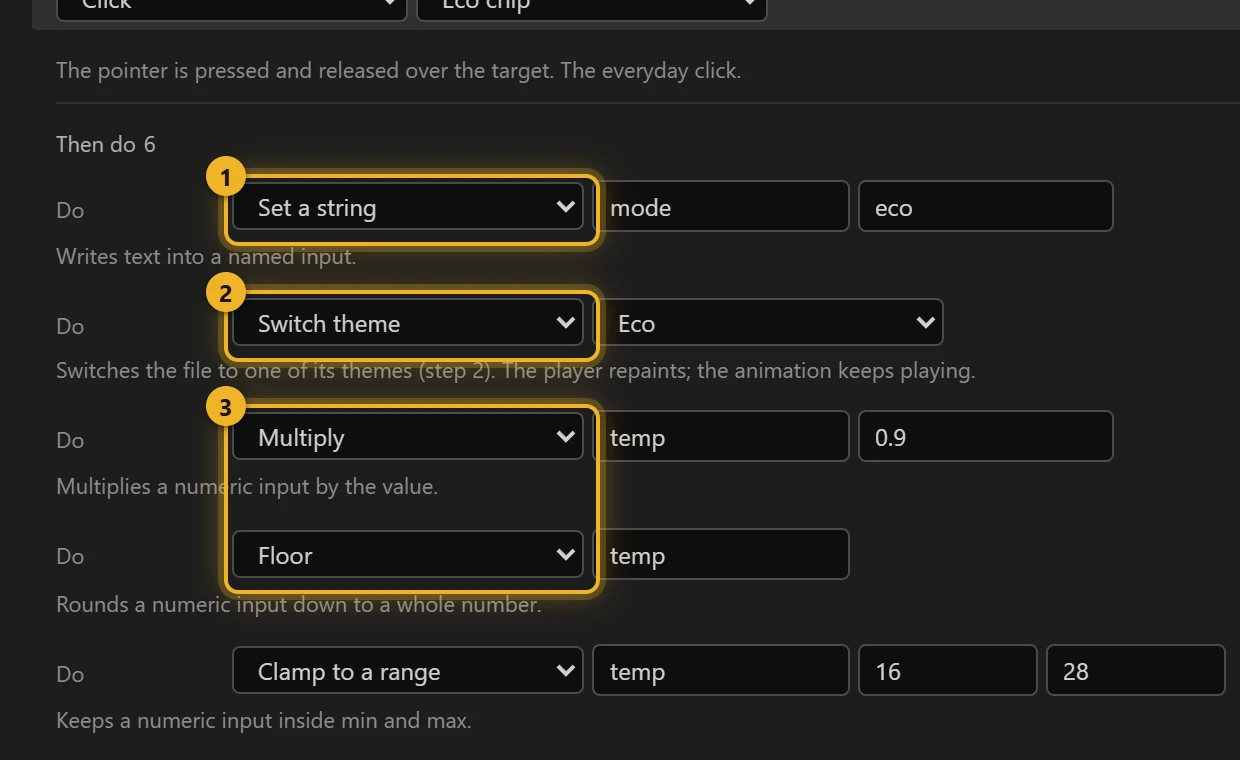
Heat, Cool and Eco don't need a state of their own. A click can switch the theme directly. The Eco chip does six things, in order: Set a string mode = eco 1, Switch theme → Eco 2, then Multiply temp by 0.9, Floor it and Clamp it to 16–28 3. So 26 becomes 23, and 17 becomes 16, never lower. Last, it fires repaint (next section). Heat, Cool and Reset fire it too.
The themes themselves are in Slots and themes:
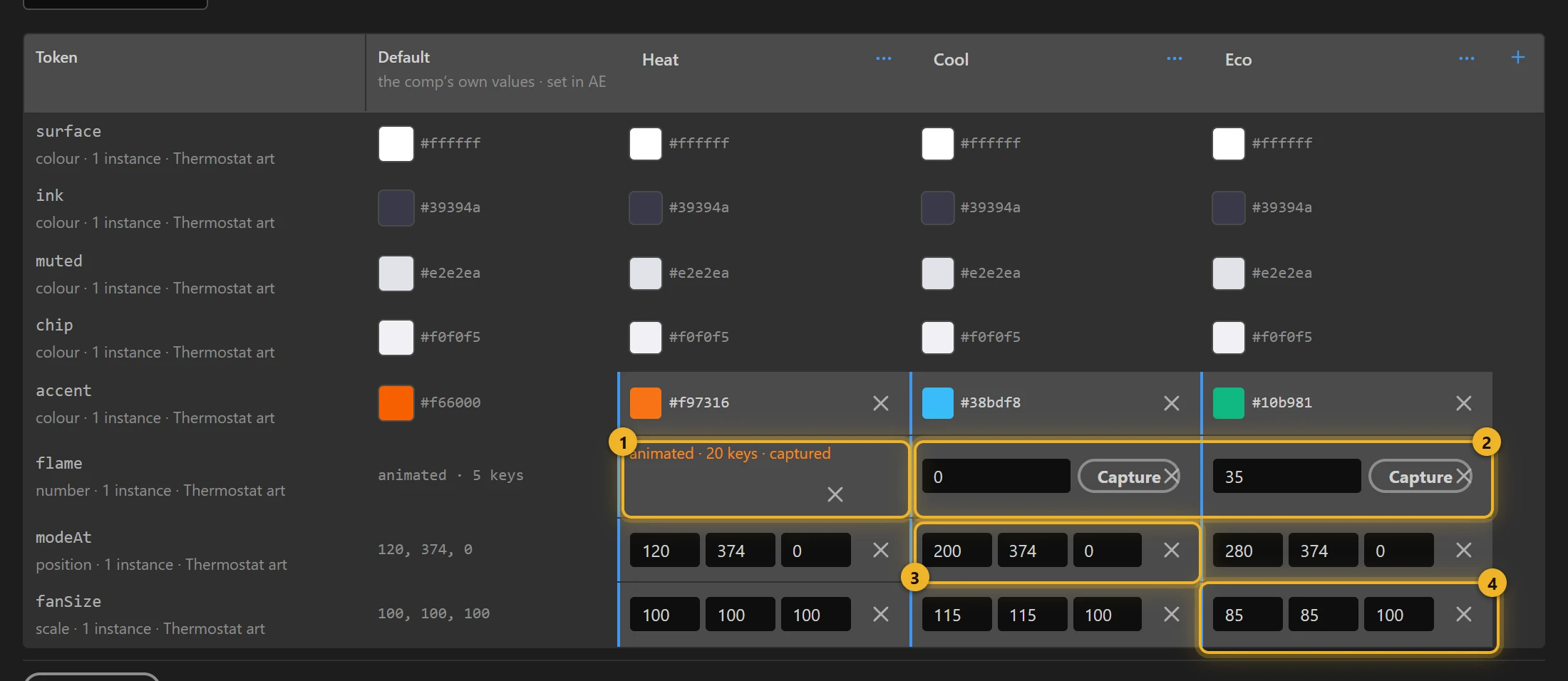
- Heat captured a flicker for
flame1: its own animation, 29 keys, replacing the comp's slow pulse. - Cool and Eco freeze
flameat 0 and 35 2: no glow, or a steady one. - Each theme moves
modeAt, the dot, under its own chip 3, and sizes the fan withfanSize4.
So one Switch theme changes a colour, an animation, a position and a scale at once. Themes lab explains each kind of slot.
Reset uses Reset an input twice, for temp and mode, which puts each back to the value it was declared with (21, heat). Then it switches to Heat.
A parked picture does not redraw by itself
While idle is parked, the player draws a new picture only when the frame changes. Measured in dotlottie-web 0.80:
- Switch theme from a click on a parked state changes the theme, but nothing on the canvas changes. Heat → Cool kept the orange; the player already reported
cool. Eco seemed to work only because it also changestemp, and so the frame. - A position or scale rule (
modeAt,fanSize) shows one draw later than the colours. With one redraw, the colours turned blue but the dot stayed under the previous chip.
So a theme click fires repaint. idle → repaint takes it; repaint enters with Set a number tick_at = @elapsedTime, then jumps to frame 0 and back to $dial_frame (that's one draw). Its rule @elapsedTime is more than $tick_at returns to idle on the next tick, and idle's own jumps are the second draw. Two ticks, and the picture never leaves the dial frame. A state that plays a segment needs none of this: its frames change all the time.
If your page calls setTheme() itself, the player redraws the colours at once, but a position or scale rule still waits for the next frame change.
A timer that movement pushes back
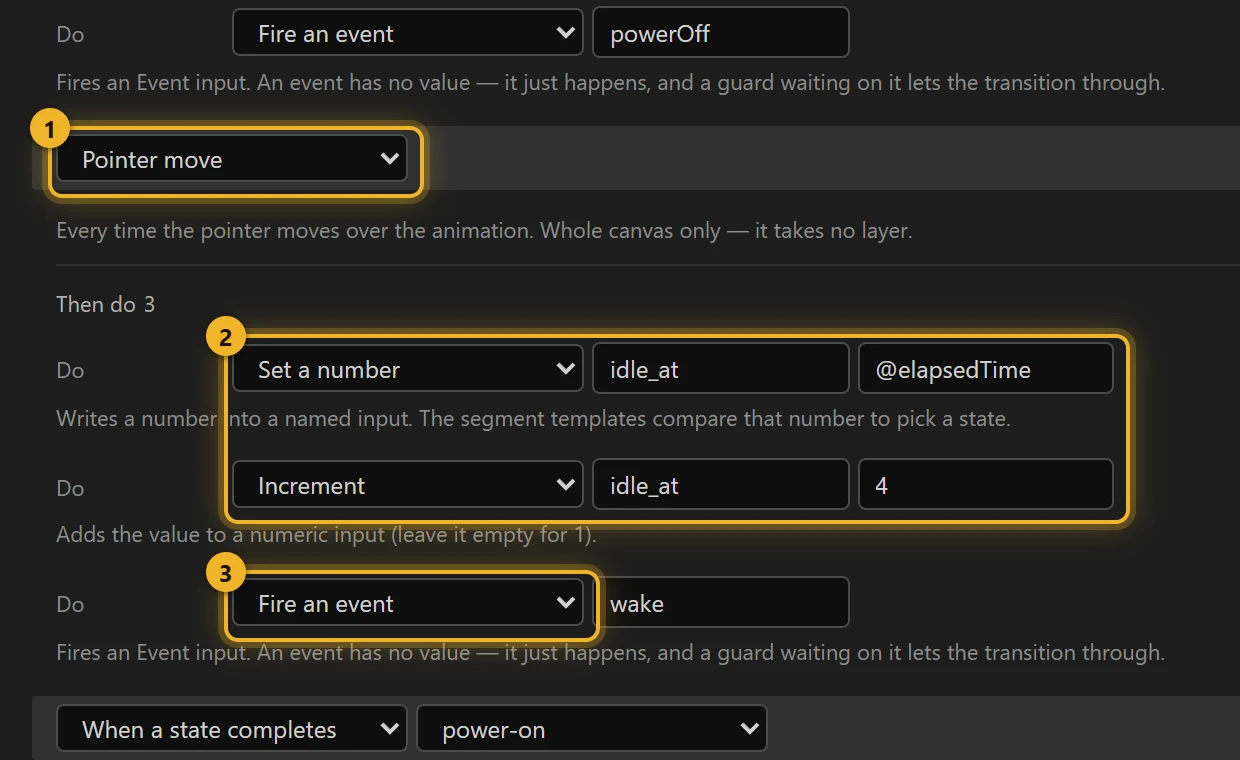
idle → sleep fires when the clock passes the time in idle_at (1, 2):
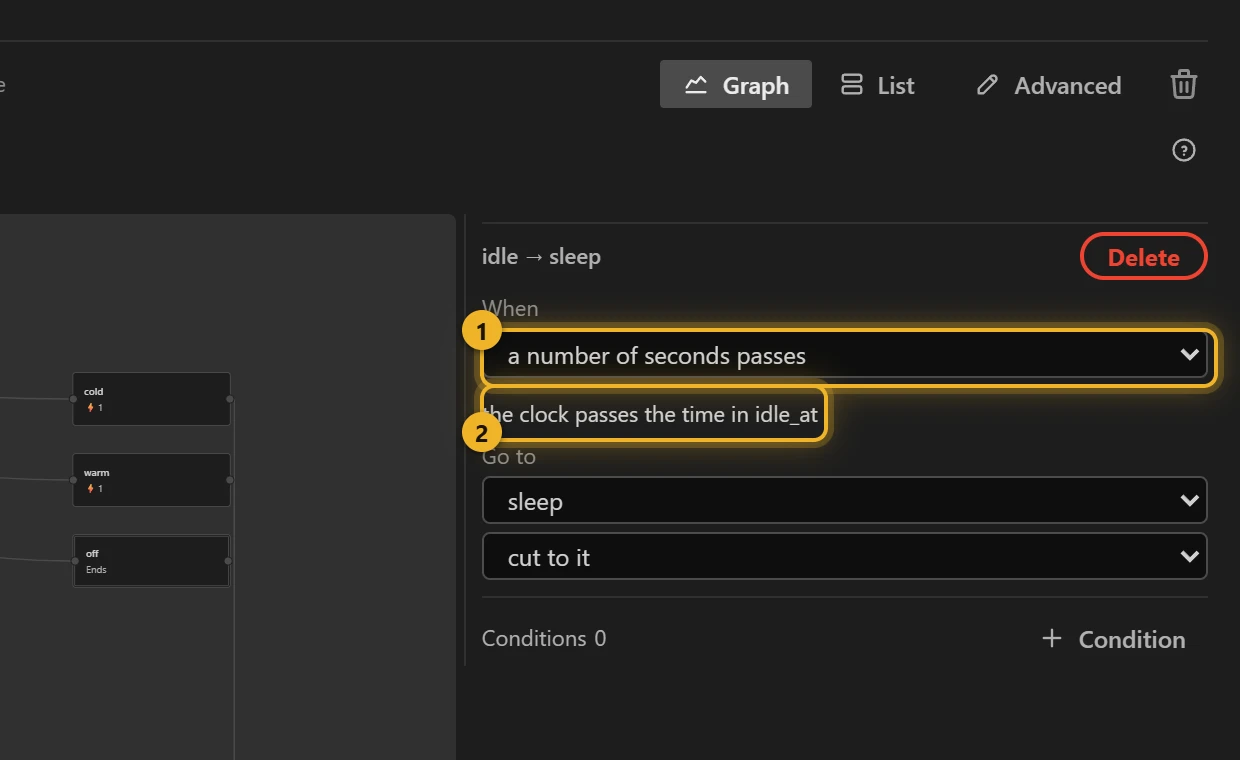
idle_at is set in two places: on entering idle, and on every pointer move, anywhere over the animation 1. Each time it is set to now + 4 s, in two steps 2: Set a number idle_at = @elapsedTime (the machine's clock), then Increment it by 4. The same interaction then fires wake 3, which wakes a sleeping screen.
Order the steps so each one is safe
The player checks the machine's rules after every action of an interaction, not only after the last one. Writing it the other way round, set idle_at = 4 then add @elapsedTime, leaves idle_at at 4 for an instant. That moment is already in the past, so the machine falls asleep and wakes up again at once. On a state's entering actions this doesn't happen, because they apply together.
Waking up, and the end
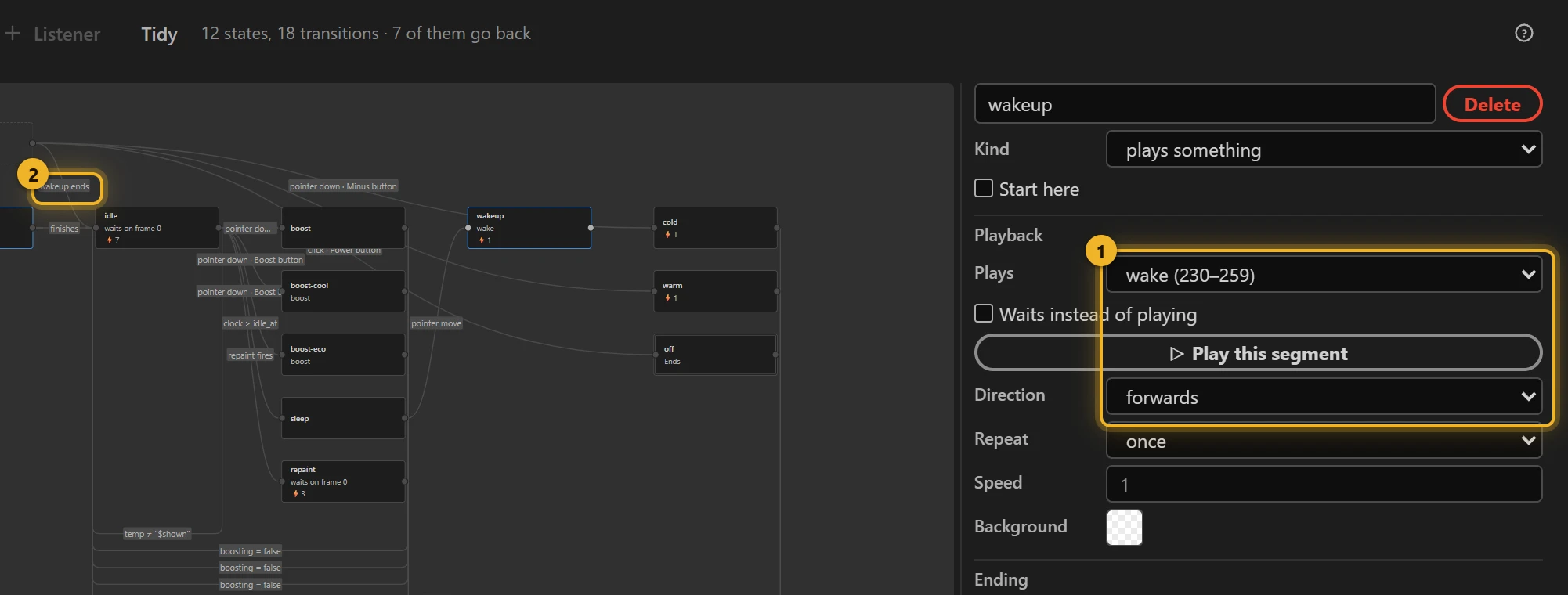
wakeup plays wake: the screen undims. It has no rule of its own: the listener waits for it: when wakeup finishes → idle. A rule on the listener is the only kind that can wait for another state to finish, because only the listener's rules are checked while that state plays.
wake could have been sleep played backwards: one segment fewer. It is not, on purpose: a state that plays backwards reports finishing only some of the time (measured: this machine stayed asleep-but-bright in 3 of 5 runs), so a rule waiting for it may never fire. A short segment of its own, played forwards, always finishes.
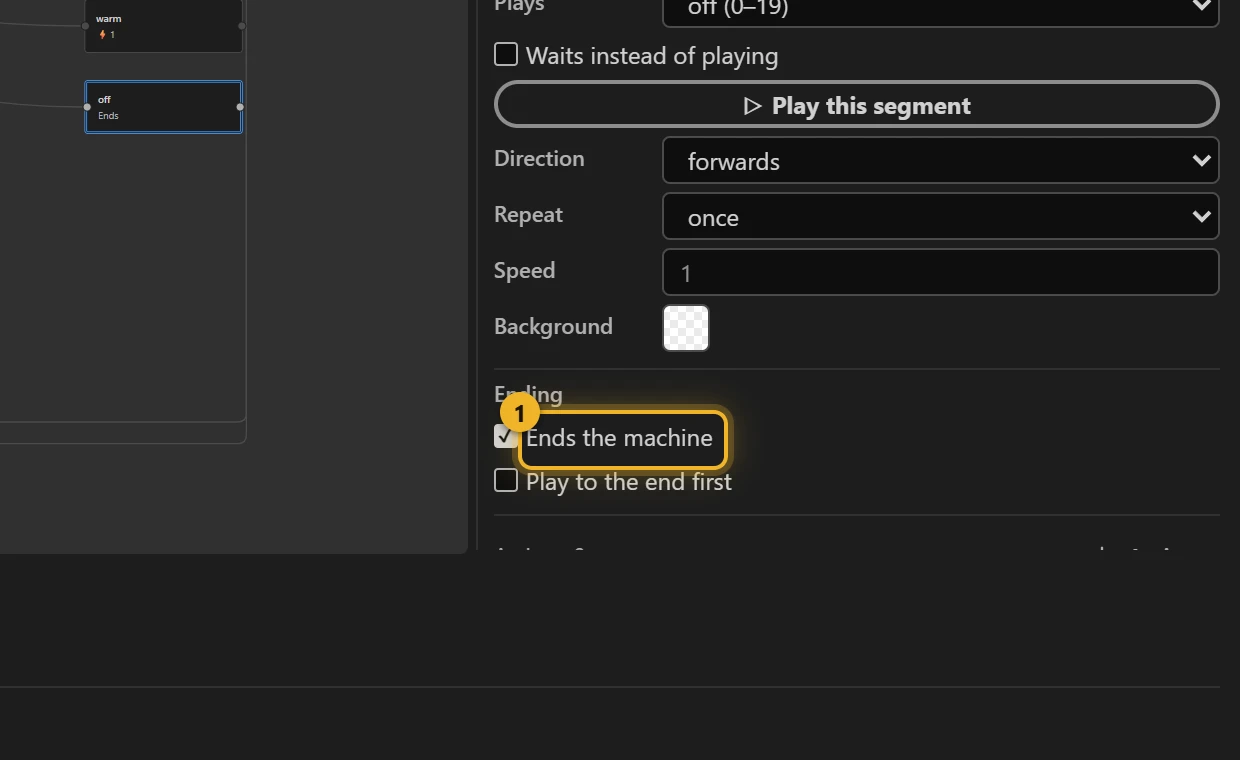
The Power button fires a custom event power-off for the page and the event powerOff. The listener sends that to off, which ends the machine 1. The machine stays there: inputs can still be set, but no rule leaves it. To switch the thermostat on again, the page starts the machine afresh. A fresh start goes back to the first state but keeps every input as it was (measured): that is why power-on sets temp, mode and the theme itself. Use Set a number / Set a string there: a Reset in the first state's entry actions does nothing on a restart.
On a web page
html
<canvas id="thermostat" width="400" height="400"></canvas>
<p>Set to <output id="temp">21</output> °C</p>
<script type="module">
  import { DotLottie } from "https://cdn.jsdelivr.net/npm/@lottiefiles/dotlottie-web@0.81.0/+esm"; // the version these pages use
  const player = new DotLottie({ canvas: document.getElementById("thermostat"), src: "Thermostat.lottie" });
  const start = () => { player.stateMachineLoad("thermostat"); player.stateMachineStart(); };
  player.addEventListener("load", start);
  // The number lives in the machine; the page shows it.
  player.addEventListener("stateMachineNumericInputValueChange", (e) => {
    if (e.inputName === "temp") document.getElementById("temp").value = e.newValue;
  });
  // "off" ends the machine: power on again = start it again.
  player.addEventListener("stateMachineCustomEvent", (e) => {
    if (e.eventName === "power-off") setTimeout(start, 3000);
  });
</script>
The animation can't draw a number that changes: a segment can't show "23". So the machine keeps temp, and the page displays it from stateMachineNumericInputValueChange.
Every behaviour on this page was played in dotlottie-web 0.80 on the file the panel wrote.