
Combining everything: a music player
The template pages each show one idea. This page puts them together. The sample comp Music player (folder Interactive examples) ships two state machines and three themes in one .lottie. Its main machine has 21 states and 77 transitions: most of them made by one idea, routing states, explained in step 4. It uses layer clicks, true/false, number, text and event inputs, counters, random numbers, a comparison between two inputs, a blended transition, theme switching from inside the machine, custom events for your page, and a link.
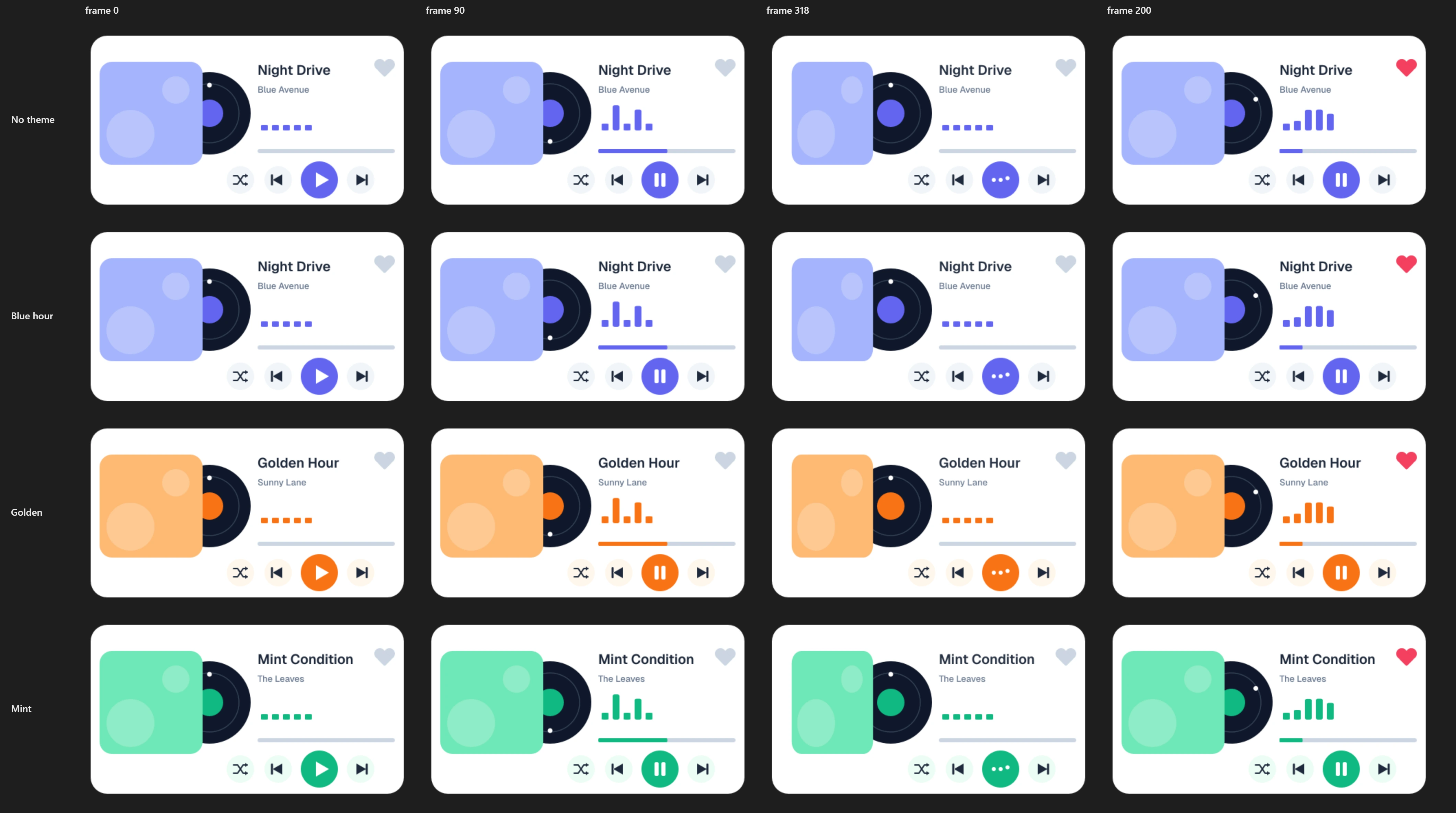
What the card does:
- Play button: starts and stops the music. Stop winds the card back to the start over 0.3 s, and the button shows ▶ again.
- Next / Prev: change the track. Each track has its own song name and its own theme (Blue hour, Golden, Mint). The button you pressed dips, the cover flips, and the play button shows three dots while the next track “loads”. The tracks are a ring: Next wraps from track 3 to track 1, Prev from track 1 to track 3.
- Shuffle: picks a random track, never the one that is already playing.
- Heart: pops a pink heart that stays pink, playing or stopped, until you click it again or change the track: a new track starts unliked, so the heart deflates while the cover flips. It tells your page "liked" or "unliked".
- Cover: opens the album's page.
- After three loops the track ends, unless your page has set
repeatto"all". Then it moves to the next track by itself. A like does not restart the count. - A second machine,
preview, just plays the loop while the pointer is over the card. It suits a grid of thumbnails.
Try it: Click Play, then the heart, then Next, Prev and Shuffle; the cover opens a link. How it works: every picture the card can show is its own segment, and the machine picks one from its inputs: playing, liked, and which button was pressed. The second machine, preview (in the picker), only peeks while the pointer is over it. The file is the .lottie the panel wrote, played by dotlottie-web, the player a web page uses.
Loading the player…
The one rule behind this design
A .lottie has one playhead. Whatever plays, plays the whole card: the heart, the icon on the play button, the disc, the progress bar are all on the same frame. So "the heart is pink while the music plays" cannot be one segment for the heart and another for the music. It has to be a stretch of timeline where the music plays and the heart is pink: playing-liked.
That is why the timeline below has two of everything the heart can be seen in. It is also why a click on the heart while the music plays restarts the disc and the progress bar from the beginning of the loop: the playhead had to leave playing to show the pop.
In After Effects
Fourteen markers (segments) cut the timeline. Each ends one frame before the next begins (see Number → segment for why).
| Segment | Frames | What it shows |
|---|---|---|
paused | 0–29 | Still. ▶ on the play button, grey heart. |
playing | 30–149 | A seamless 2 s loop: the disc turns, the equaliser bounces, the progress bar fills. ⏸ on the button. |
paused-liked, playing-liked | 150–179, 180–299 | The same two, with the heart pink. |
switch-next, switch-prev, switch-shuffle | 300–389 (30 frames each) | The pressed button dips, the cover flips, the play button shows a loader. |
switch-next-liked, switch-prev-liked, switch-shuffle-liked | 390–479 | The same three, leaving a liked track: the heart deflates to grey. |
like-paused, like-playing | 480–539 | The heart pops pink with a burst ring; ▶ or ⏸ as before the click. |
unlike-paused, unlike-playing | 540–579 | The heart deflates back to grey. |
Every control the machine listens to is its own layer, named after what it is: Play button, Next button, Prev button, Shuffle button, Heart, Cover. A click is matched to a layer by name, so name them before you build the machine.
The colours that change with the track (accent, cover, chip) are exposed in Essential Graphics, and so are title1–title3: the opacity of each song's name (three names, one on top of the other). Each track's theme sets them, so the name follows the track with no extra state. See Themes by example.
Put the way back into the segment
The heart's pop grows and settles inside its segment, played forwards. It would be tempting to author only the growth and play it there and back. But the dotLottie player never reports a there and back state as finished, so the rule that returns to the music would never run. The Studio flags this rule as a problem.
1. Start from Blank
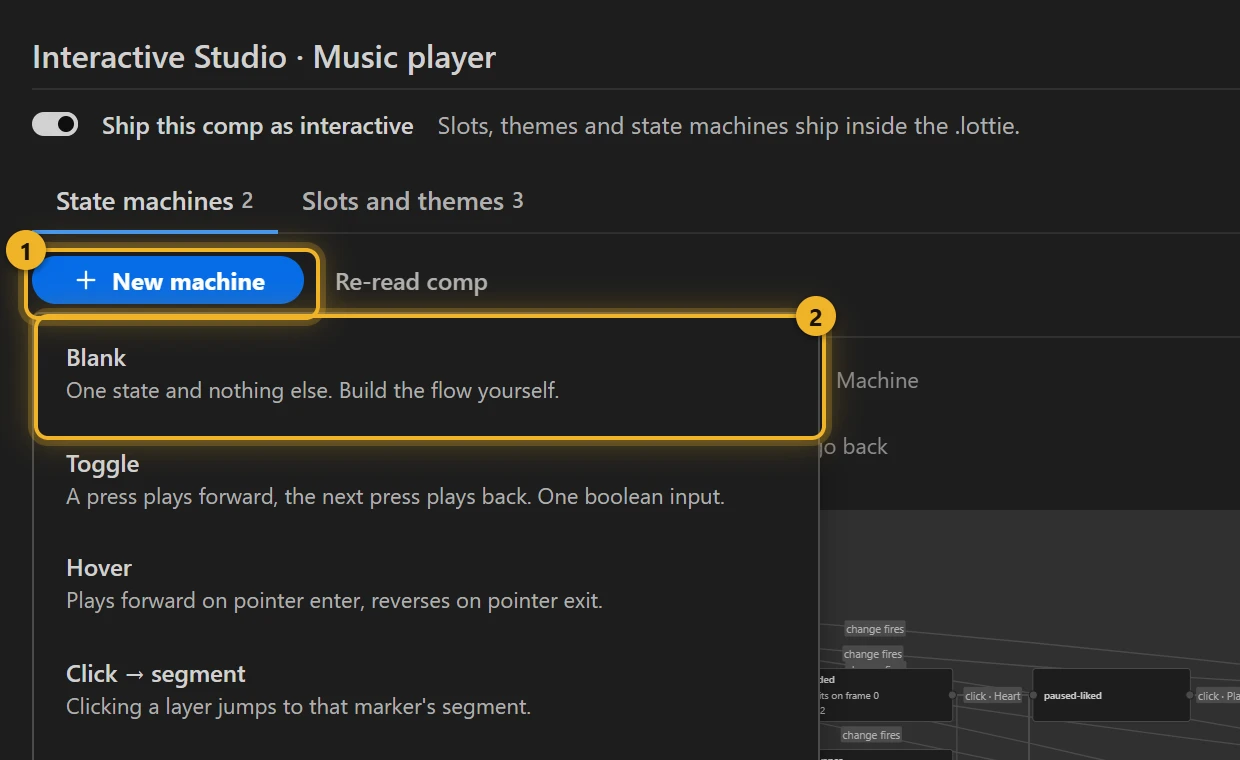
Open the Studio (Build → the comp's row → Interactive → Ship this comp as interactive). Then New machine 1 → Blank 2. None of the templates is this machine, and Blank gives you one state to start from.
2. Declare the inputs
Inputs are the machine's memory, and your page's way in. Open Advanced and add them under Inputs:
| Input | Kind | Start | What it is for |
|---|---|---|---|
playing | true/false | false | Is the music playing? The Play button flips it. |
liked | true/false | false | The heart flips it. |
track | number | 1 | Which track: 1, 2 or 3. |
prev | number | 1 | The track before the last click — so the machine can tell whether track really changed. |
loops | number | 0 | Loops played on this track, a counter. |
repeat | text | off | Set by your page: off or all. |
button | text | next | Which button changed the track: next, prev or shuffle. |
change, heart, switched, popped | event | — | Signals: "the track changed", "the heart was clicked", "the flip finished", "the pop finished". |
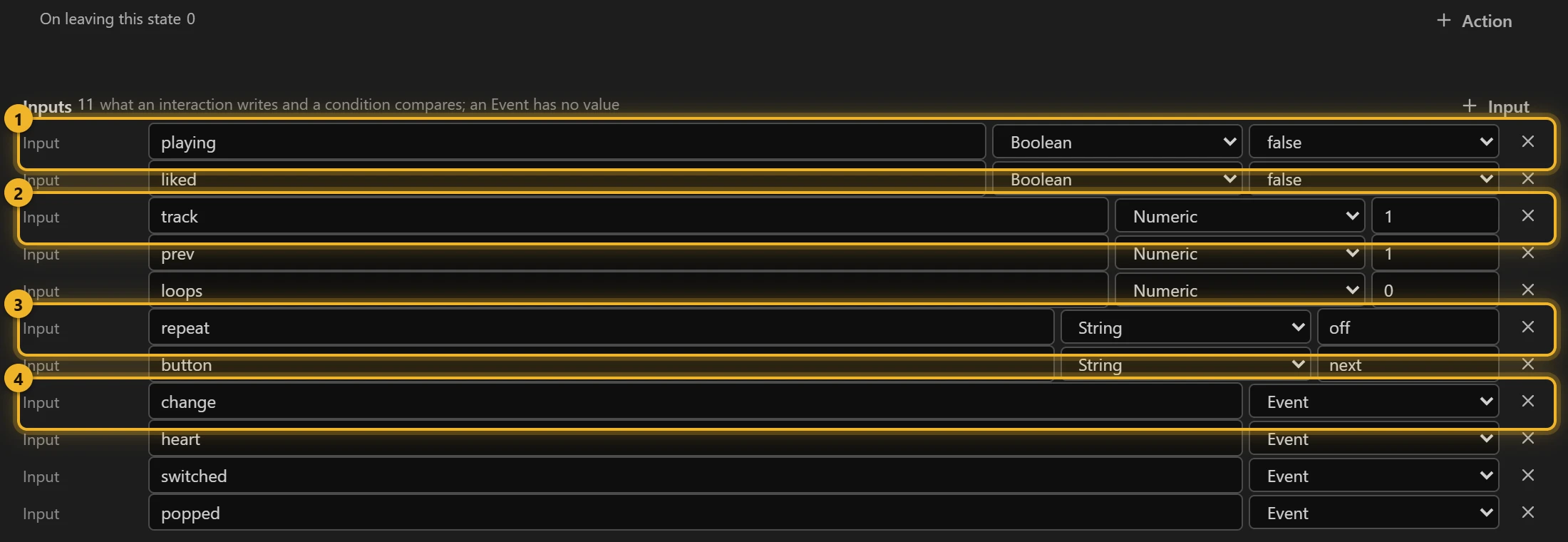
An event has no value. It happens, and a transition waiting for it goes through once. Events keep a machine readable: "when change fires and track is 2" says exactly what happens.
3. Wire the clicks
Still in Advanced, under Interactions, add one interaction per button. Each one is when this happens → do these things, in order:
| When | Then do |
|---|---|
Click on Play button | Toggle playing |
Click on Next button | Set button to next · Set prev to $track · Increment track by 1 · Fire change |
Click on Prev button | Set button to prev · Set prev to $track · Decrement track by 1 · Fire change |
Click on Shuffle button | Set button to shuffle · Set prev to $track · Set a random number in track, 1 to 2.999 · Floor track · Increment track by $prev · Fire change |
Click on Heart | Toggle liked · Fire heart |
Click on Cover | Open a URL https://example.com/album, in a new tab |
Next 1 adds one and fires change 2:
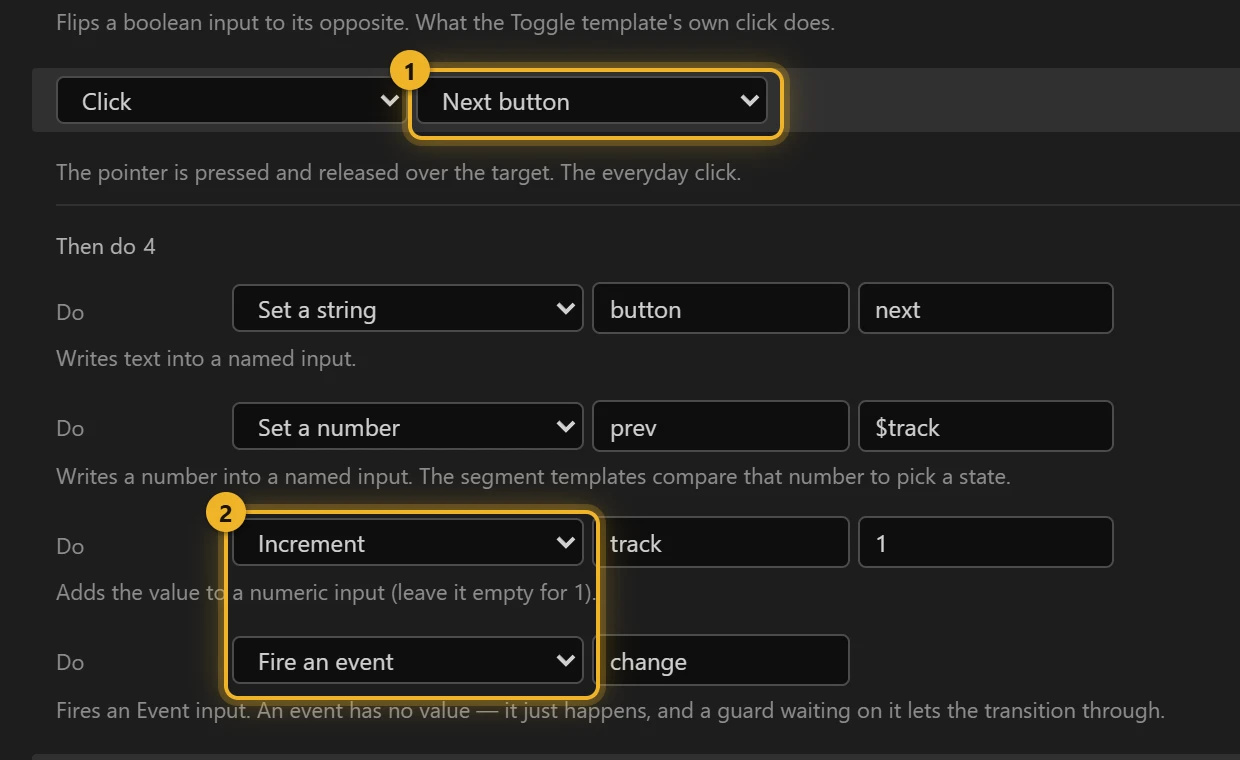
Every button that moves track first copies it into prev. A value that starts with $ names another input, so Set prev to $track stores the track as it was before the click. The actions run in order, and the machine checks its rules after each one, so so Fire change comes last, when everything it depends on is set.
Shuffle must never land on the track that is playing: a press that changes nothing reads as a broken button. So it picks a random step instead of a random track. Set a random number 1 gives anything from 1 to 2.999, Floor 2 rounds it down to 1 or 2, and Increment track by $prev 3 adds the current track. From track 3 that gives 4 or 5, which the listener wraps to 1 or 2, like Next past the last track:
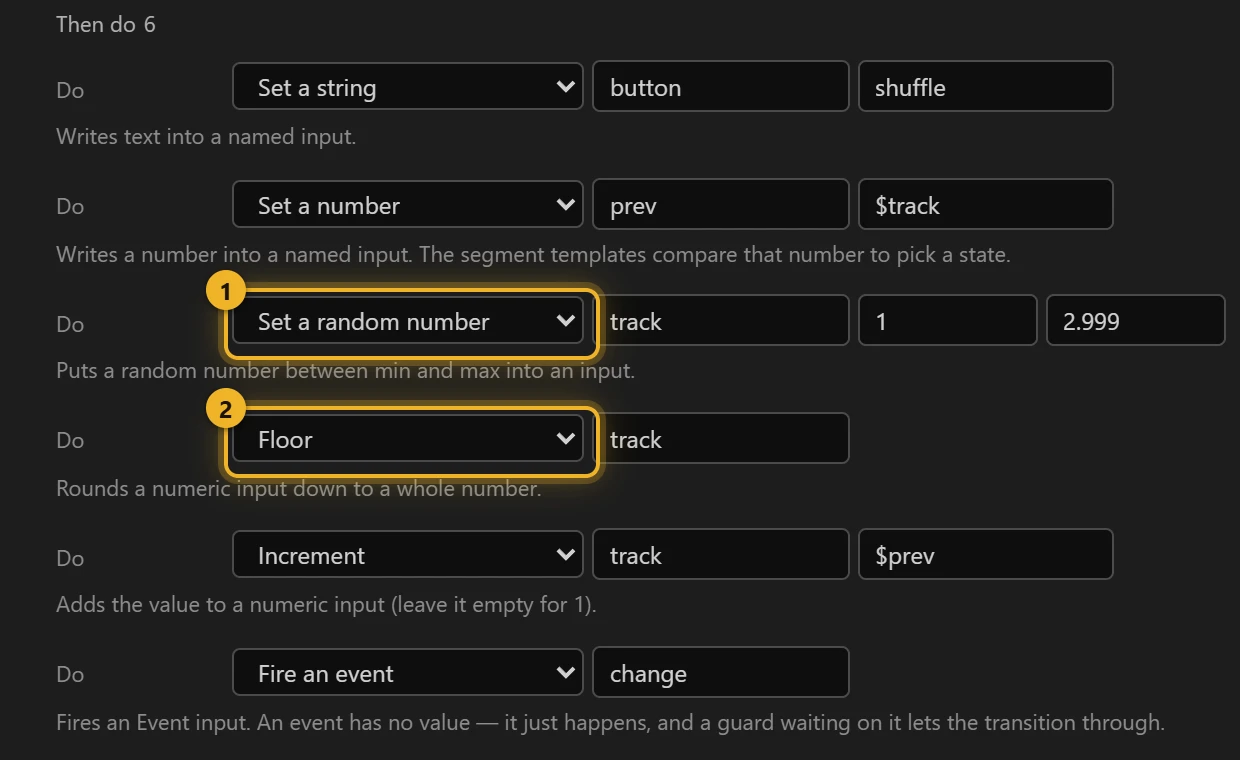
Two more interactions are not clicks: on every loop of playing (and of playing-liked) → Increment loops, and when a switch / like / unlike segment finishes → Fire switched or popped.
4. The states
Back in Graph, add the states with + State, and one + Listener:
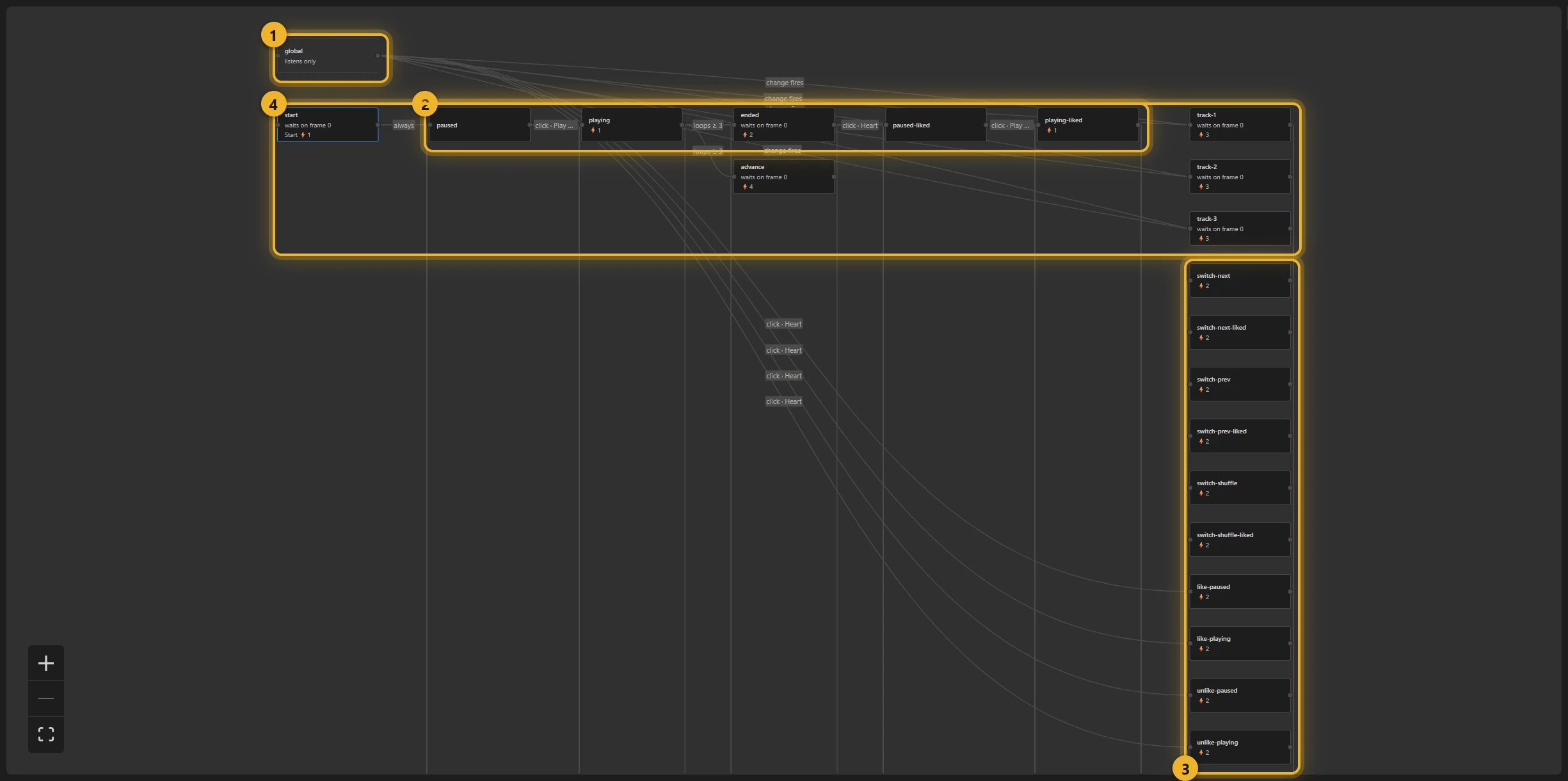
- global 1 is the listener. It plays nothing, and its rules apply from every state. That is how Next and the heart work whether the music is playing or stopped.
- paused, playing, paused-liked, playing-liked 2 are the four places the card rests. playing and playing-liked repeat for ever.
- switch-… (six) and like-… / unlike-… (four) 3 play once, then go back to the right rest state. Each switch state sets
likedto false on entry: a new track starts unliked. - start, track-1, track-2, track-3, ended and advance 4 are routing states: they play nothing and leave at once.
A routing state is a state with no segment whose rules have conditions but no event. The machine enters it, runs its entry actions, checks its rules and leaves. In the same moment, nothing is drawn. It turns one event into many outcomes without a state for every combination: track-2 sets the Golden theme and track = 2, then goes to switch-next, switch-prev-liked or any of the six, by button and liked. Without it the machine would need a track state for each of 3 tracks × 3 buttons × liked or not.
5. Moving between states
Pick a wire to edit it. Each wire has a When, a target and, if needed, more Conditions. All of them must be true together.
playing → paused. The wire waits for playing to become false; the Studio reads it as click · Play button, the click that flips it. Blend into it 1 over 0.3 s:
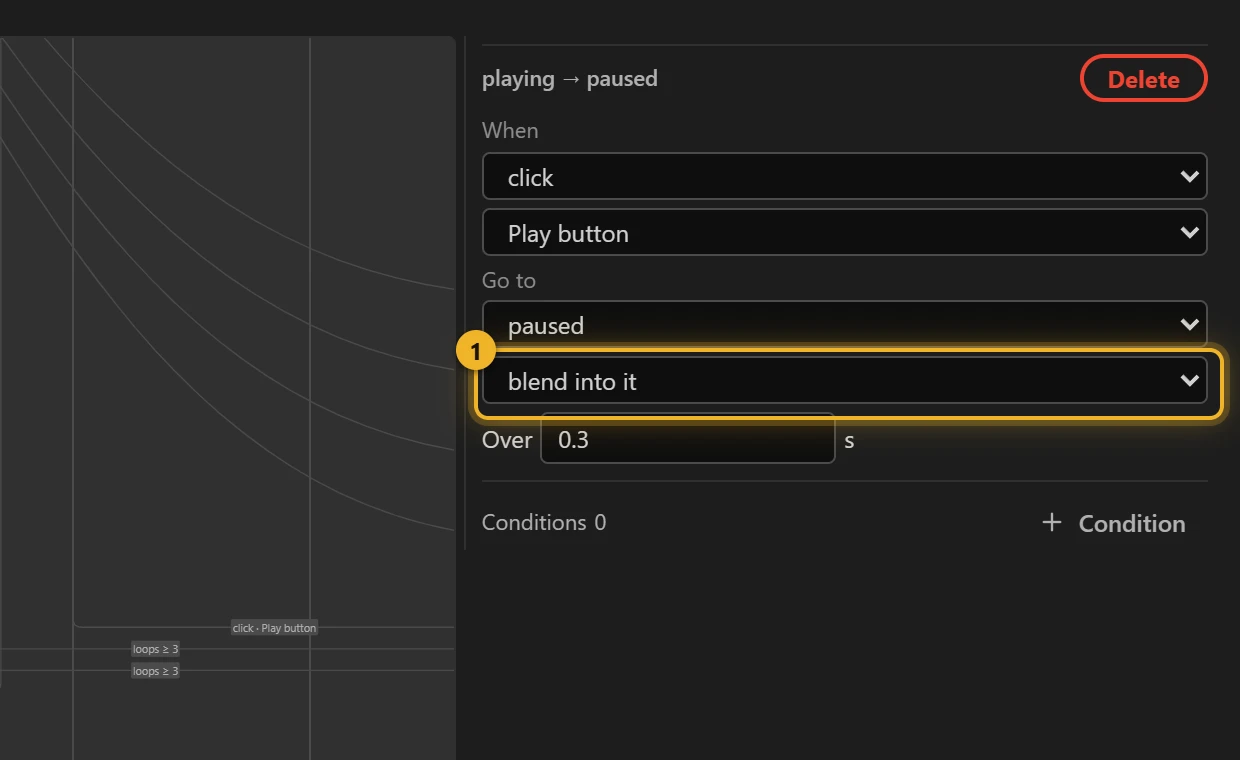
A blend does not cross-fade two pictures: it plays the timeline from the current frame to the first frame of the new state's segment, in the time you give it, and then the new state starts. From the middle of playing back to paused that is a quick rewind: the disc spins back and the progress bar drains, which is exactly what a Stop should look like. Whatever sits on the timeline between the two frames is shown on the way, so use a blend where those frames are a natural path. The way back, paused → playing, is a plain cut: the loop starts where paused ends.
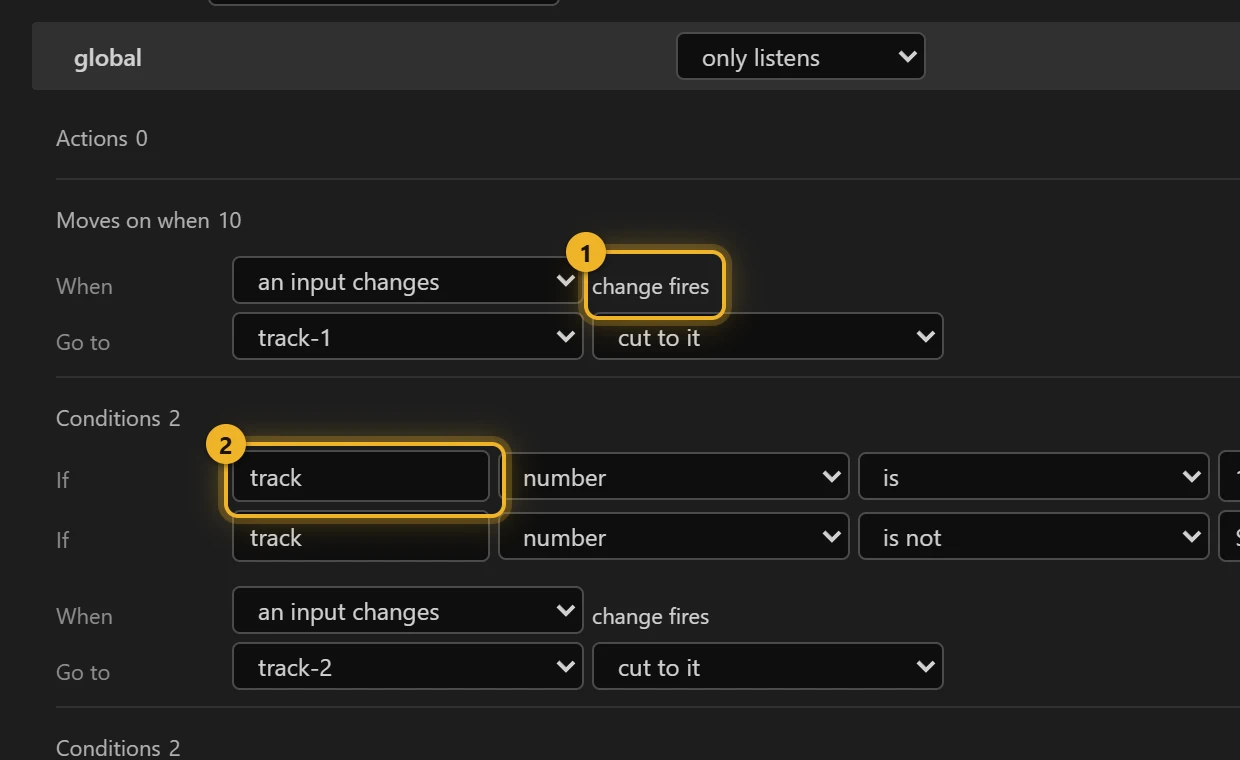
The listener's routes. Ten rules on global, read in the List view. When change fires 1 and track is 1 2 and track is not $prev, go to track-1. The same goes for 2 and 3, plus three rules that close the ring: track is 4 → track-1 (Next past the last, or Shuffle from 3), track is 5 → track-2 (Shuffle from 3), track is less than 1 → track-3 (Prev before the first). The condition track is not $prev compares two inputs; with the ring every button changes the track, so it is a safety net for a page that fires change itself without moving track. The heart: heart fires and liked is true and playing is true → like-playing, and the three other pairs.
Back to rest. Each switch and heart state has four rules on its finishing event: switched fires (or popped) and playing and liked say which of the four rest states. One playhead again: the card can only come back to the picture that matches all of them.
Counting loops. On every loop of playing → Increment loops counts each pass. The count goes back to 0 on entering a track (an entry action on each track state), so a like in the middle does not restart it:
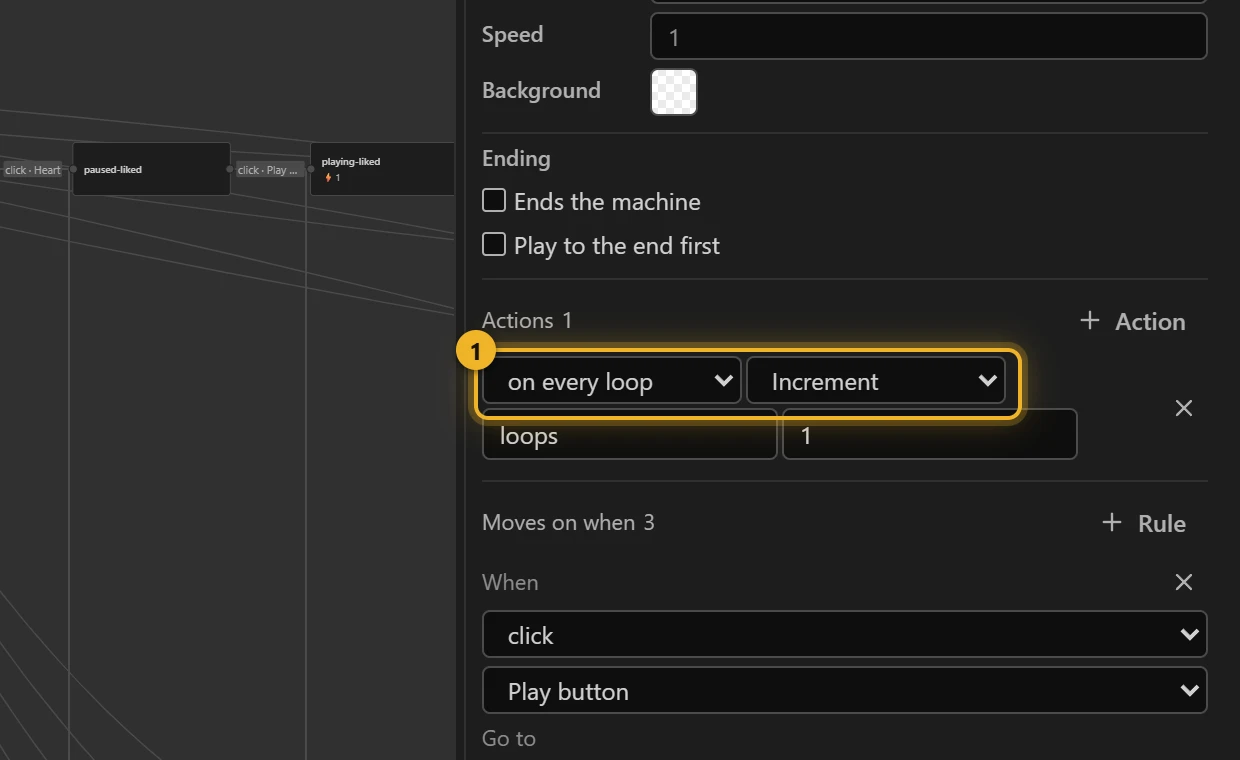
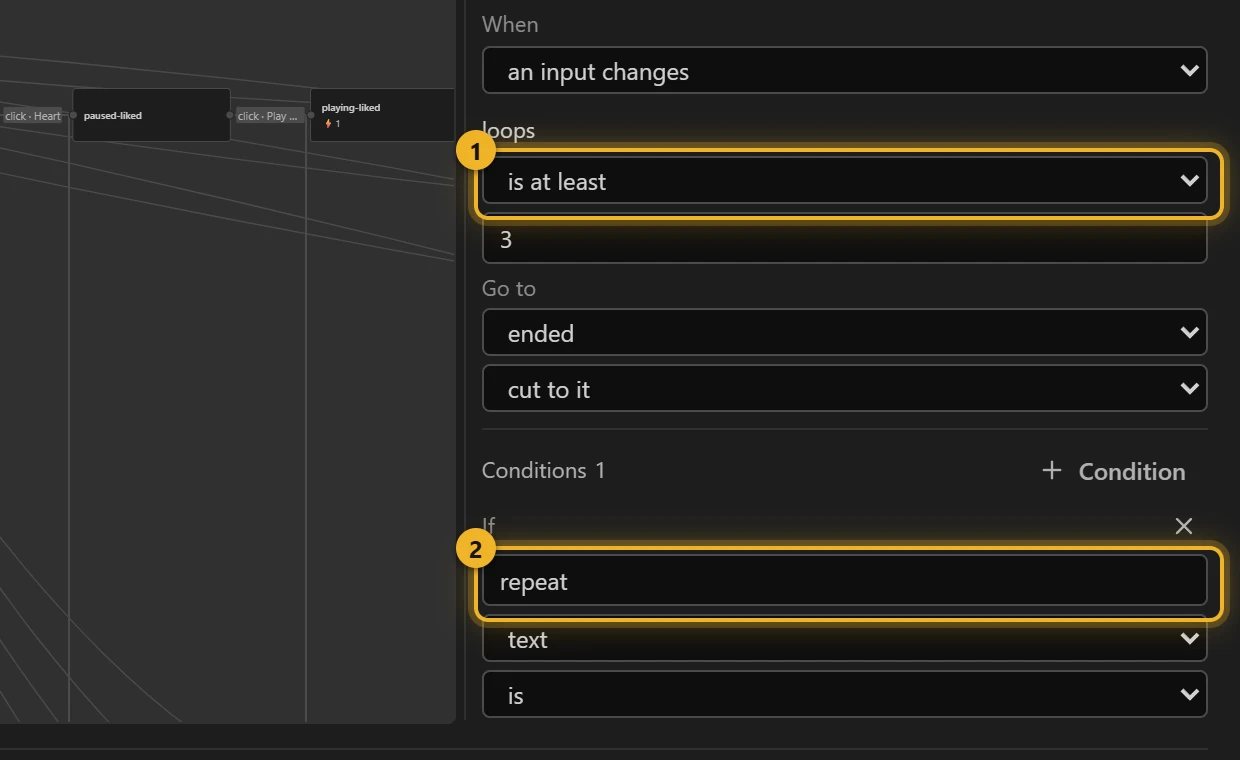
Two conditions at once. playing → ended when loops is at least 3 1 and repeat is off 2. The same pair with repeat is all goes to advance, whose entry actions are Set prev, Set button to next, Increment track and Fire change. The listener then routes to the next track exactly as if Next had been clicked. ended stops the music (playing = false, custom event track-ended) and routes to paused or paused-liked.
6. Themes from the machine
Each track state does three things on entering (1–3):
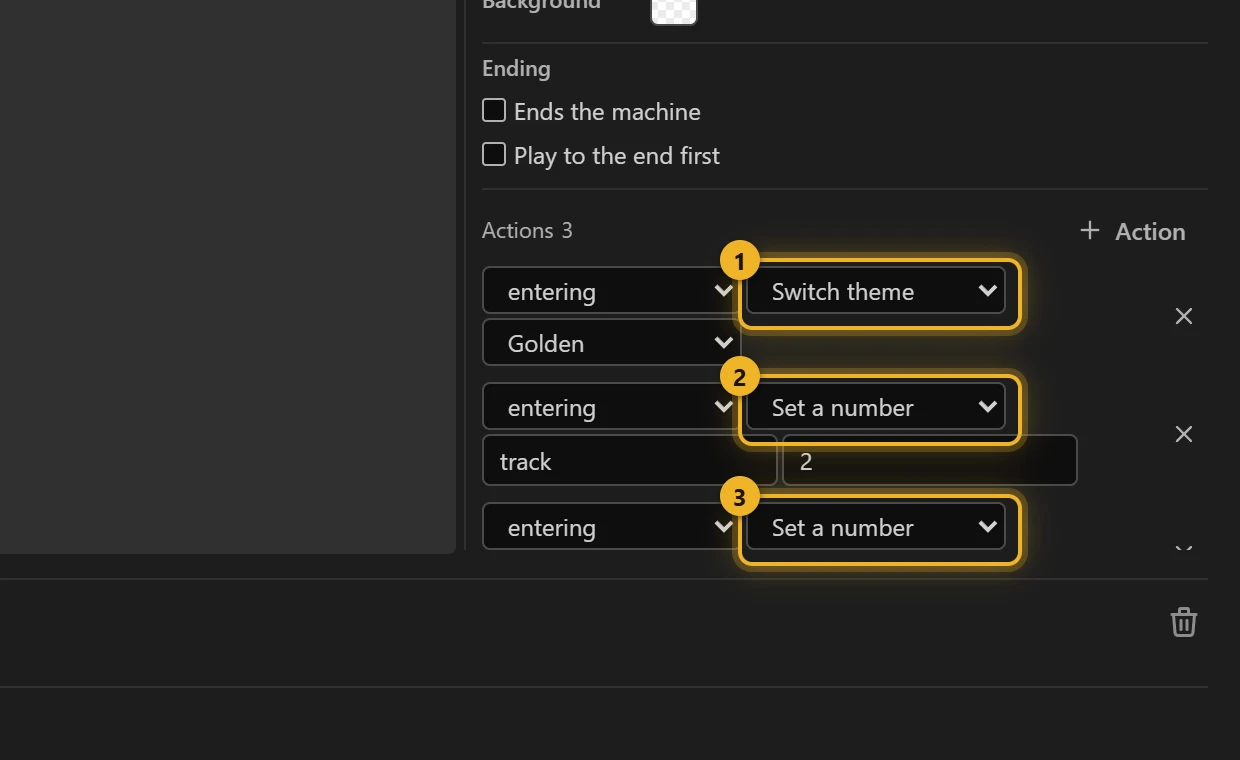
- Switch theme → Golden. The player repaints at once, without a reload.
- Set a number
track= 2. This keepstrackright when the state was reached by the wrap. - Set a number
loops= 0. A new track counts its loops from zero.
start, the first state, sets the Blue hour theme before anything is drawn. The comp's own colours happen to match it, but a theme switched later stays until another replaces it, so the first one is set on purpose.
The heart states fire a custom event on entering (liked, unliked); ended fires track-ended.
The themes themselves are columns in Slots and themes: Blue hour, Golden and Mint each set accent, cover and chip, and show their own song name (title1, title2 or title3 at 100, the other two at 0).
7. A second machine in the same file
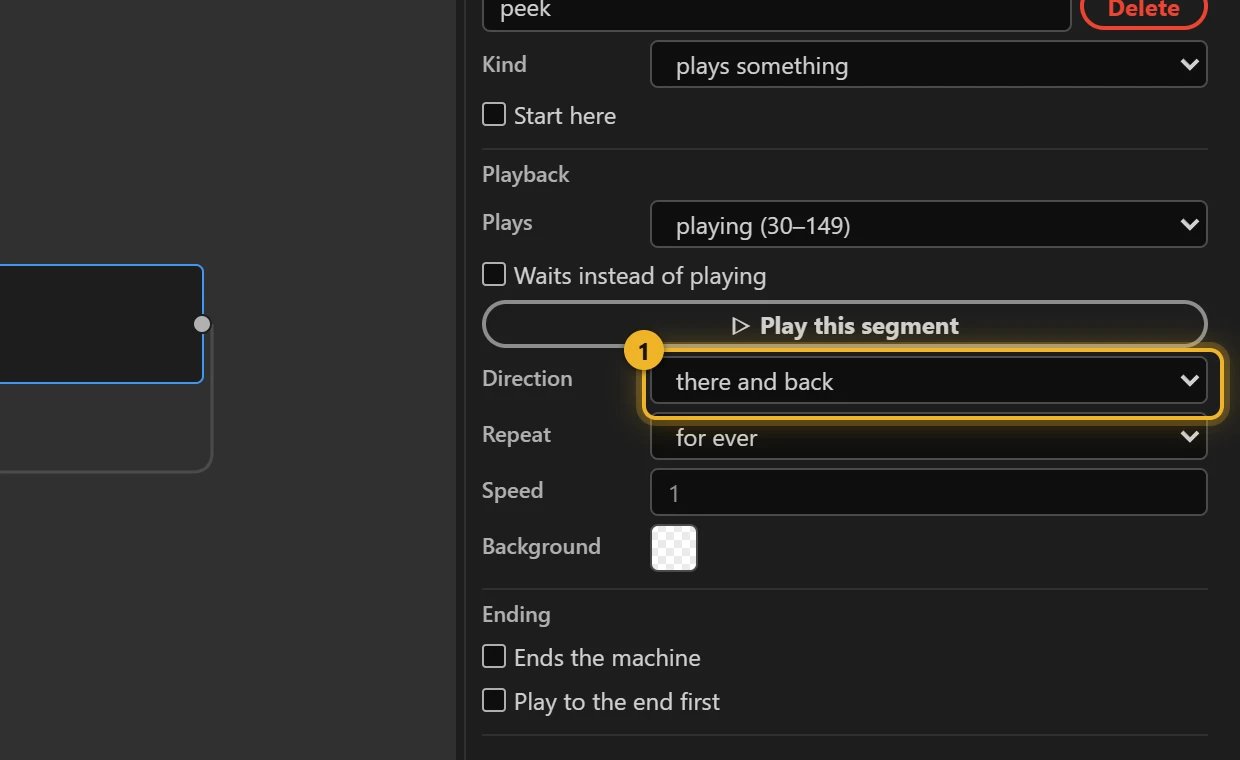
A second New machine → Blank, preview, with two states. idle plays paused, and pointer enter goes to peek, which plays playing there and back 1, for ever. Nothing waits for peek to finish, so there and back is safe here. Pointer exit blends back to idle over 0.3 s, so the disc settles instead of jumping.
A page picks one machine when it loads the file. The full card uses player, a thumbnail grid uses preview.
8. Build and test
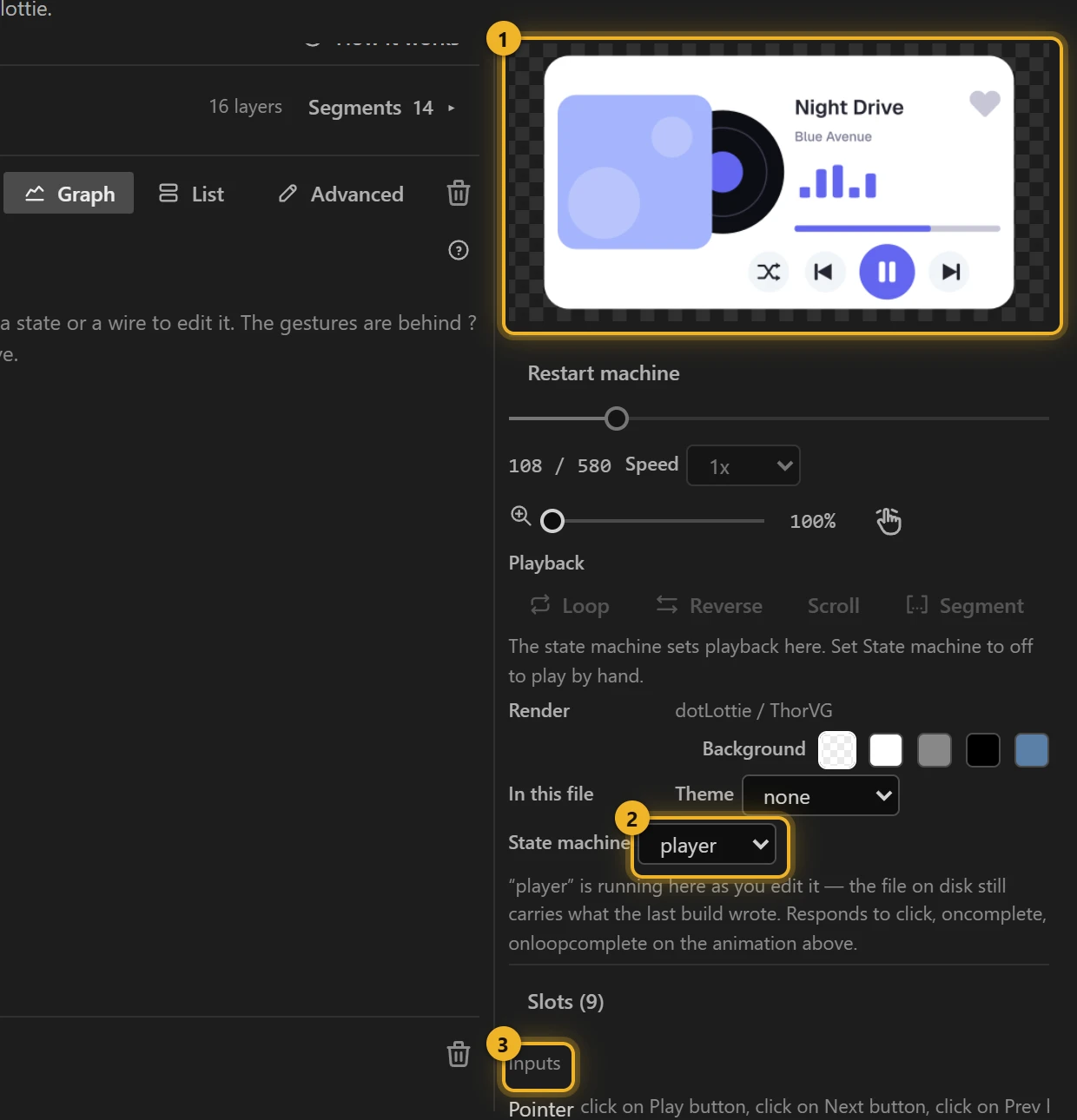
Build this comp, then pick player under State machine 2. Click the buttons on the Test player 1, and under Inputs 3 type all into repeat to watch it move on to the next track by itself. playing ticks itself when you press the Play button: the panel shows the machine's inputs live.
On a web page
html
<canvas id="player" width="480" height="270"></canvas>
<label><input type="checkbox" id="repeat"> Repeat all</label>
<script type="module">
  import { DotLottie } from "https://cdn.jsdelivr.net/npm/@lottiefiles/dotlottie-web@0.81.0/+esm"; // the version these pages use
  const player = new DotLottie({
    canvas: document.getElementById("player"),
    src: "Music player.lottie",
    // Open a URL is refused unless the page allows it:
    stateMachineConfig: { openUrlPolicy: { whitelist: ["https://example.com/*"] } },
  });
  player.addEventListener("load", () => {
    player.stateMachineLoad("player"); // or "preview" for a thumbnail
    player.stateMachineStart();
  });
  // The machine talks back: liked, unliked, track-ended.
  player.addEventListener("stateMachineCustomEvent", (e) => console.log("player says", e.eventName));
  // And listens: text input `repeat`.
  document.getElementById("repeat").onchange = (e) =>
    player.stateMachineSetStringInput("repeat", e.target.checked ? "all" : "off");
</script>- Open a URL is blocked by default in the dotLottie player: a click on the cover does nothing until the page allows the addresses (
openUrlPolicy.whitelist). An address outside the list stays blocked. - Custom events arrive as
stateMachineCustomEvent, with the name ineventName. Use them to save the like, or to show the next track's title. - Any input can be set from the page, not only
repeat:stateMachineSetBooleanInput("playing", true)starts the music from your own button.
Every behaviour on this page was played in dotlottie-web 0.80 on the file the panel wrote.
Next: Press, hold, wait: a thermostat covers press-and-hold, pointer move, timers, text comparisons, speed, a dial driven by an input, and ending a machine.