
Carousel: weather icons that take turns
Sun, then cloud, then rain, then sun again, every two seconds, for ever, or sooner when you click. The Carousel template shows each segment in turn on a timer; a click rule on each state adds "next". The pictures use the sample comp Weather icons (folder Interactive examples).
Try it: Watch the icons change on their own, or click for the next one. How it works: Each state loops its icon and moves on when the machine's clock passes value_at, which the state sets as it starts: sun → cloud → rain → sun. A click anywhere fires one event; the playing state takes its own "next" wire, and the new state starts its two seconds afresh. The file is the .lottie the panel wrote, played by dotlottie-web, the player a web page uses.
Loading the player…
In After Effects
- One marker per slide, in order, each ending one frame before the next begins:
sun0–59,cloud60–119,rain120–179. - Why one frame short: the player plays a segment through its last frame. A
sunthat ended on frame 60 showed the cloud for one frame on every repeat: a flicker at each loop and a jerk at every change. Design the loop so its last frame is one step before its first (Weather icons: the bob is back down, the sun has turned one frame short of a full ray). - Each segment is a loop. A slide stays up for two seconds and repeats its segment meanwhile, so a segment shorter than that plays more than once. Make each one seamless (Weather icons has each icon bob and come back), and let the change between slides be a cut. An icon that popped in at the start of its segment would pop again on every repeat.
1. Open the Studio
Build → open the comp's row → Interactive → Ship this comp as interactive (and Add .lottie if asked).
2. New machine → Carousel
Press New machine and pick Carousel. It takes every segment, in comp order.
3. What the template built
One state per slide 1, each wire marked 2s 2: it is taken two seconds after the slide came up (the click under it comes in step 4). Each state plays its segment with Repeat set to for ever 3. The last slide's wire goes back to the first.
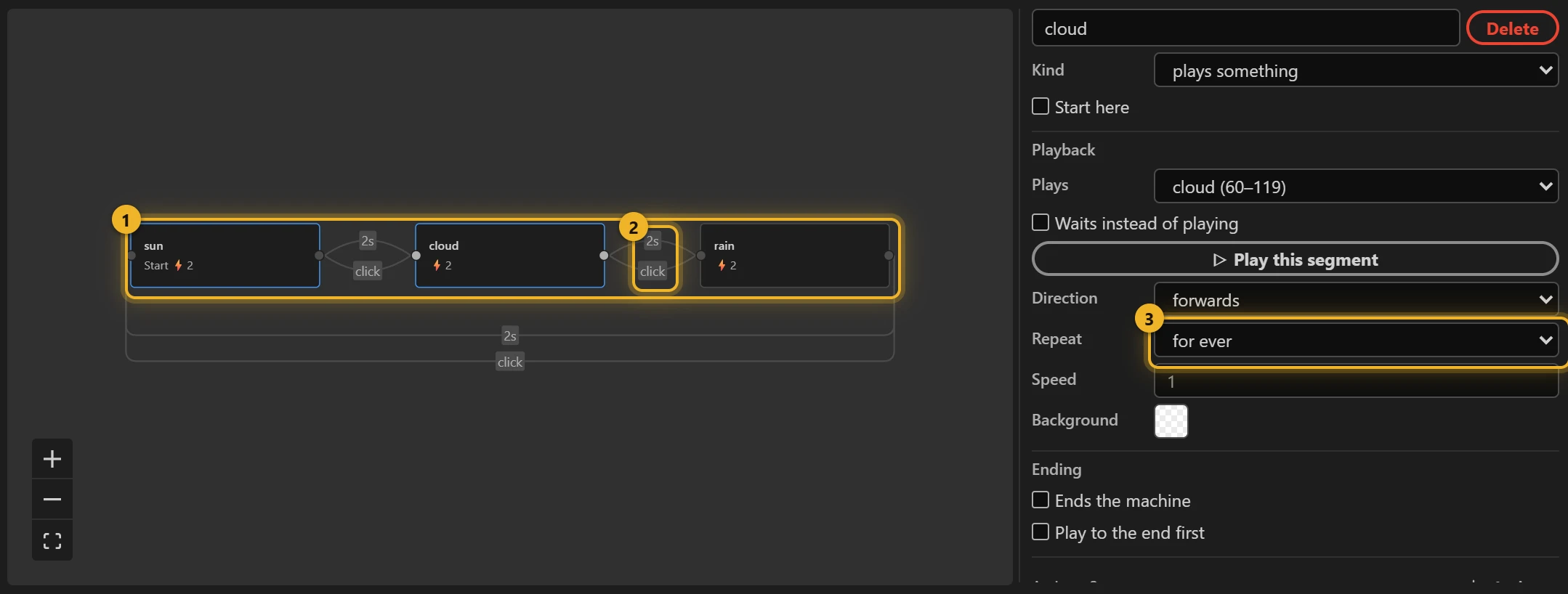
The timer is the machine's own clock (@elapsedTime): on entering a slide it notes the deadline in the numeric input value_at, and the wire compares against it. To change the pace, change the seconds on a wire.
4. A click for the next slide (optional)
Select sun, press + Rule, choose click (anywhere on the animation) and go to cloud; the same for cloud → rain and rain → sun. The panel wires the three rules to one click event, so a click moves exactly one slide on (three separate clicks would all run at once and bring you back where you started).
5. Build and test
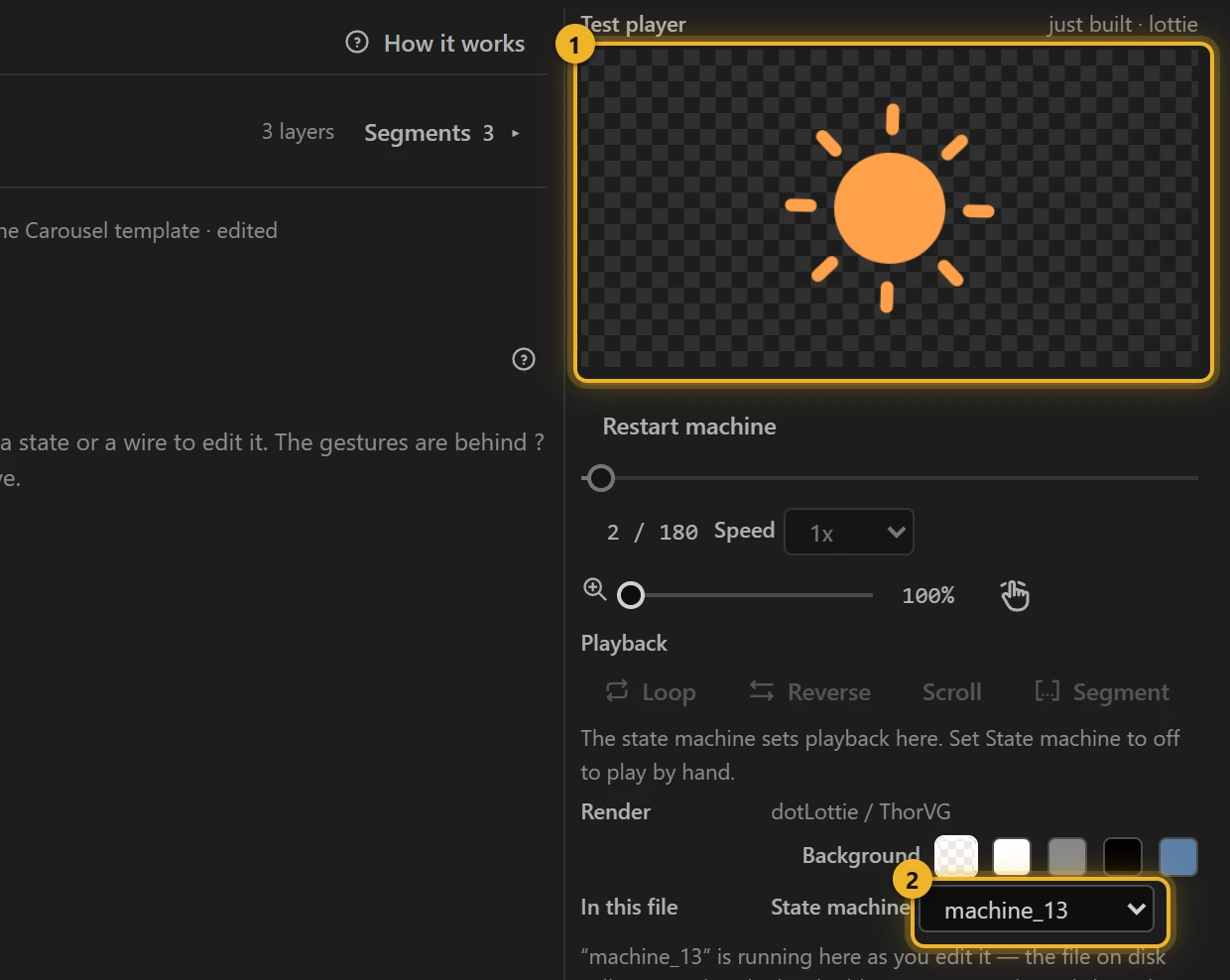
Press Build this comp. The Test player 1 moves on by itself, and on a click; the machine 2 is the one you just built.
6. On a web page
html
<canvas id="weather" width="240" height="200"></canvas>
<script type="module">
  import { DotLottie } from "https://cdn.jsdelivr.net/npm/@lottiefiles/dotlottie-web@0.81.0/+esm"; // the version these pages use
  const player = new DotLottie({ canvas: document.getElementById("weather"), src: "Weather icons.lottie" });
  player.addEventListener("load", () => {
    player.stateMachineLoad("machine_13");
    player.stateMachineStart();
  });
</script>
7. Wait while the pointer is over it
A carousel that moves on while someone is reading it is a carousel they cannot read. The same file carries a second machine, carousel_pause, that holds the icon while the pointer is over the animation and gives it two fresh seconds when the pointer leaves.
Loading the player…
What changes, against the template's machine:
- A Boolean input
hovered. Pointer enter sets it totrue. - Every timer rule gets a second condition: the clock is past
atandhoveredisfalse. While the pointer is over it, the icon keeps looping and the timer rule never fires. - Pointer exit does three things, in this order: sets
atto the clock, adds 2, and only then setshoveredtofalse. The player checks the rules after each action of an interaction, so clearinghoveredfirst would find the oldatlong past and move on at once. - A click still moves on, hovered or not.
Both are made in Advanced (the raw view of the machine): + Condition under each timer transition adds the hovered check, and + Interaction adds pointer enter / pointer exit with their actions.
html
<script type="module">
  // ...the same page as above, with the other machine:
  player.addEventListener("load", () => {
    player.stateMachineLoad("carousel_pause");
    player.stateMachineStart();
  });
</script>
Variations
- Rotating feature highlights, a logo wall, "what's new" tips.
- Clicks only, no timer: delete the 2s wires. Steps that should play once and wait: Sequence with a Next button.