
Counter → goal: add to cart
Each click adds one: the badge pops 1, 2, 3, and and on the third the cart is full and the button says so. The Counter → goal template counts clicks in a number input and plays the segment for each count; the last segment is the goal. The pictures use the sample comp Add to cart (folder Interactive examples).
Try it: Click the button three times, then set count to 0 below. How it works: a click adds 1 to count (never past the last step); the machine plays the segment for that count. The last one fires the custom event goal for your page. Setting count from the page jumps straight to that step; 0 goes back to the start. The file is the .lottie the panel wrote, played by dotlottie-web, the player a web page uses.
Loading the player…
In After Effects
- One marker per count, in order:
add-1,add-2,add-3. The last is the goal. - A counter only ever goes up by one, so each segment starts from the previous one's last pose:
add-2starts with the badge showing 1 and pops it to 2. That is what Number → segment cannot do (a rating jumps), and why this one never flashes back to an empty start. - End each segment one frame before the next marker (the player holds a segment's last frame).
1. New machine → Counter → goal
New machine → Counter → goal. On a file with more than the button, change the click's anywhere on the animation to the button's layer.
2. What the template built
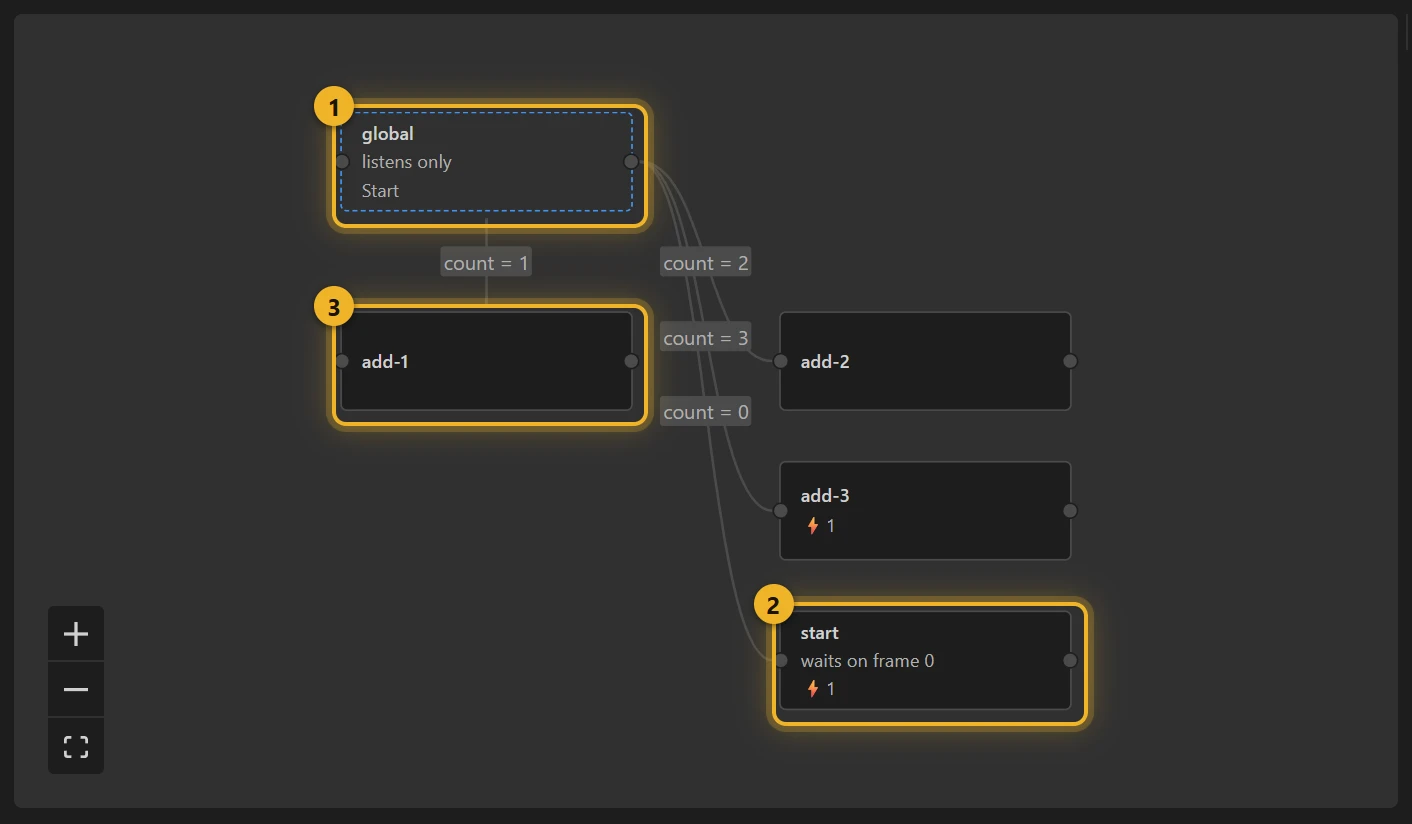
- The listener 1 reads
count: count is 1 → add-1, is 2 → add-2 … and is 0 → start 2, which waits on frame 0. - The click 3 does two things, in order: Increment
countby 1, then Clampcountto 0 … the number of steps. So extra clicks after the goal change nothing. - The last step, on entering, fires the custom event
goal.
3. On a web page
html
<canvas id="cart" width="320" height="120"></canvas>
<script type="module">
  import { DotLottie } from "https://cdn.jsdelivr.net/npm/@lottiefiles/dotlottie-web@0.81.0/+esm"; // the version these pages use
  const player = new DotLottie({ canvas: document.getElementById("cart"), src: "Add to cart.lottie", stateMachineId: "machine_17" });
  player.addEventListener("stateMachineCustomEvent", (e) => { if (e.eventName === "goal") showCheckout(); });
  // The cart was emptied elsewhere: player.stateMachineSetNumericInput("count", 0);
</script>
Variations
- “Tap three times”, stamps on a loyalty card, a streak, steps of a checklist: anything that fills up one at a time.
- Counting down (lives, attempts left): author the segments in that order and let the page set
count.