
Themes lab: every kind of slot
Themes by example re-colours a file. A theme can do more than colours: it can change a number, move something (position), resize it (scale) and even replace an animation. The sample comp Themes lab (a notification card) exposes one property of each kind. Its five themes each show one idea. All pictures below come from the one .lottie AXO wrote, drawn by the dotLottie player:
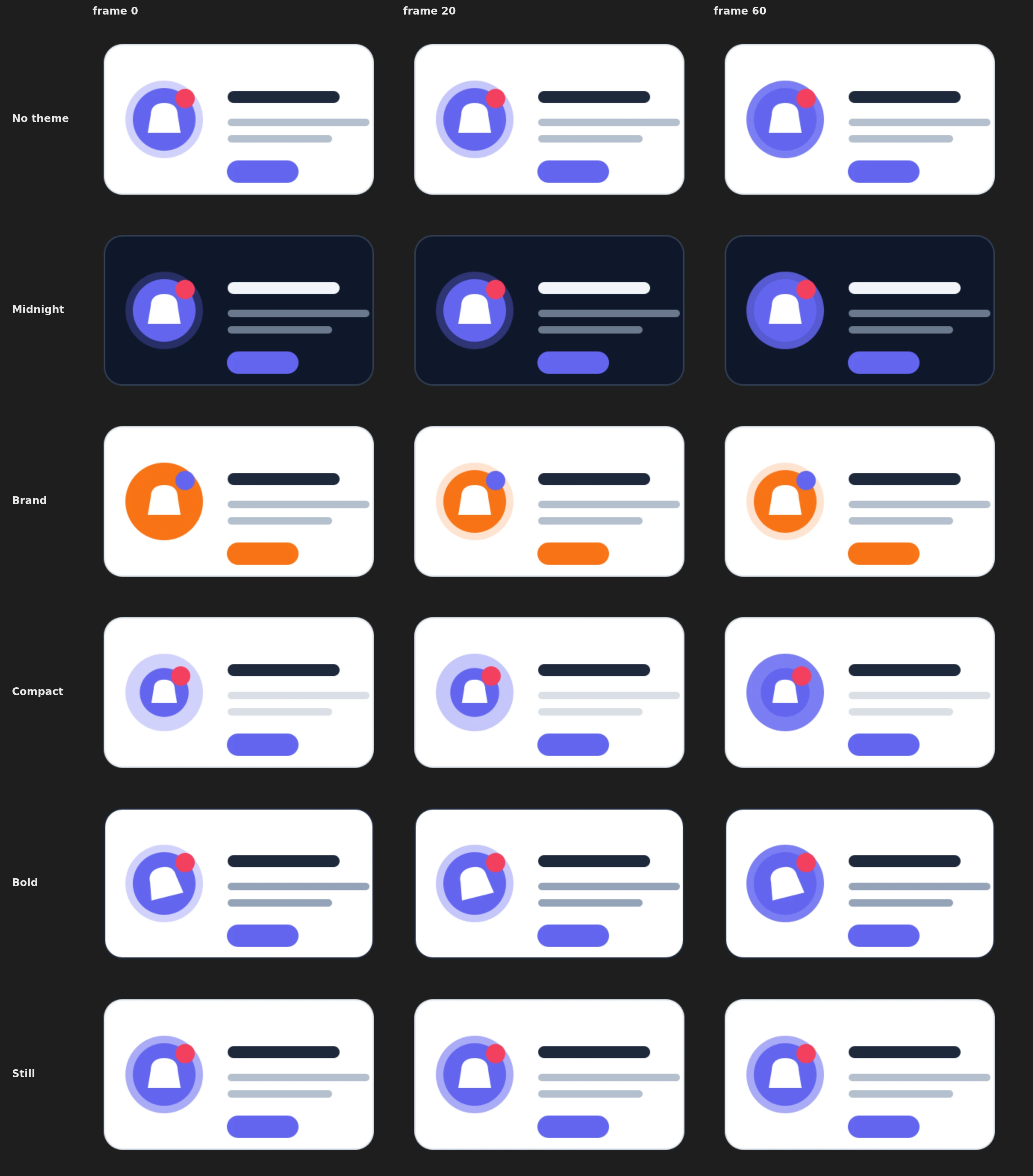
Try it: Click the theme chips. How it works: No machine here: each theme re-values the slots of the file (colour, number, position, scale and one animated slot). Original is the comp's own values. The file is the .lottie the panel wrote, played by dotlottie-web, the player a web page uses.
Loading the player…
What the comp exposes
A theme can only change what the comp exposes. In After Effects, add each property to Essential Graphics, then Rescan in the Studio's Slots and themes tab. Each token says what kind it is 1.
| Token | Kind | After Effects property | What the themes do with it |
|---|---|---|---|
surface, ink, line | colour | card fill, title fill, card stroke colour | Midnight turns the card dark |
accent, badge | colour | icon disc, glow and button fills; badge fill | Brand swaps them for the brand orange and indigo |
lines | number | fill opacity of the two text lines | Compact fades them to 35 %, Bold shows them at 100 % |
glow | number, animated | opacity of the ring behind the icon (a pulse) | see Animated slots |
tilt | number | icon rotation | Bold tilts the icon −14° |
badgeAt | position | badge layer position | Compact moves the badge in |
iconSize | scale | icon layer scale | Compact shrinks the icon to 78 % |
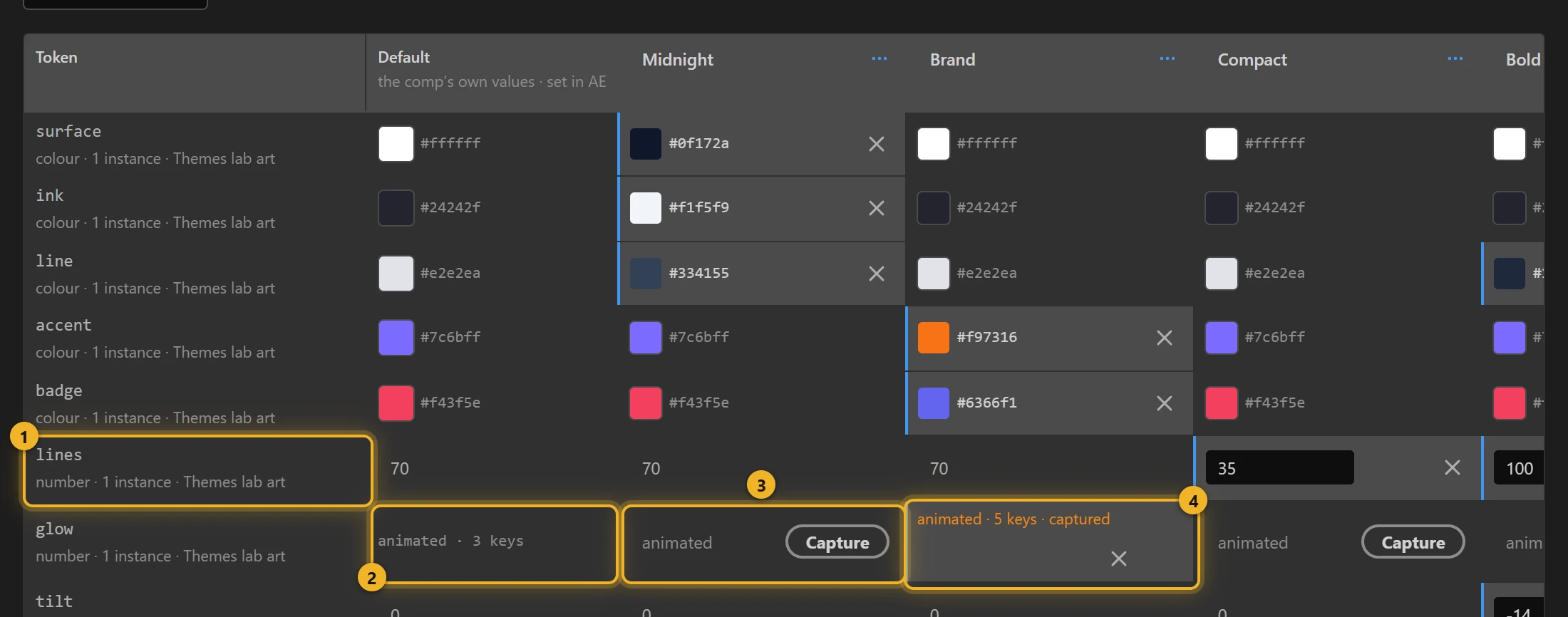
A cell with a value in it overrides that token for that theme. An empty-looking cell (grey text) follows the comp. The ✕ next to a value clears it again.
Five themes, one idea each
| Theme | Changes | Idea |
|---|---|---|
| Midnight | surface, ink, line | A dark variant: only the colours that sit on the background. |
| Brand | accent, badge, glow (animated) | A brand colour, plus its own glow animation. |
| Compact | iconSize, badgeAt, lines | Layout without a second export: smaller icon, badge moved to match, quieter text. |
| Bold | lines, line, tilt | Stronger contrast and a tilted icon. |
| Still | glow = 55 | No animation: the glow is frozen at one value. |
A theme changes only the tokens you set; every other token keeps the comp's value. The file still carries every token in every theme. This lets a page switch from Bold straight to Compact without Bold's tilt staying behind.
Animated slots: three choices
glow is animated in After Effects (30 → 85 → 30 % over two seconds), so the Default column says animated · 3 keys 2 instead of a value. Each theme then has three choices:
- Leave it 3: the theme plays the comp's own animation. Midnight, Compact and Bold do this.
- Capture 4: stores the keyframes After Effects has right now as this theme's animation. To give a theme a different motion, change the keys in After Effects, press Capture in that theme's column, then set the keys back. Brand captured a blink: hold keys between 100 % and 20 %, which the player plays as steps, not a fade. The cell then reads animated · 5 keys · captured; ✕ drops the capture.
- Freeze: type a number in the cell. Still holds the glow at 55 % the whole time.
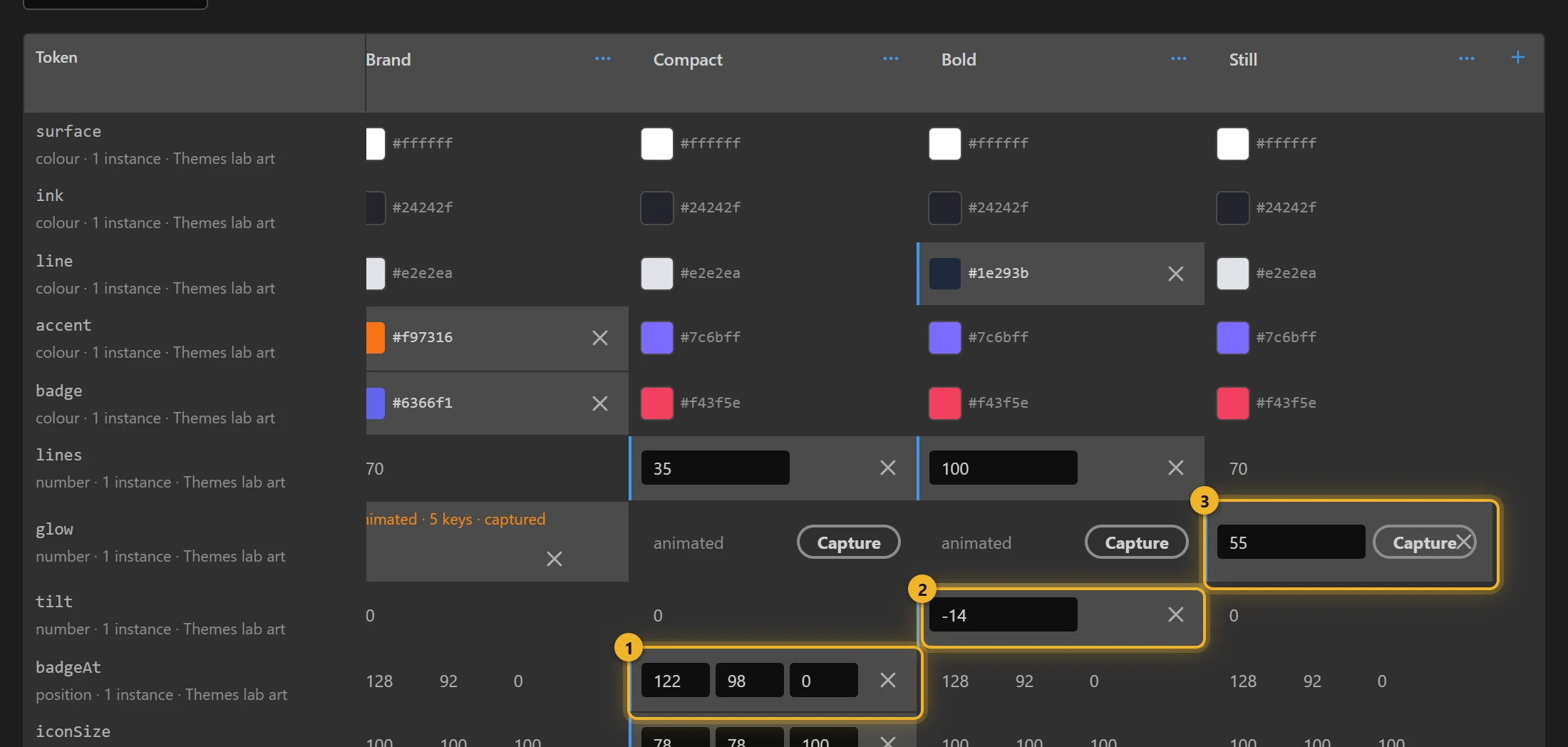
When the grid has more themes than fit, it scrolls sideways and the token names stay on the left. Above, Compact moves the badge 1, Bold tilts the icon 2 and Still freezes the glow 3.
Easing comes along
A captured animation keeps After Effects' easing (the curves, not just the values), and hold keys stay steps. Keyframe times are in the root comp's frames, the same as the rest of the file.
What cannot be a slot
Some properties export with the comp's value and never become a token. The tab says why when you try one:
- Shape geometry and path modifiers: rectangle or ellipse size, roundness, star points, the path itself, trim paths, round corners, repeater, offset, pucker, twist, zigzag. Also a layer's anchor point. With a slot on any of these, the dotLottie player draws nothing at all.
- Stroke width. The file plays, but as soon as any theme is applied the dotLottie player drops that stroke. Stroke colour and opacity are fine, which is why Themes lab re-colours its border (
line) rather than thickening it.
On a web page
The theme ids are the names in lower case: midnight, brand, compact, bold, still. The Studio's Theme picker lists them after a build.
html
<canvas id="card" width="400" height="240"></canvas>
<p>
  <button data-theme="">Default</button>
  <button data-theme="midnight">Midnight</button>
  <button data-theme="brand">Brand</button>
  <button data-theme="compact">Compact</button>
  <button data-theme="bold">Bold</button>
  <button data-theme="still">Still</button>
</p>
<script type="module">
  import { DotLottie } from "https://cdn.jsdelivr.net/npm/@lottiefiles/dotlottie-web@0.81.0/+esm"; // the version these pages use
  const player = new DotLottie({
    canvas: document.getElementById("card"),
    src: "Themes lab.lottie",
    autoplay: true,
    loop: true,
  });
  for (const b of document.querySelectorAll("[data-theme]")) {
    // An empty id goes back to the comp's own values.
    b.onclick = () => (b.dataset.theme ? player.setTheme(b.dataset.theme) : player.resetTheme());
  }
</script>
A theme applies while the animation plays: Brand's blink and Still's frozen glow take over from the pulse on the next frame, with no reload.
From a state machine
Any state can switch the theme when it is entered: select the state, Action → Switch theme, then pick a theme. For example, a hover state that switches to Bold and an idle state that switches back. See Themes by example.