
Theme switch: day and night
The switch slides from sun to moon and the whole card turns dark: background, text, accent, then back again. The Theme switch template is Toggle with two segments plus one thing: each direction switches the file's theme as it starts. The pictures use the sample comp Theme switch (folder Interactive examples).
Try it: Click the switch. How it works: a press flips value; on plays to-night and switches to Night mode, off plays to-day and switches to Day mode. The first state sets Day mode before anything is drawn. The file is the .lottie the panel wrote, played by dotlottie-web, the player a web page uses.
Loading the player…
In After Effects
- Two markers:
to-night(the knob slides and becomes a moon) andto-day(back to the sun), each ending one frame before the next marker. Names with night, dark, on are taken as the way on; day, light, off as the way back. - Everything that changes colour is a slot: the card, the text, the track, the knob, exposed in Essential Graphics (see Slots and themes).
- Two themes on the comp: in the Studio, Slots and themes → New theme, twice, named Day mode and Night mode. A theme whose name says dark / night is the “on” theme, light / day the start; otherwise the comp's first theme is the start. The template is greyed until the comp has two.
Give the themes names nobody else in the library uses: a theme's id in the file comes from its name, and a second Night elsewhere in the library would be filed as night_2.
1. New machine → Theme switch
New machine → Theme switch.
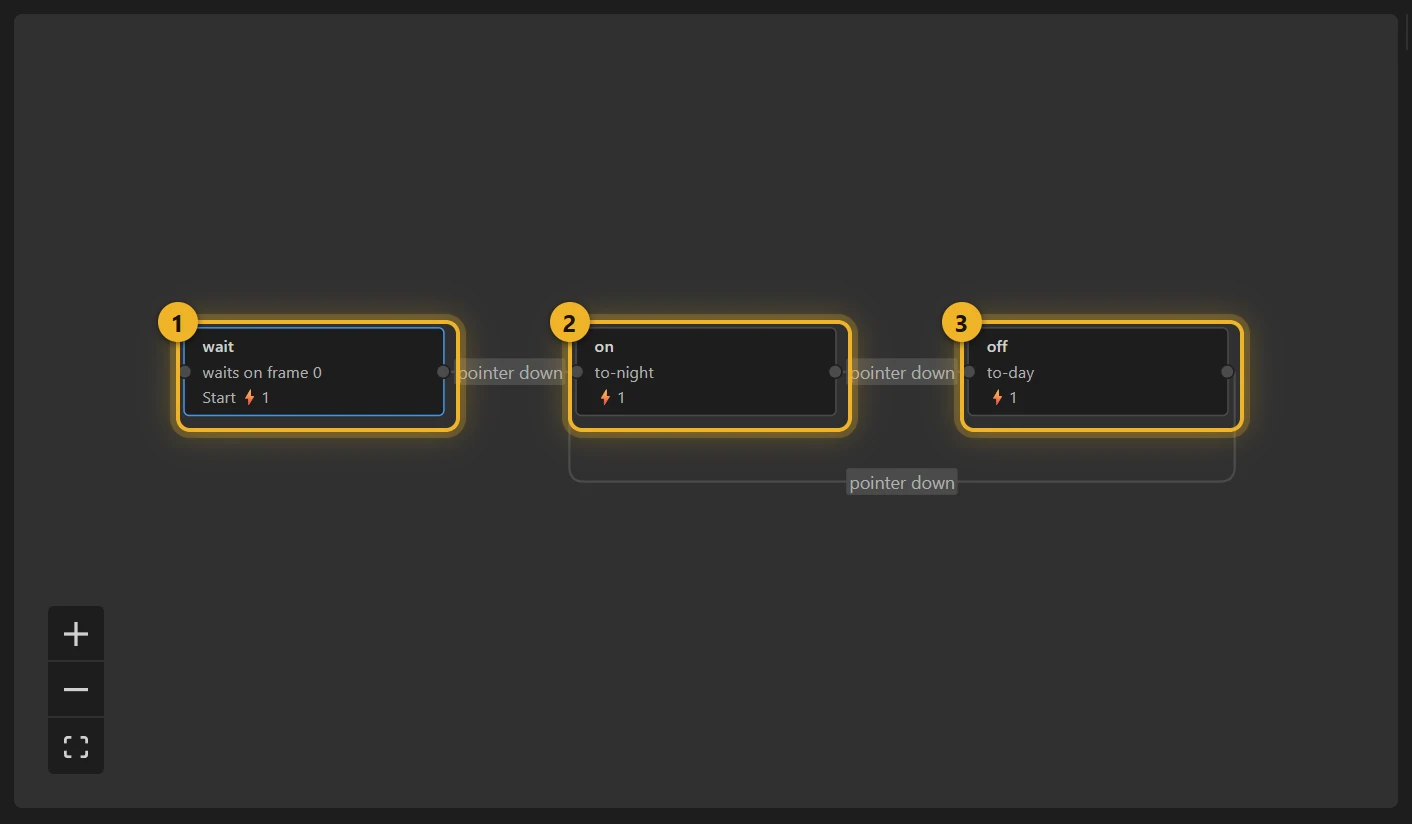
wait 1 is where it starts: it plays nothing and, on entering, switches to Day mode. The dotLottie player applies no theme when a file loads (the page would have to), so the machine sets its own starting look. on 2 and off 3 each switch theme on entering and play their segment. A pointer down flips value, exactly as in Toggle with two segments.
2. Build and test
Build this comp and click the switch on the Test player: the card turns to night and back. The theme in use is marked in the test player in the Slots and themes table.
3. On a web page
html
<canvas id="theme" width="320" height="160"></canvas>
<script type="module">
  import { DotLottie } from "https://cdn.jsdelivr.net/npm/@lottiefiles/dotlottie-web@0.81.0/+esm"; // the version these pages use
  const player = new DotLottie({ canvas: document.getElementById("theme"), src: "Theme switch.lottie", stateMachineId: "machine_16" });
  // Follow the page's own dark mode -- the machine's input is the switch:
  player.addEventListener("load", () => {
    player.stateMachineSetBooleanInput("value", matchMedia("(prefers-color-scheme: dark)").matches);
  });
</script>
Variations
- Light / dark mode toggles, a “sleep” switch on a device mock-up, brand A / brand B: any two looks of one design.
- More than two looks: one theme per button with Click → segment, and a Switch theme action on each click: the thermostat's mode chips do that without any state at all.