
Idle + random fidget: a mascot that blinks
Pip, the mascot, breathes; every few seconds, at random, it does something small: blinks, looks around, waves. A regular blink reads as a machine; a random one reads as alive. The Idle + random fidget template loops one segment and, every 2 to 6 seconds, plays another once. The pictures use the sample comp Mascot (folder Interactive examples).
Try it: Watch it for a while, then click it. Leave it alone for 15 seconds and it falls asleep; a click wakes it. Its eyes follow the pointer anywhere on the page. That part is not the machine but the page writing a position slot (Follow the cursor). The file is the .lottie the panel wrote, played by dotlottie-web, the player a web page uses. The picker holds two machines: pip (below, step 2) and machine_20, the template as it comes (step 1).
Loading the player…
In After Effects
- Markers name the segments:
idle(a seamless loop) and the fidgets that play once and start and end on the idle pose:blink,look,wave. For step 2 alsohappy,doze,sleep(a loop) andwake. - Names with idle, loop, rest, breath are the loop; fidget, blink, wiggle, look the fidget.
- Each segment ends on the pose the next one starts from:
dozeends wheresleepbegins,wakeends on the idle pose. A jump between two segments is then invisible.
1. New machine → Idle + random fidget
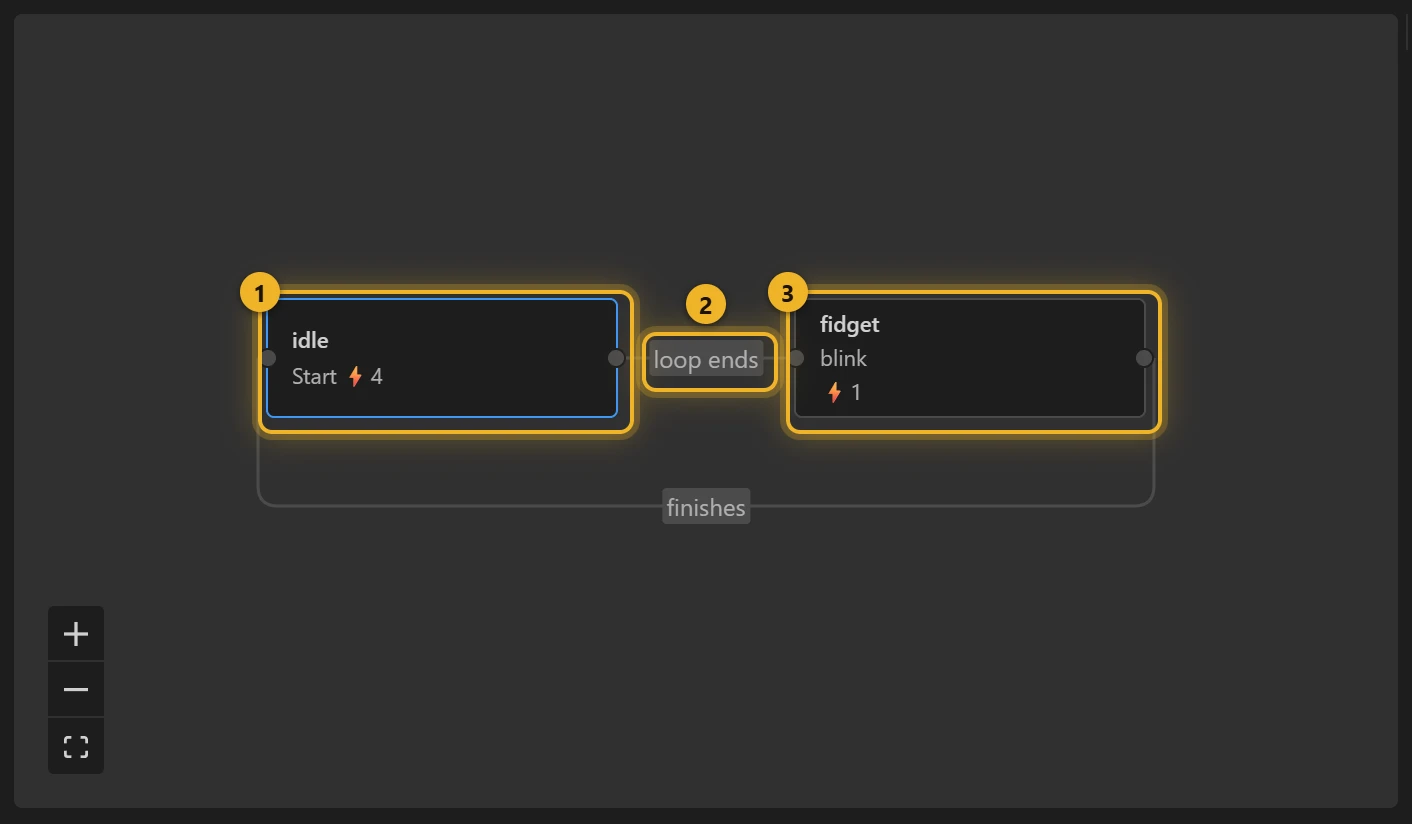
- idle 1 loops. On entering: Set a random number
value_waitbetween 2 and 6, Setvalue_atto$value_wait, Increment it by@elapsedTime(the machine's clock). Entering actions apply together, so this order is safe. - Its rule 2 fires when the loop completes and the clock has passed
value_at, and goes to fidget, which plays once; when it finishes, back to idle 3, and a new wait. Waiting for the end of the loop is what makes the cut invisible: mid-loop the idle pose is mid-breath, at its end it is back at the pose the fidget starts from.
That is the whole template: one loop, one fidget, a random wait.
2. More than one fidget, a click and sleep
The pip machine grows the template with three ideas.
A random pick. When the wait is over and the idle loop ends, idle goes to pick, a state with no segment. On entering it Sets a random number roll between 0 and 9.999 and rounds it down (Floor), then its rules choose at once: roll below 5 → blink, 5 to 7 → look, 8 or more → wave. So blinks come about half the time, looks a third, waves a fifth. The rules do not overlap, so their order does not matter. One more input, last, remembers the previous fidget: a roll that would repeat it takes the next one instead, so the same fidget never plays twice in a row. Each fidget fires done when it finishes (On complete), and done takes it back to idle.
A click anywhere. A Click interaction with no layer listens to the whole animation: it moves bedtime 15 seconds past the clock, then fires tap. A listener (global) turns tap into happy (a hop with closed happy eyes), or into wake, when asleep is on.
Sleep. idle has a second rule: at the end of a loop, the clock past bedtime → doze (the eyes droop and close; it sets asleep), then sleep, a loop with rising Z's, until a click. wake clears asleep and goes back to idle.
| Input | Type | What it is |
|---|---|---|
wait, at | number | The random wait, and the clock time it ends. |
roll | number | Which fidget: 0–9. |
last | number | The previous fidget (0 blink, 1 look, 2 wave), so it is not repeated. |
bedtime | number | The clock time Pip falls asleep; each click moves it. |
asleep | true/false | Set by doze, cleared by wake: what a click means. |
tap, done | event | "Clicked", and "the segment finished". |
On a web page
js
// the version these pages use
import { DotLottie } from "https://cdn.jsdelivr.net/npm/@lottiefiles/dotlottie-web@0.81.0/+esm";

const pip = new DotLottie({ canvas: document.querySelector("#pip"), src: "mascot.lottie", autoplay: true });
pip.addEventListener("load", () => {
  pip.stateMachineLoad("pip");
  pip.stateMachineStart();
});
The random numbers come from the player. dotlottie-web starts the same sequence on every page load, so the first few fidgets after a load are the same each time; they differ from one wait to the next.
Variations
- A cursor that blinks irregularly, a plant that sways now and then, a notification dot that nudges: idle life that should not look looped.
- A different range: change the two numbers in Set a random number.
- More fidgets: add a segment and one more rule on pick; widen
rollto keep the shares you want.