
Hover + click: a send button
The button lifts under the pointer and settles when it leaves; a click sends the paper plane flying, and the button turns green and reads Sent for a second before it is ready again. The Hover + click template gives the hover one segment and the click another. The pictures use the sample comp Send button (folder Interactive examples).
Try it: Hover the button, move away, then click it, and move away while the plane is still flying. How it works: Entering plays hover forward, leaving plays it back, and a click plays click. The click always finishes: leaving during the flight waits until it ends, then the button settles. The file is the .lottie the panel wrote, played by dotlottie-web, the player a web page uses.
Loading the player…
In After Effects
- The plane stays inside the button. A copy of the button's shape sits right above the plane layer as its track matte (Alpha Matte), so the plane is cut off at the button's edge instead of flying over the page. The matte layer follows the button's hover lift. Mattes export as they are; both players draw them.
- Two markers, each with a duration:
hover0–20 (the lift; it plays backward on exit, so its first frame is the resting button) andclick20–140: the plane pulls back, then shoots out through the button's edge, Sent with a tick on green holds for a second, then Send fades back and a new plane rises into place from below. - "Sent" and its timer are frames of
click. When the click finishes, the template follows the pointer: gone, the button settles; still there, it holds. A sent state of its own after the click would only be reached while the pointer stays, and a finger on a phone has usually left by then. Drawn into the segment, the confirmation shows either way, and its length is the timer: one second here (frames 60–120). To hold Sent until something else happens instead, endclickon it and add a rule on sent (a number of seconds passes) that goes on to hover_out. - Names help: hover, over or enter is taken as the hover, click, press or tap as the click.
- An idle loop and an intro, if your comp has them. A marker called idle (or loop, rest, wait) becomes the resting state: it loops until the pointer comes, and the button settles back into it after the hover. A marker called intro (or appear, reveal, start) plays once first. Markers with other names are left alone.
1. Open the Studio
Build → open the comp's row → Interactive → Ship this comp as interactive (and Add .lottie if asked).
2. New machine → Hover + click
Press New machine and pick Hover + click.
3. What the template built
The machine starts in rest, which waits on the first frame of hover: the resting button, where playing the hover back also ends. (With an idle marker, rest loops it instead; with an intro, an intro state plays it once and then goes to rest.) Pointer enter 2 goes to hover_in, which plays hover forward; pointer exit goes to hover_out, which plays it backward, and entering again goes back to hover_in. The hub 1 listens for one thing only: a click goes to clicked 3 from wherever the machine is, and plays click once.
When the click finishes, the machine looks at where the pointer is: gone → hover_out, the button settles; still over it → sent, which holds the last frame of click until the pointer leaves.
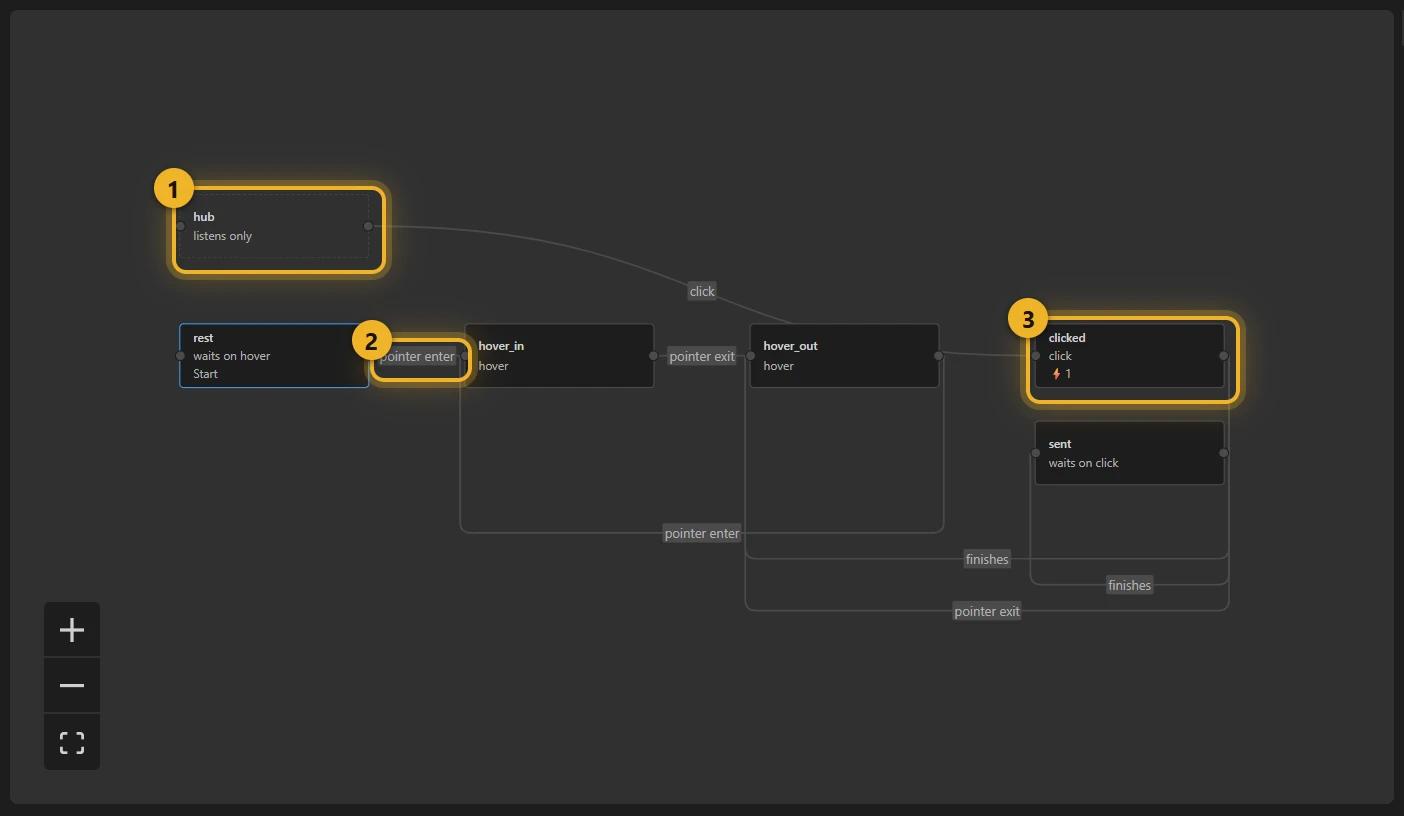
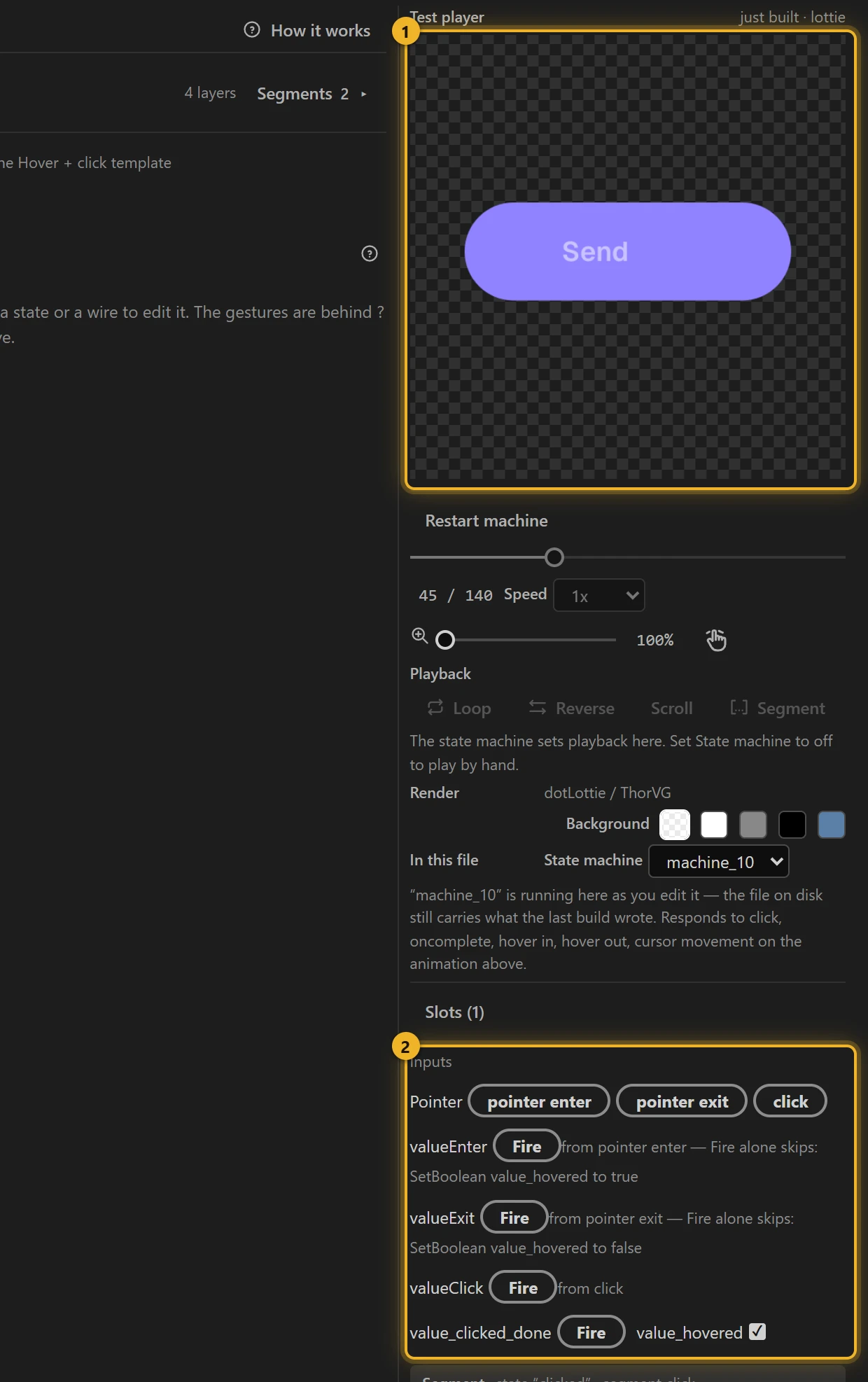
The pointer fires three Event inputs: valueEnter, valueExit, valueClick; the end of the click fires value_clicked_done. The Boolean value_hovered remembers whether the pointer is over the button: enter sets it, exit clears it.
Why enter and exit are not on the hub: a hub rule fires from every state, so a pointer leaving mid-click would cut the plane off and jump the button down. Only the click belongs there: it may start from anywhere.
4. Only the button (optional)
On a file with more than the button, pick each pointer wire that says anywhere on the animation and change it to the button's layer.
5. Build and test
Press Build this comp, move the pointer over the Test player 1 and click. Inputs 2 lists the events; press Fire on one to trigger it without the pointer.
6. On a web page
html
<canvas id="send" width="320" height="120"></canvas>
<script type="module">
  import { DotLottie } from "https://cdn.jsdelivr.net/npm/@lottiefiles/dotlottie-web@0.81.0/+esm"; // the version these pages use
  const player = new DotLottie({ canvas: document.getElementById("send"), src: "Send button.lottie" });
  player.addEventListener("load", () => {
    player.stateMachineLoad("machine_10");
    player.stateMachineStart();
  });
  // The message really went out -- play the click from your own code:
  // player.stateMachineFireEvent("valueClick");
</script>
Variations
- Call-to-action buttons, "add to cart", download buttons: a hover that invites and a click that confirms.
- No click needed? Hover is the same without the third wire.