
Number → segment: a star rating
Click the third star and three stars light up; your page can set the same number from a saved rating. The Number → segment template maps a numeric input to segments: 1 plays the first, 2 the second, and so on. A click on each star, added in the Studio, sets that number. The pictures use the sample comp Star rating (folder Interactive examples).
Try it: Click a star, or type 1 to 5 into value below. How it works: Each star is a layer, Star 1 … Star 5; clicking Star 3 sets value to 3, and the machine plays the segment star-3. Your page sets the same input (a rating it saved), so a click and your code always agree. The file is the .lottie the panel wrote, played by dotlottie-web, the player a web page uses.
Loading the player…
In After Effects
- One marker per value, in order, each ending one frame before the next begins:
star-10–29,star-230–59 …star-5120–149. The template reads them in comp order: the first marker is 1, the second is 2. - Why one frame short: the player plays a segment through its last frame and stays there. A
star-3that ended on frame 90 would end onstar-4's first frame (five grey stars) and the rating would vanish right after lighting up. - Every segment starts from the same frame (five grey stars) and ends on its own result, so
star-4can play afterstar-2or afterstar-5and always looks right. - The price: going from 3 stars to 4 dims all five and lights four again. A segment cannot start “from wherever the rating is now”: the player has one playhead, and a state that plays a different segment starts it at its first frame. Two other shapes avoid it: one segment per pair (3 → 4, 4 → 2 …, twenty for five stars), or one long fill animation (0 → 5 stars) that the page moves through with Jump to progress; see Building blocks. A blend between states will not do it: it plays the timeline between the two frames, so from
star-3's end tostar-4's start it shows whatever lies between them. - One layer per star, named
Star 1…Star 5: those are what a click lands on.
1. Open the Studio
Build → open the comp's row → Interactive → Ship this comp as interactive (and Add .lottie if asked).
2. New machine → Number → segment
Press New machine and pick Number → segment. You get a hub, global, that listens to value, and one state per segment. On its own this machine is driven by your code only.
3. Make the stars clickable
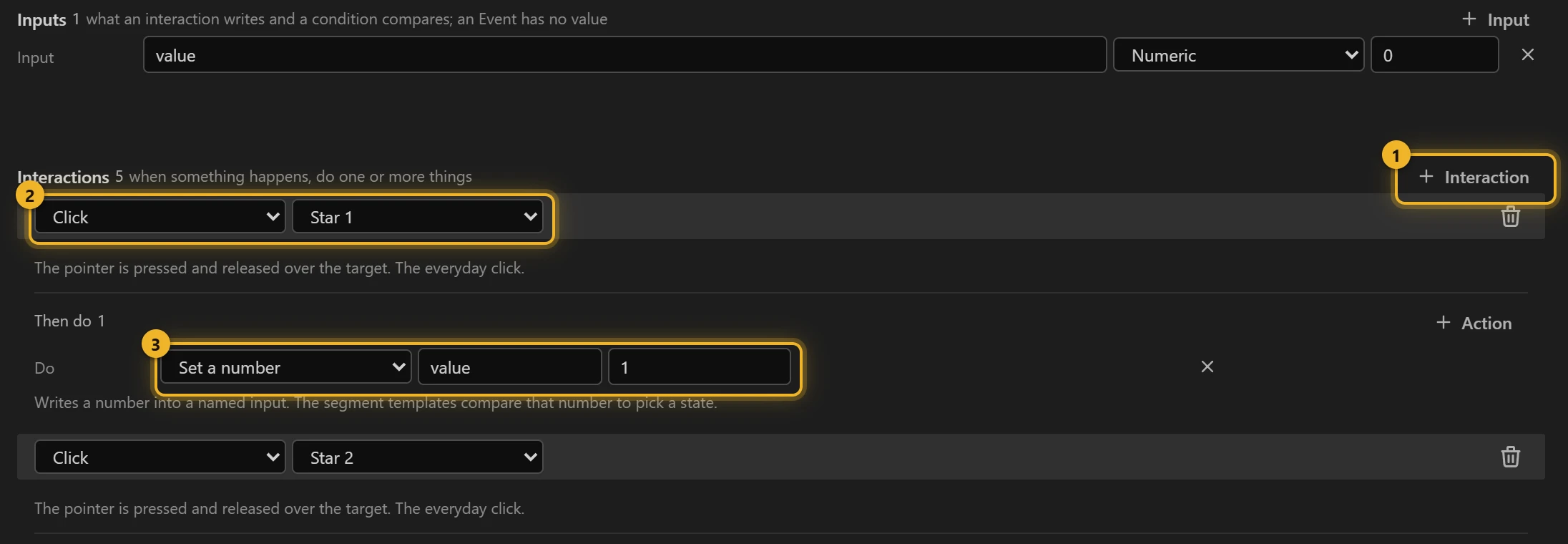
Open Advanced (in the machine's header, beside Graph and List) and press + Interaction 1 once per star. For each: trigger Click on the layer Star 1 2, then Set a number, input value, value 1 3. Repeat for Star 2 … Star 5 with 2 … 5, then go back to Graph.
4. What you have now
global 1 is a hub that only listens. One wire per value 2, now read click · Star 1, click · Star 2 … because a click is what sets that value, leads to the state that plays that segment 3.
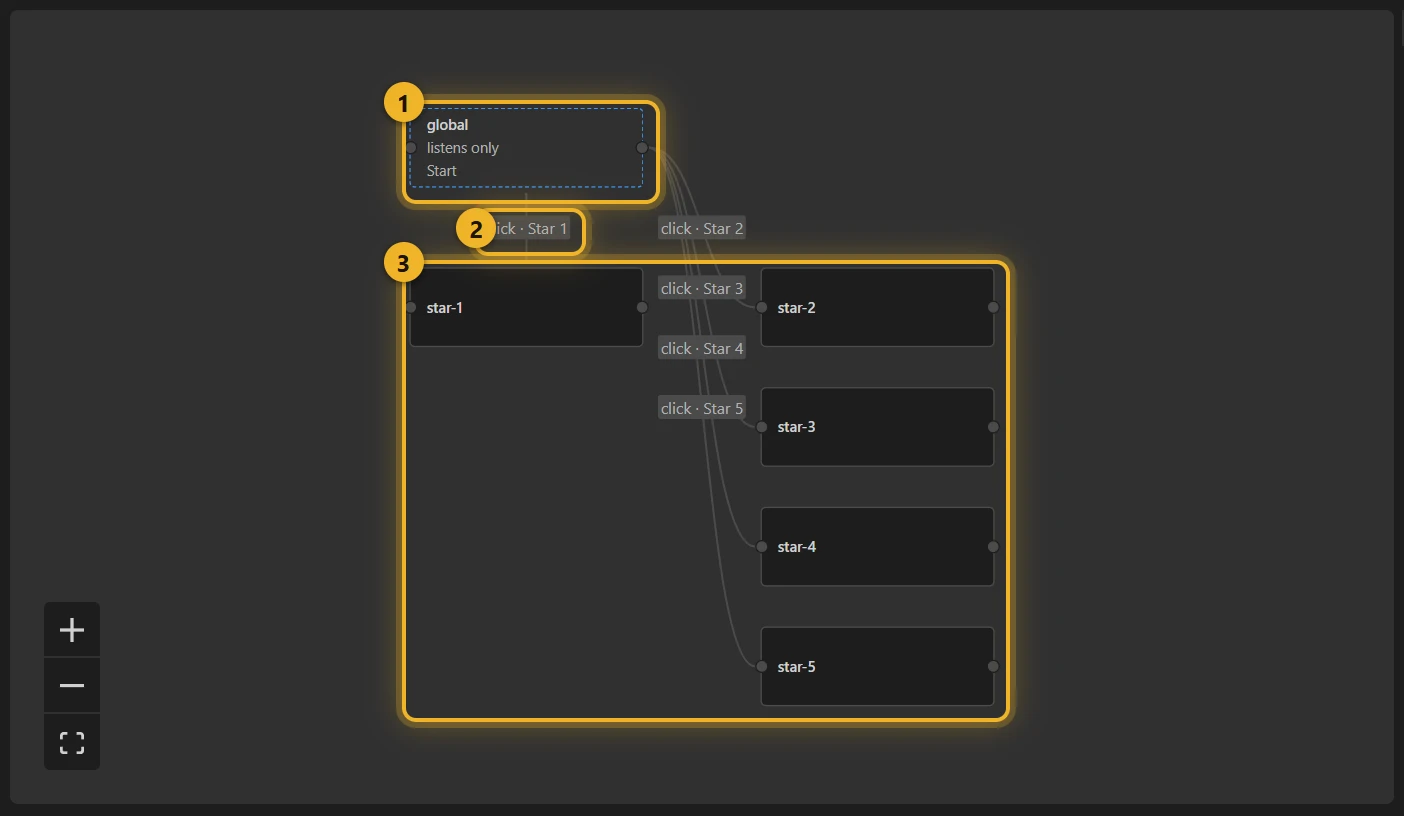
Behind the wires is still one Numeric input, value. Clicks write it, and so can your page.
5. Build and test
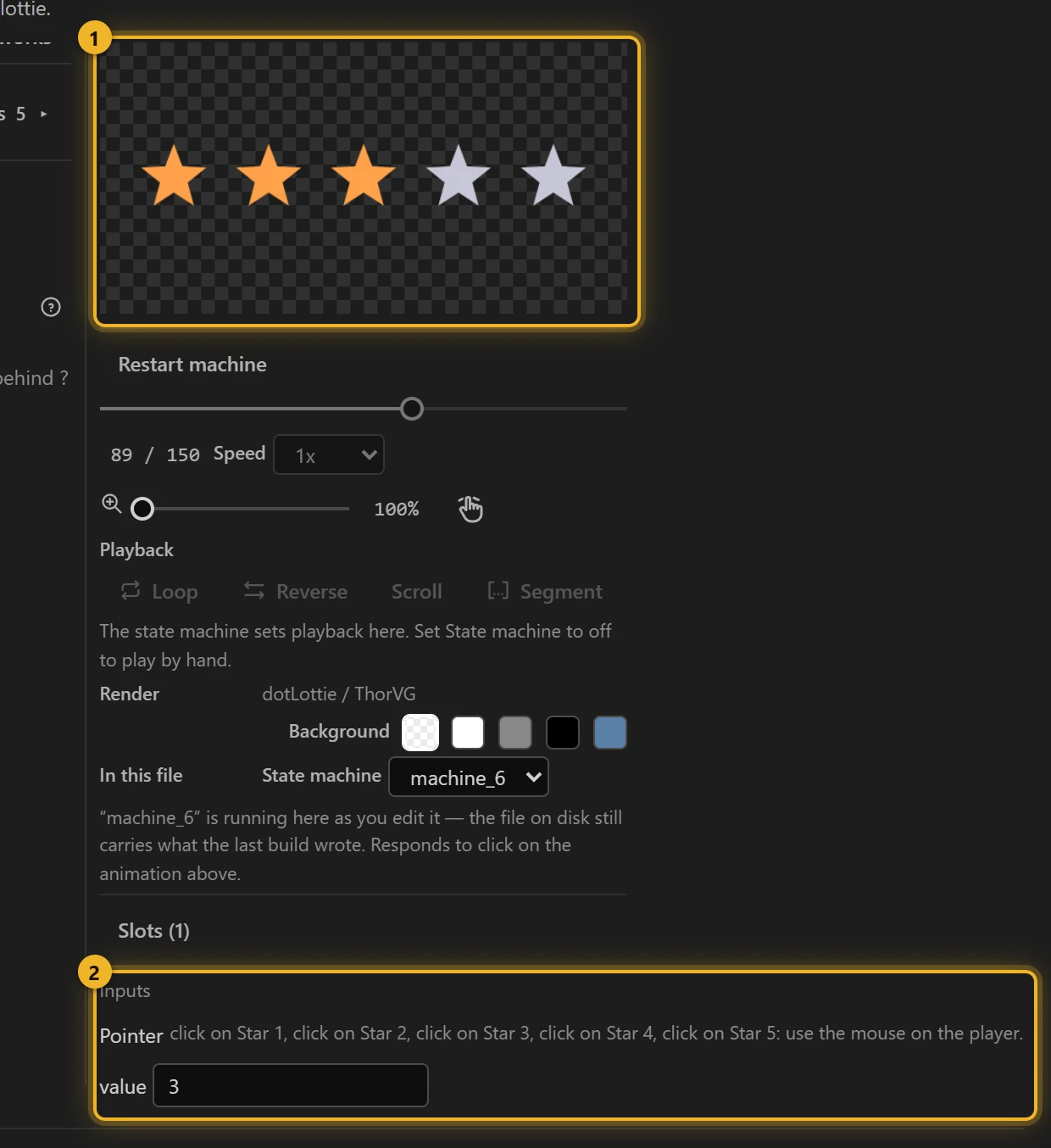
Press Build this comp, then click a star in the Test player 1: that many stars light up, and Inputs 2 shows value following. Type a number there to set it without clicking.
6. On a web page
html
<canvas id="rating" width="400" height="120"></canvas>
<script type="module">
  import { DotLottie } from "https://cdn.jsdelivr.net/npm/@lottiefiles/dotlottie-web@0.81.0/+esm"; // the version these pages use
  const player = new DotLottie({ canvas: document.getElementById("rating"), src: "Star rating.lottie" });
  player.addEventListener("load", () => {
    player.stateMachineLoad("machine_6");
    player.stateMachineStart();
    player.stateMachineSetNumericInput("value", 4); // the rating you saved; a click changes it
  });
  // What the visitor picked, to save it:
  // player.stateMachineGetNumericInput("value");
</script>
Variations
- Battery or signal level, a step counter, a progress badge: anything your data picks.
- No clicks, only your data (a battery level): skip step 3.
- Every choice is a click and nothing else sets it? Click → segment builds this whole machine, clicks included, in one step.
Password strength, set by the page
Loading the player…
The same template, no clicks at all: the sample comp Password strength has five markers, empty, weak, fair, good, strong, and the page sets value as the person types. The template counts from 1 (the first marker), so a strength score of 0–4 is score + 1. Each segment starts with the bars below its level already lit in its colour and grows only its own bar (200 ms, ease-out), so typing one more character never empties the meter first. A drop cuts straight to the lower level.
html
<input id="password" type="password">
<canvas id="strength" width="320" height="110"></canvas>
<script type="module">
  import { DotLottie } from "https://cdn.jsdelivr.net/npm/@lottiefiles/dotlottie-web@0.81.0/+esm"; // the version these pages use
  const player = new DotLottie({ canvas: document.getElementById("strength"), src: "Password strength.lottie" });
  player.addEventListener("load", () => {
    player.stateMachineLoad("machine_25");
    player.stateMachineStart();
  });
  // Your own scoring; this one counts length and character kinds, 0-4.
  const score = (s) => !s ? 0 : Math.min(4, (s.length >= 8) + (s.length >= 12) + /[A-Z]/.test(s) + /[^A-Za-z0-9]/.test(s) + (s.length > 0));
  document.getElementById("password").addEventListener("input", (e) => {
    player.stateMachineSetNumericInput("value", score(e.target.value) + 1);
  });
</script>
Rating with a preview under the pointer
Loading the player…
A bigger example built on this one, as data rather than from the template (sample comp Rating preview, machine rating). Pointing at a star previews that many, a click keeps it, and leaving the card shows the kept rating again. Moving from 1 to 4 lights stars 2, 3 and 4 in turn; going back puts them out the same way. How:
- Poses, not segments from scratch. Marker
rate-k(k = 0…5) is a two-frame pose at frame 12 × k showing k stars lit; star k lights between poses k − 1 and k. Every rule blends (250 ms, ease-out): the playhead travels the timeline from the pose on screen to the one wanted, so the stars between light or go out on the way. - One number decides the picture.
hover(set by pointer enter onStar 1…Star 5) wins while it is not 0; otherwiserating(set by a click on a star). The rules sit on a hub (from anywhere): hover = k →rate-k, and hover = 0 and rating = k →rate-k. shownstops repeats. Each pose's entry setsshownto its k, and every rule also asks shown ≠ k, so a rule fires only when the number on screen changes.- Leaving is the canvas's pointer exit, not each star's: a star's exit would set
hoverto 0 between two stars and blend back to the rating before the next star's enter arrives. - A click also sends the page a custom event,
rated:
js
player.addEventListener("stateMachineCustomEvent", (e) => {
  if (e.eventName === "rated") save(player.stateMachineGetNumericInput("rating"));
});