Audit and fixes
Audit reads the composition you have open in After Effects, and every precomp inside it, and lists what will not survive the export. It changes nothing until you press Fix.
Run Audit
Open the comp in After Effects, then press Run Audit. The summary strip shows which players the findings are judged against 1, how many there are of each severity 2 and which comp was audited 3.

Target players
A finding matters only if a player you ship to cannot draw it. Target players 1 lists every player AXO knows 2; tick the ones your file has to work in.
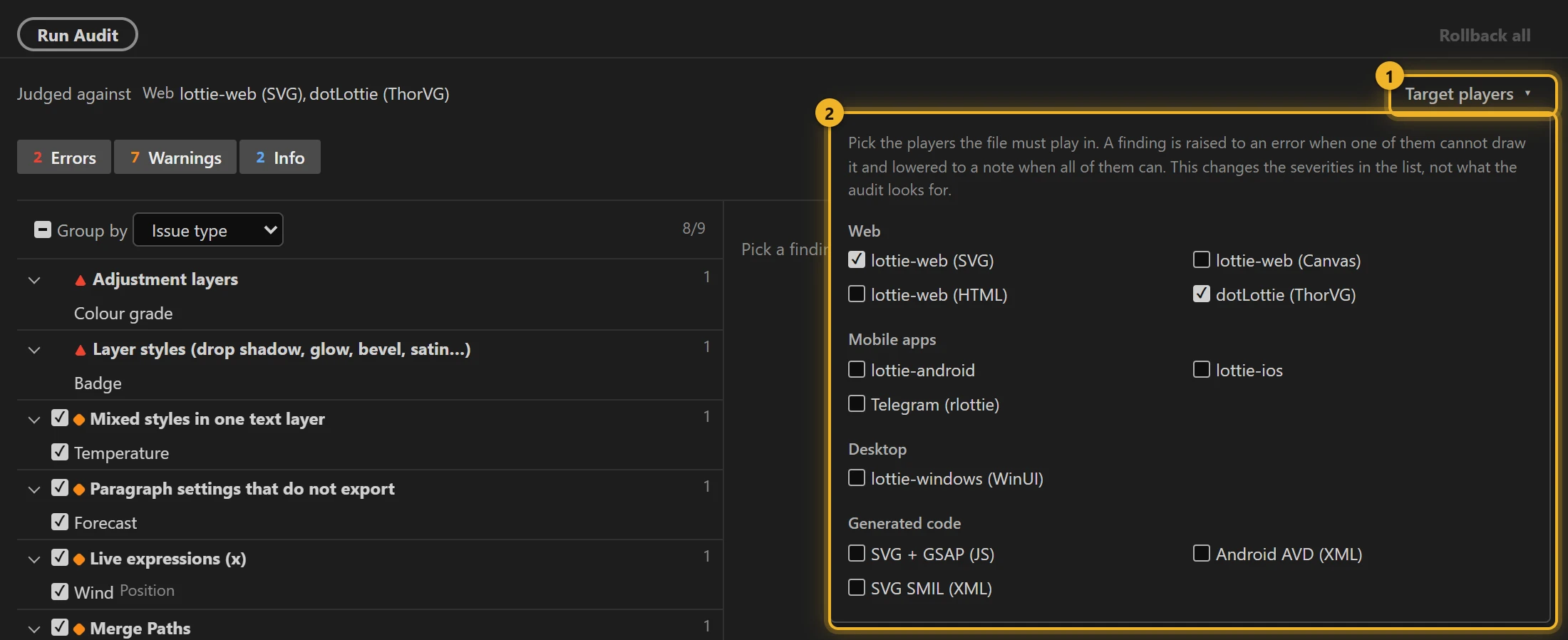
Ticking a player says the file has to work there. A finding becomes an error when a target cannot draw it and drops to a note when every target can. Targets change the severities only: the audit looks for the same things whatever you tick. The default pair is lottie-web (SVG) and dotLottie web (ThorVG).
The players are lottie-web (SVG, Canvas, HTML), dotLottie web (ThorVG), lottie-android, lottie-ios, lottie-windows (WinUI), Telegram stickers (rlottie), and three outputs AXO generates itself: SVG + GSAP, Android AVD and SVG SMIL.
Telegram stickers are judged against a real rlottie build as well as Telegram's own list of banned features. In a sticker, text never draws, blend modes and effects are ignored, mask opacity and Mask Expansion are dropped, and a camera layer stops the sticker from rendering at all. A solid at half opacity and a Repeater fade come out exactly as After Effects shows them, which the web players do not manage. Track mattes (alpha, luma, inverted) also draw correctly in rlottie, so the sticker check does not warn about them. A matte that is not directly above its layer is still flagged, because rlottie pairs a matte with the layer above it.
lottie-web's HTML renderer is judged against its own SVG renderer. Opacity, masks on shapes, gradients, blend modes, solids and text animators come out the same in both. In HTML, a shape with a Repeater draws nothing, a text layer with any mask draws nothing, and track mattes are not applied, so a comp with any of those is flagged for that target.
The three generated outputs are judged from our own converter's code. Pick Android AVD or SVG SMIL and the audit lists what those formats lose: layer and precomp opacity and solids in an AVD; in both, text strokes, text animators, masks below full strength, effects, blend modes, the Repeater, Twist, audio and adjustment layers, slots, and markers asked for by name.
The findings list
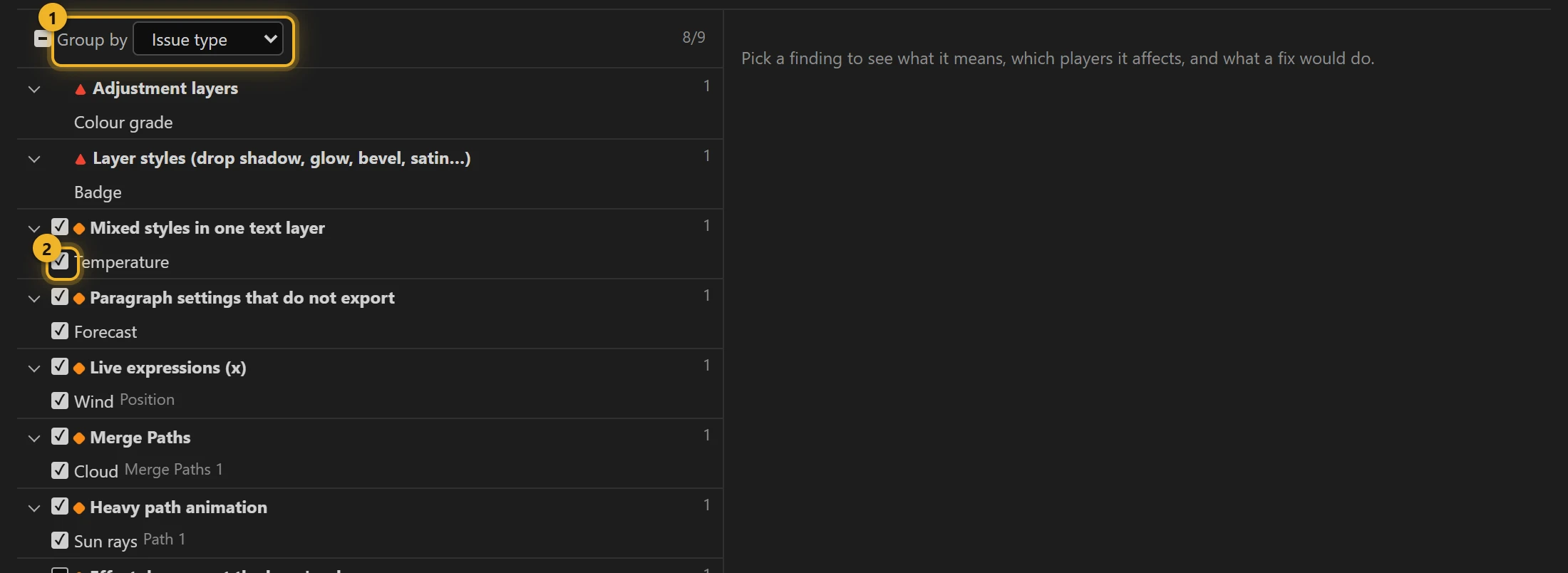
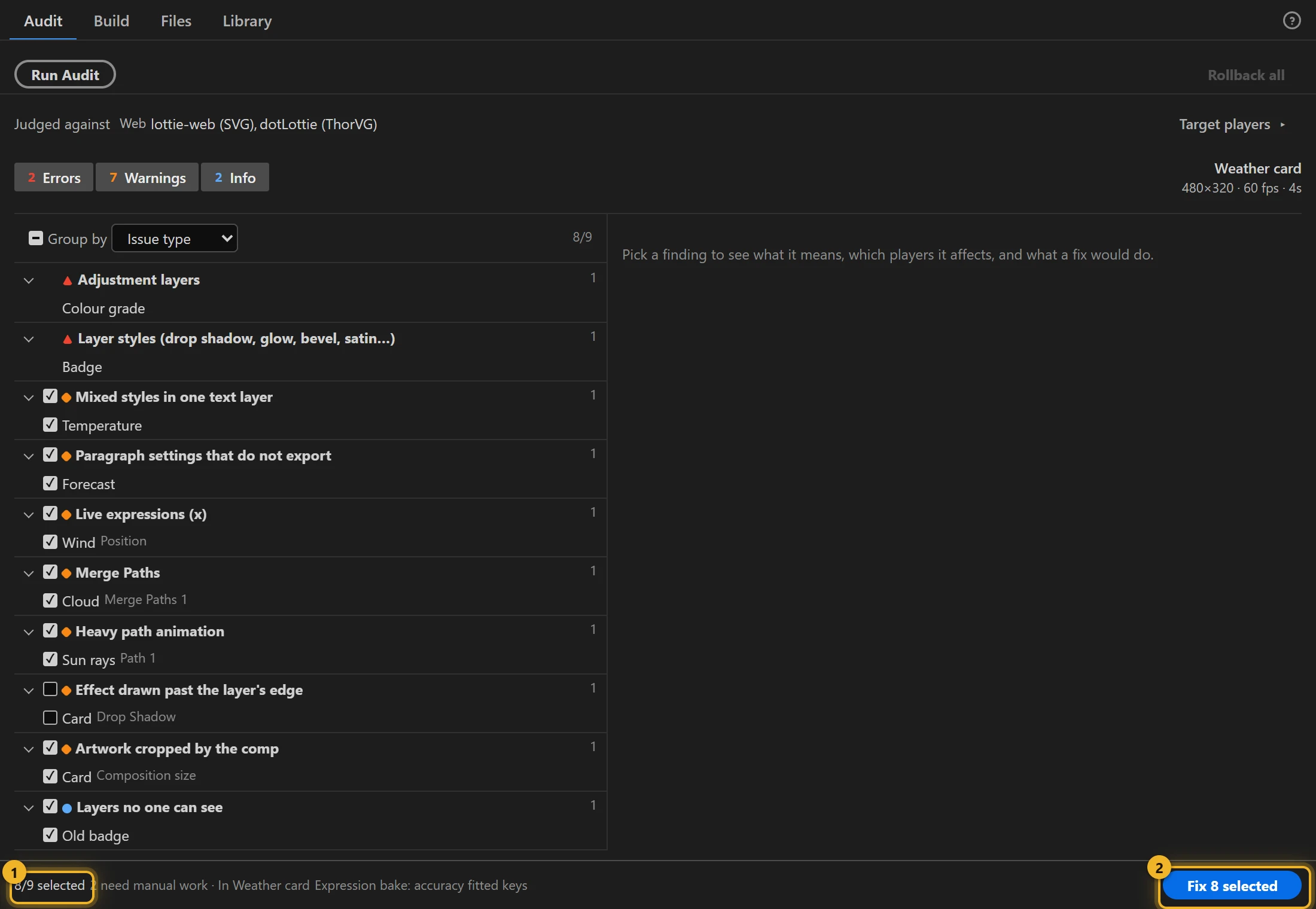
Group by 1 sorts the findings by Issue type, Layer or Composition. The tick beside a finding 2 puts it into the next Fix run; a finding without a tick has no automatic repair.
Every fixable finding starts ticked, with two exceptions:
- Effect drawn past the layer's edge. A file you build with AXO already keeps the whole effect, so the comp does not need changing. Tick it when the same comp will also be exported with another tool: the fix adds an invisible rectangle to the layer so that tool keeps the effect too.
- Many still layers. It works on the layers you select in After Effects, so it runs from its own Rasterize selected button instead of with the other fixes.
Some findings depend on how the layer is used:
- A layer that another layer's expression reads (a controller null with sliders, for example) is never reported as invisible, so no fix switches it off. Nulls are not judged by their Opacity at all.
- A layer attached to a parent is measured where the parent puts it before the audit says the composition crops it.
- Text is checked on every Source Text keyframe, so a missing font, right-to-left text or a paragraph box on a later key is reported too.
Some findings are reported only for the players that get them wrong:
- A layer with its own opacity inside a precomp that is faded too. lottie-web's canvas renderer paints the layer at its own opacity and drops the precomp's, so it comes out too solid.
- Mask opacity and Mask Expansion. The same canvas renderer clips every mask at full strength, on the path as drawn.
- A gradient whose transparency comes from opacity stops that do not sit on its colour stops. lottie-web's canvas renderer draws it fully opaque, so the fade disappears there and nowhere else.
- A text animator that scales, rotates or skews characters, when dotLottie is a target. That player turns each character about its left edge instead of its own anchor, so the characters land in the wrong place, and Grouping Alignment does nothing.
- Text typed along a mask path, when a target cannot draw it. lottie-web's canvas renderer draws such a layer as nothing; its SVG renderer and dotLottie follow the path.
- A marker outside the frames the file carries (past the end of the work area, or with a duration that runs past it), when dotLottie is a target. If the marker is meant as a segment, a dotLottie player asked for it by name stops on one frame. Markers you keep as working notes need no attention.
- A blend mode set inside a shape (on a group, fill or stroke). lottie-web and dotLottie do not draw it, so the shape blends as Normal there.
Footage that is missing on disk is reported before you build.
A finding in detail
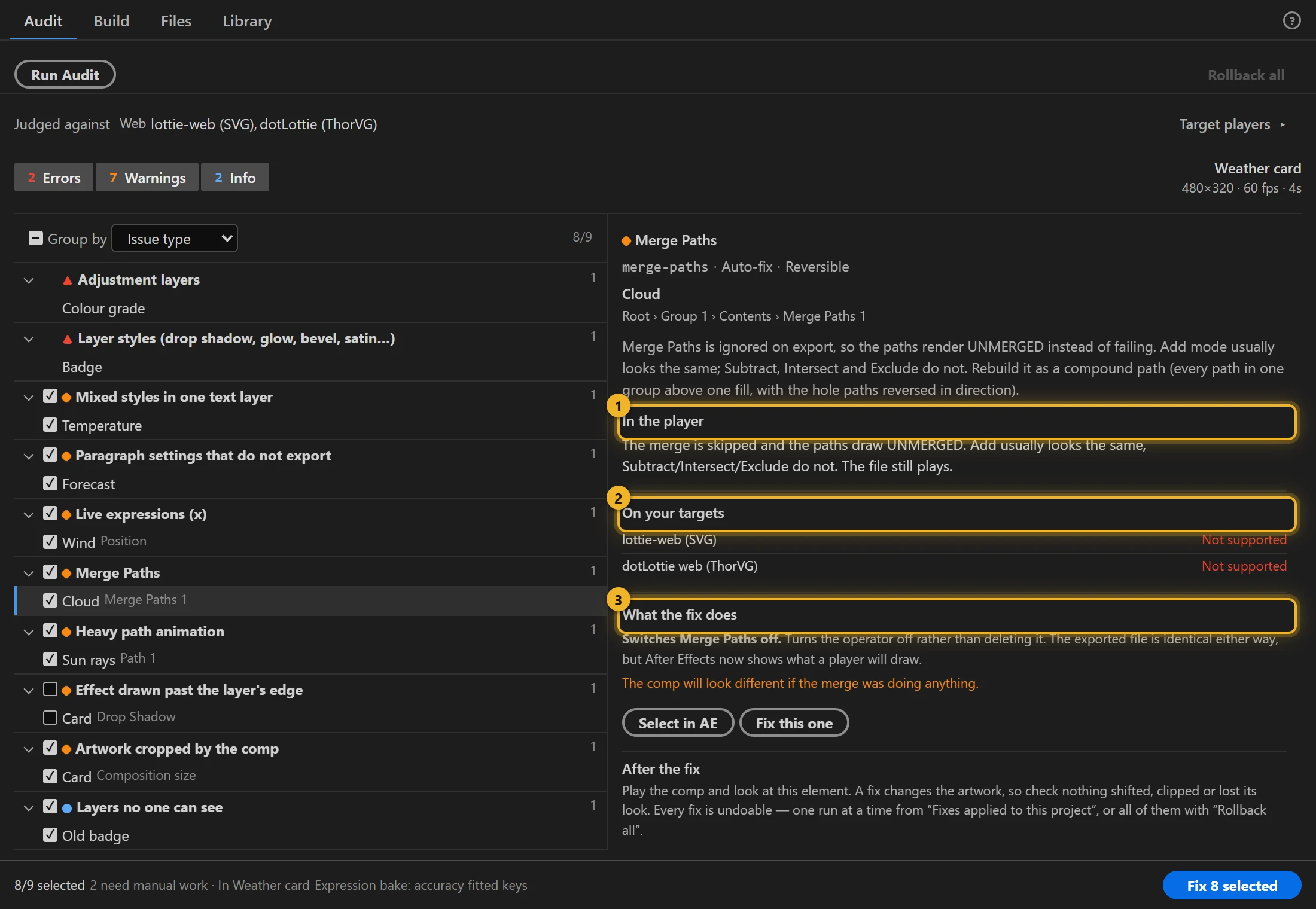
Pick a finding to see what the problem is and where (layer and property path), and:
- In the player 1: what happens on playback;
- On your targets 2: whether each target player renders it;
- What the fix does 3: the exact change and any cost, such as "the comp will look different if the merge was doing anything".
Select in AE opens the finding's composition and selects the layer, and the exact mask, effect, stroke or property when the finding names one. Opening a precomp this way does not change what the next audit reads: it stays on the comp you audited until you open another comp or select one in the Project panel. Fix this one repairs only this finding.
Why does a finding have no Fix button?
There are two reasons, and the detail pane says which applies. Either the feature has no mechanical equivalent, or every player you named drops it anyway, so a repair would not change the output. Fixes that replace a feature with a supported one (baking expressions, text to layers) are always offered.
A finding also has no button when the fix cannot handle this particular case: animated Source Text, a matte that feeds several layers, an expression on a property that also has its own keyframes, or a shape item that is switched off and exported only because Include hidden layers is on. The finding says why and what to do by hand.
Anything switched off in After Effects (an effect, a layer's fx switch, a shape operator, a muted audio track) is left out of the export, so the audit does not report it as lost.
Fix
The bar at the bottom shows how many findings are ticked and how many need manual work 1. Fix N selected 2 repairs the ticked ones in one run, then runs the audit again so the list shows what is left. The findings it fixed stay crossed out. Fixing a single finding or group crosses out only what it fixed and does not re-run the audit, so After Effects does not pause; the button at the top then reads Re-run Audit.
Each fix duplicates the layer in place. The copy that keeps the original name gets the repair, so expressions that address the layer by name use the fixed version. The other copy is the original, switched off (its audio too, so nothing plays twice) and tagged [axo:orig], with a rollback note in the layer comment. Nothing is copied at comp level, and the whole run is one After Effects undo step.
A note you had in a layer's comment is kept while the fix stands and comes back after Rollback.
Locked layers are left alone. The run reports them in one line ("3 fixes skipped on locked layers: …") above the other skipped fixes; unlock them in the timeline and fix again.
If you delete an [axo:orig] copy, that fix can no longer be rolled back. Rollback leaves the repaired layer in place and counts it as not reversed, so you do not lose the only copy you have.
If you duplicate a fixed layer (or its [axo:orig] copy) with Ctrl+D, Rollback cannot tell your copy from the fix's layer, so it leaves that fix alone and counts it as not reversed. Delete the copy and roll back again. If you rename the fixed layer, the original comes back under your new name, so expressions After Effects re-pointed to it keep working.
The repairs:
| Finding | Fix |
|---|---|
| Expression not baked | Bakes expression-driven properties to keyframes, from the keys of what drives them |
| Dense keyframes / animated paths | Thins keys with the same curve fitter the export uses |
| Mixed text styles | Splits the line into one layer per styled run. The line keeps its animation: position, scale and rotation through the layer the runs hang on, and opacity (which a parent does not pass on) on every run, keyframes included |
| Paragraph text | Converts box text to point text, keeping the wrapped lines as line breaks. A layer that moves, scales, turns or fades keeps its keyframes. The text keeps its character and paragraph settings (horizontal and vertical scale, spacing, indents, ligatures), and the layer keeps its switches (motion blur, label) and comment |
| Merge Paths | Switches the operator off. The file is identical; After Effects now shows what the player draws. A layer with several Merge Paths is one finding and one fix, and all of them go off together |
| Identical copies | Puts the shared content into one precomp and shows it once per copy. Each precomp layer takes its copy's position, scale, rotation, opacity, parent and timing, keyframes included, so copies that move on their own keys (confetti, particles) merge too, and a copy with motion blur keeps it. The file stores the content once. Layers that differ in something scripts cannot read (a gradient's colours, a Curves effect) are never treated as copies |
| Track matte for older players | Moves the matte above its layer |
| Solid below 100% opacity | dotLottie players apply a solid layer's opacity twice, so a solid at 50% shows at 25% and a fade comes in late and faint. The fix puts a shape layer in its place: a rectangle of the solid's size and colour, with the same position, scale, rotation, opacity (keyframes and expressions included), masks, timing, parent and blending mode. Layers parented to the solid follow the shape, and it looks the same in After Effects. A solid with effects or layer styles, a time-stretched one, or one in a comp with Essential Graphics controls is left for you |
| Oversized footage | Resamples a copy into _axo/ next to the project and relinks it, raising the layer's scale and moving its anchor point to match. Some layers are left alone, because their settings are measured in the image's pixels and would change size on screen: a layer with masks, layer styles, an animated anchor point or child layers, or with effects other than common colour corrections (Levels, Curves, Hue/Saturation, Tint and the like are fine; blurs, shadows and glows are not) |
| Many still layers | Renders the layers you select in After Effects into one image in _axo/. Layer scale is the image layer's scale in the comp: 100% holds the comp's own pixels; 75% and 50% (the default) hold 1.33× and 2× the pixels and stay sharp on high-density screens. A selection with effects or layer styles stays at 100%, where they look as they do in the comp |
| Colliding gradient names | Renames the duplicate |
| Negative Time Stretch | Makes the stretch positive and reverses the keyframes, so the layer stays at the same place on the timeline and shows the same values at the same frames. Keys you have selected on other layers are deselected first, so only this layer reverses. A layer whose properties are keyed over different time ranges is left for you: After Effects reverses each property inside its own range, which would shift them against each other |
How expressions are baked
The bake options set how closely the keys follow the expression: Smart (a curve fitted to the samples), Smart, high precision, or Every frame (exact). For text, they set how often a new key is taken (every frame, every 2nd, 3rd…). The repair and Bake expressions on export use the same bake, so a comp baked here and a file baked on export get the same keys: a position follows its path as a curve with a few keys, and a colour gets one ease per key, as After Effects stores it.
A property longer than 9000 frames is sampled more sparsely so its end is not lost, and the report says when that happened. A position longer than about 40 seconds gets a key per frame instead of a fitted path, because fitting one over that many frames is slow enough to look like a hang. If After Effects refuses part of a bake (a key, its easing or a motion path), that property is left exactly as it was, with its expression, and listed under Left alone with the reason. A half-applied bake would look finished and animate differently.
Undo and rollback
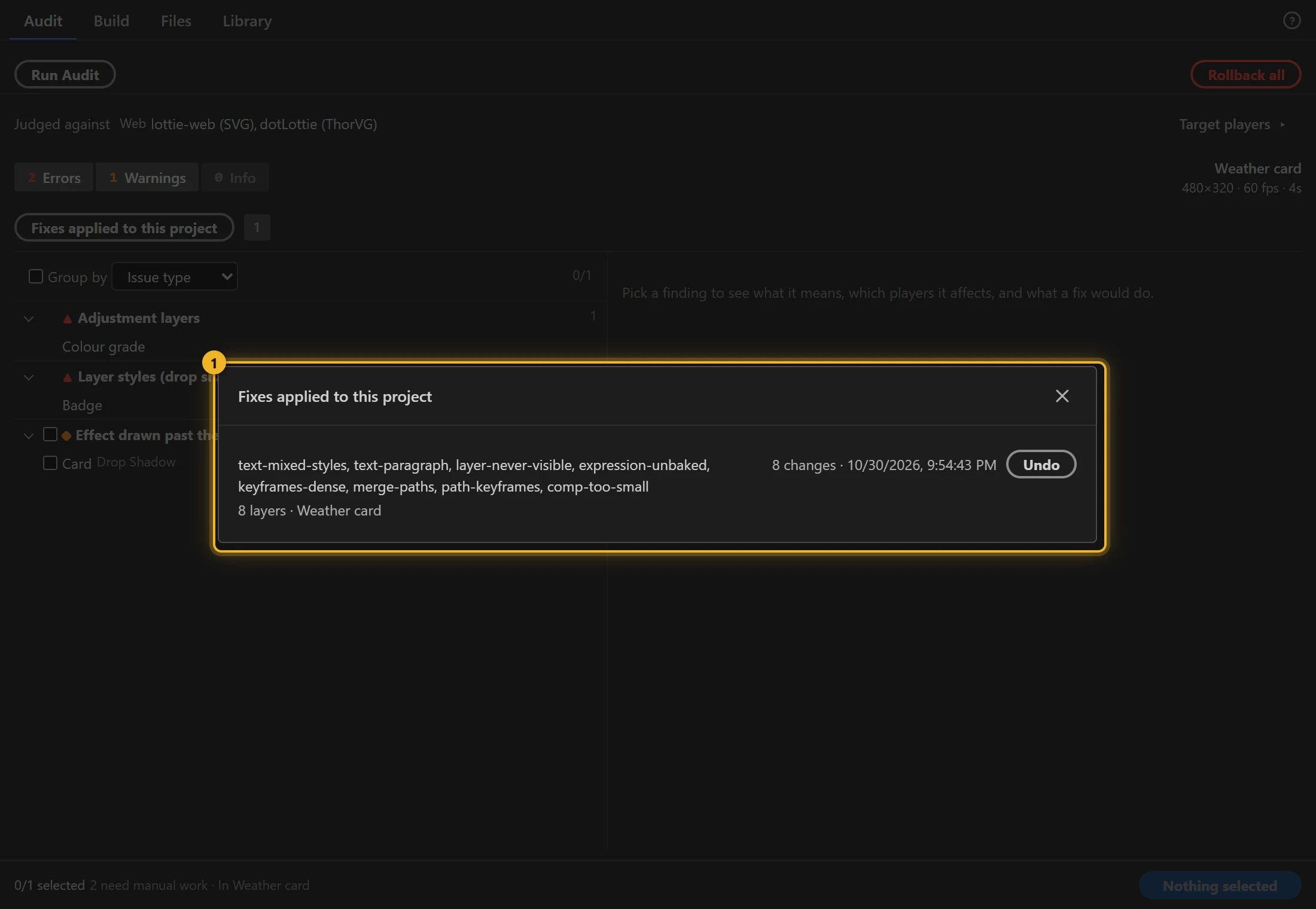
After a run, a message says what was fixed and offers Undo 1. The audit runs again by itself, so the list shows what is left.
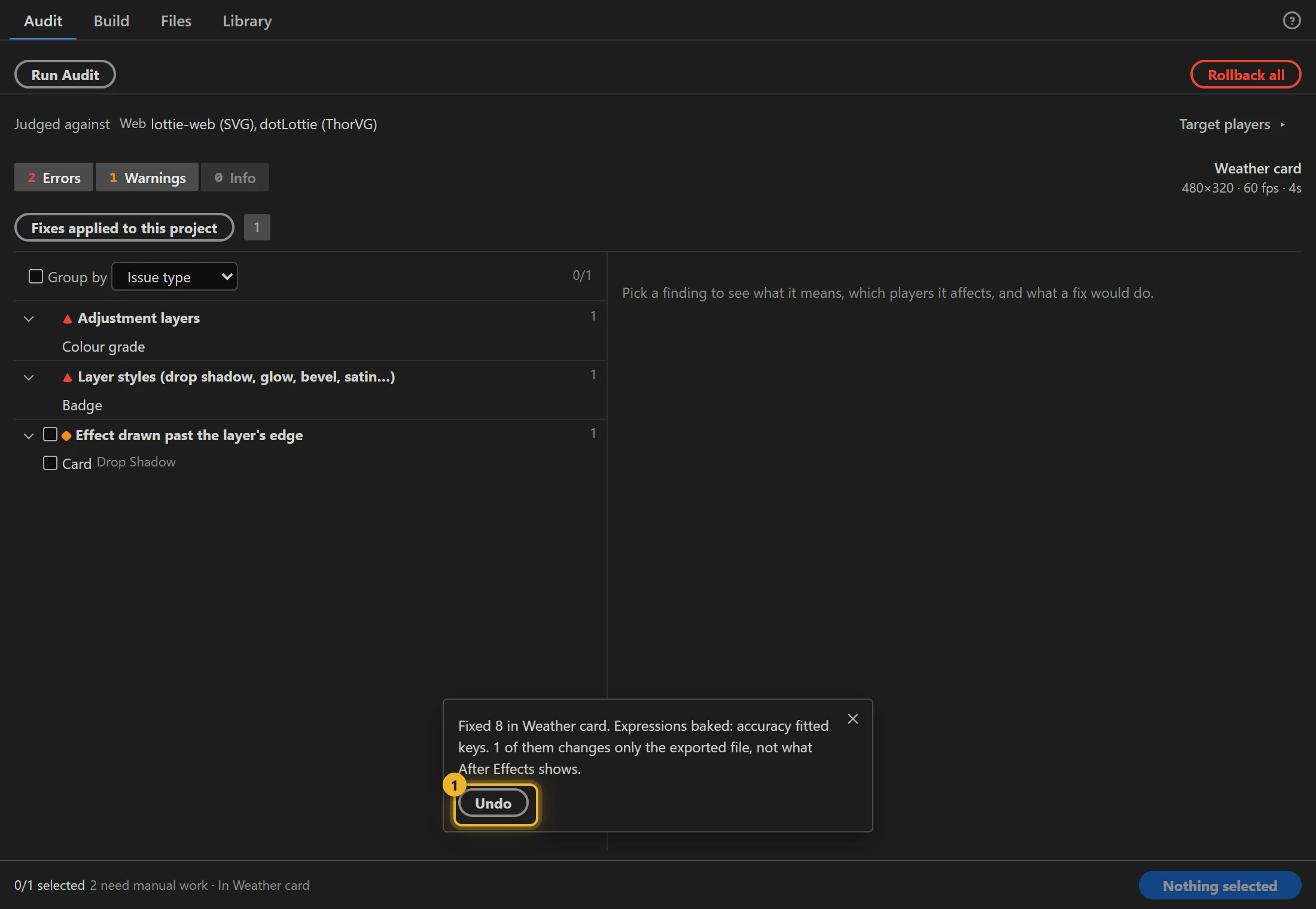
Every run is also kept in Fixes applied to this project 1, so you can roll back one run later, or all of them with Rollback all at the top of the tab. Rollback works from marks stored in the project itself, so it still works after a crash or when you reopen the project.
Runs can be undone in any order, even when a later run rebuilt a layer an earlier run had moved or renamed: the layer comes back as it was before both runs. If After Effects refuses to put something back (for example, because you have since locked the layer), Rollback counts it as not reversed and keeps its mark, so a later Rollback can finish it once the layer is unlocked. A run that stops on an unexpected error still lists what it had already applied, and that part can be undone like any other run.
Growing a composition that crops its layers is all or nothing. If any layer cannot move with the new origin (a locked layer, a refused write), the composition is left exactly as it was and the fix names the layer that stopped it.