
Appearance
Import into After Effects
| Where | To AE on a row in Files, or Import into AE in its toolbar for the ticked rows. |
| Reads | .json (Lottie), .lottie (every animation in it), .tgs (Telegram), animated .svg (SMIL). |
| Does | Rebuilds the animation as editable comps and layers in the open project, with its keyframes. |
| Trial | Included (what else). |
Import is the way back: a file whose project is gone, one somebody else made, or one of your own you want to change becomes a comp you can keep working in, and the next Build writes it out again.
Start an import
| From | How | Good to know |
|---|---|---|
| A file on disk | Add files… in Files, then To AE on its row | Tick several rows and press Import into AE in the toolbar: they come in one after another. |
| Text on the clipboard | Paste (Ctrl+V / Cmd+V) in Files, then To AE | The text of a Lottie JSON or an animated SVG. |
| The Library | Send to Files, then To AE | The Library's stored copy is used; the original file is not needed. |
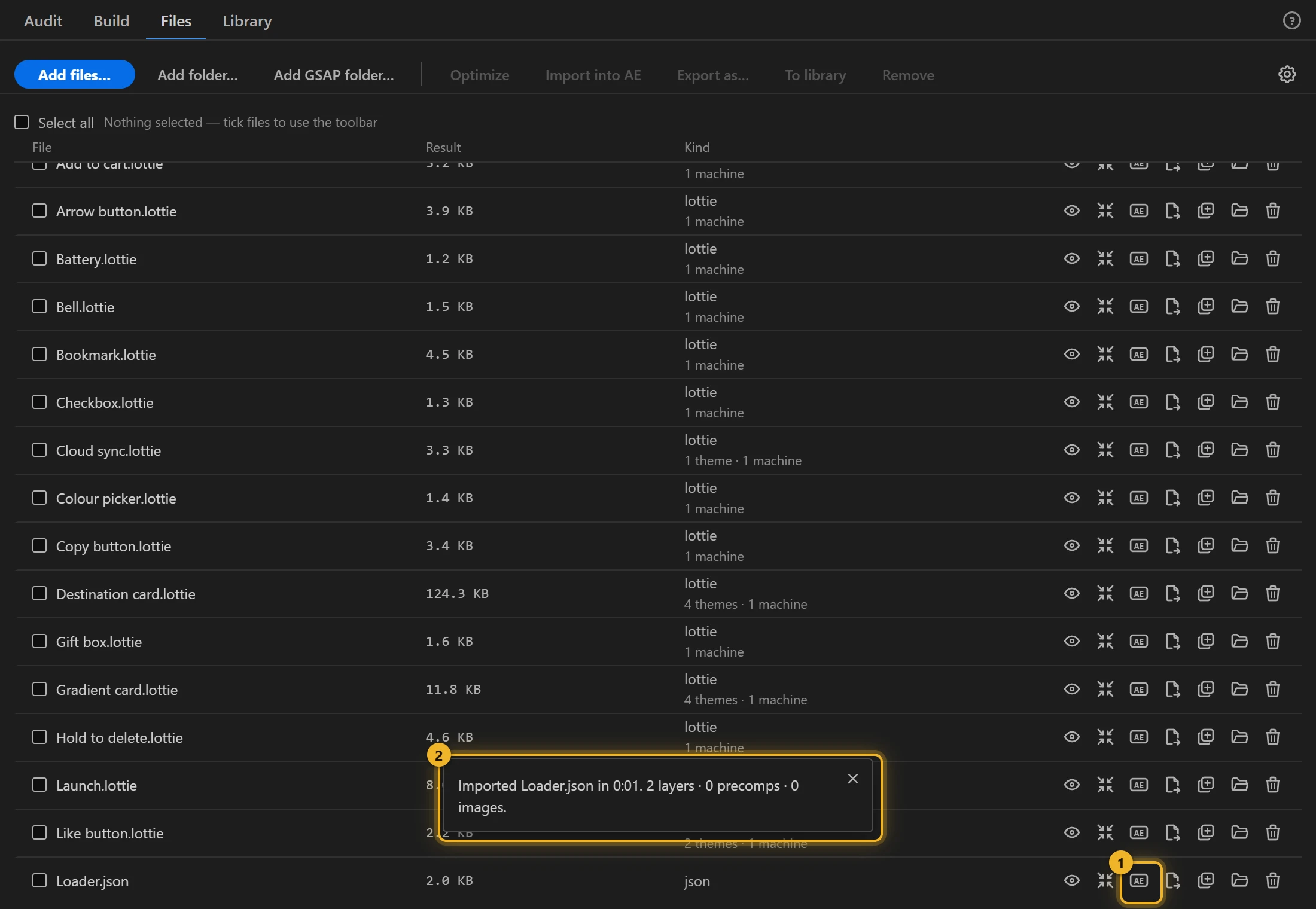
A message under the row says what was built 2 after To AE 1.
Formats
| File | Comes in as | Good to know |
|---|---|---|
.json | One comp | — |
.lottie | One comp per animation, named after its id | Themes and state machines come with it (see below). A damaged animation in the archive is named in the report and the rest still come in. |
.tgs | One comp | A Telegram sticker is a compressed Lottie; it is read as one. |
Animated .svg | One comp | SMIL animation only. Masks become luma mattes, clip paths alpha mattes; what SVG has and After Effects does not is listed in the report. More in Files. |
Images and sounds inside the file are saved in a folder beside the project, <project>_assets/<file name>. When the file carries images or sound and the project was never saved, the import asks first: save the project, or import anyway and keep them in a folder beside the source file.
What comes back
| In the file | Comes back in After Effects as |
|---|---|
| Shapes, masks, track mattes, gradients (still and animated) | Shape layers, masks, mattes, Gradient Fills and Strokes, with their keyframes |
| Text | Text layers |
| Layer styles and effects | The same styles and effects, with values and keyframes: Fill, Tint, Drop Shadow, Gaussian Blur, expression controls (Slider, Checkbox, Layer…), and any other effect the file carries, such as Glow |
| Slots | Properties in Essential Graphics. A slot several properties share comes in as name, name +2, … and goes out again as one slot |
| Gradient and image slots | A Gradient Fill / image layer named slot: <id> |
| Markers (segments) | Composition markers with their names and durations |
| Images | Footage items, saved next to the project |
| Sound | An audio layer with its own sound file, where it started, with its Audio Levels |
| Themes and state machines | Kept with the comp inside your project; the comp is switched to Interactive, and the next Build writes them back |
| A layer's web id and classes | A line in the layer's comment, like lottie: #hero .button. The next export reads it from there |
Several animations in one .lottie | One comp each |
So you can change a downloaded example in After Effects and export it again.
What is different after a round trip
| Thing | Why |
|---|---|
| Audio Levels | One level for both channels, at most 0 dB (a web player cannot play louder than the file), and a fade as a key on every frame instead of your original keys. |
| An effect from a plugin or preset not installed here | Listed in the report instead. |
| A frame rate or length After Effects does not accept | Brought into range; keyframes keep the file's timing. |
| An SVG smaller or larger than a comp may be | Gets a comp of the nearest allowed size. |
| Empty entries in the layer list of a damaged file | Skipped. |
The import report
When the import has something to tell you (a gradient to set by hand, a skipped property, where the images were put), a coloured mark appears after the file's name. Click it to read the report, one item per line; you can select and copy gradient stops. Esc or a click elsewhere closes it.
A .lottie whose animations do not all come in is reported as failed, and the message stays until you close it: it says how many came in and names the ones that did not. An animation that stopped halfway may leave part of its comp in the project.
Better than the importer it is built on
What AXO's import gets right that the Bodymovin importer loses or gets wrong is listed on What AXO does differently.