
Appearance
Connect your AI (MCP)
AXO has no AI assistant of its own. You connect the one you already use, and it controls After Effects and the panel directly. You describe what you want, and your assistant draws the illustration, animates it, and sets up the interactive part of the comp: keyframes, segments, tokens, themes and state machines. It works through MCP (Model Context Protocol), the standard way assistants such as Claude, Cursor and VS Code talk to other apps.
"This comp is a like button. Frames 0–30 are the idle loop, 30–60 the click. Make it loop idle, play the click once when the heart is pressed, and add a dark theme that turns the background navy."
The assistant reads the comp, adds the two segments as markers, builds the state machine, creates the theme, and tells you what it did. Everything it makes shows up in the Interactive Studio at once, where you can test and change it by hand.
What you need
- After Effects with the AXO panel open.
- An assistant that supports MCP: Claude Desktop, Cursor, VS Code, Claude Code, Codex, Antigravity and others.
- Node.js installed on the computer, for every assistant except Claude Desktop, which brings its own. The panel tells you when it is missing.
Switch it on
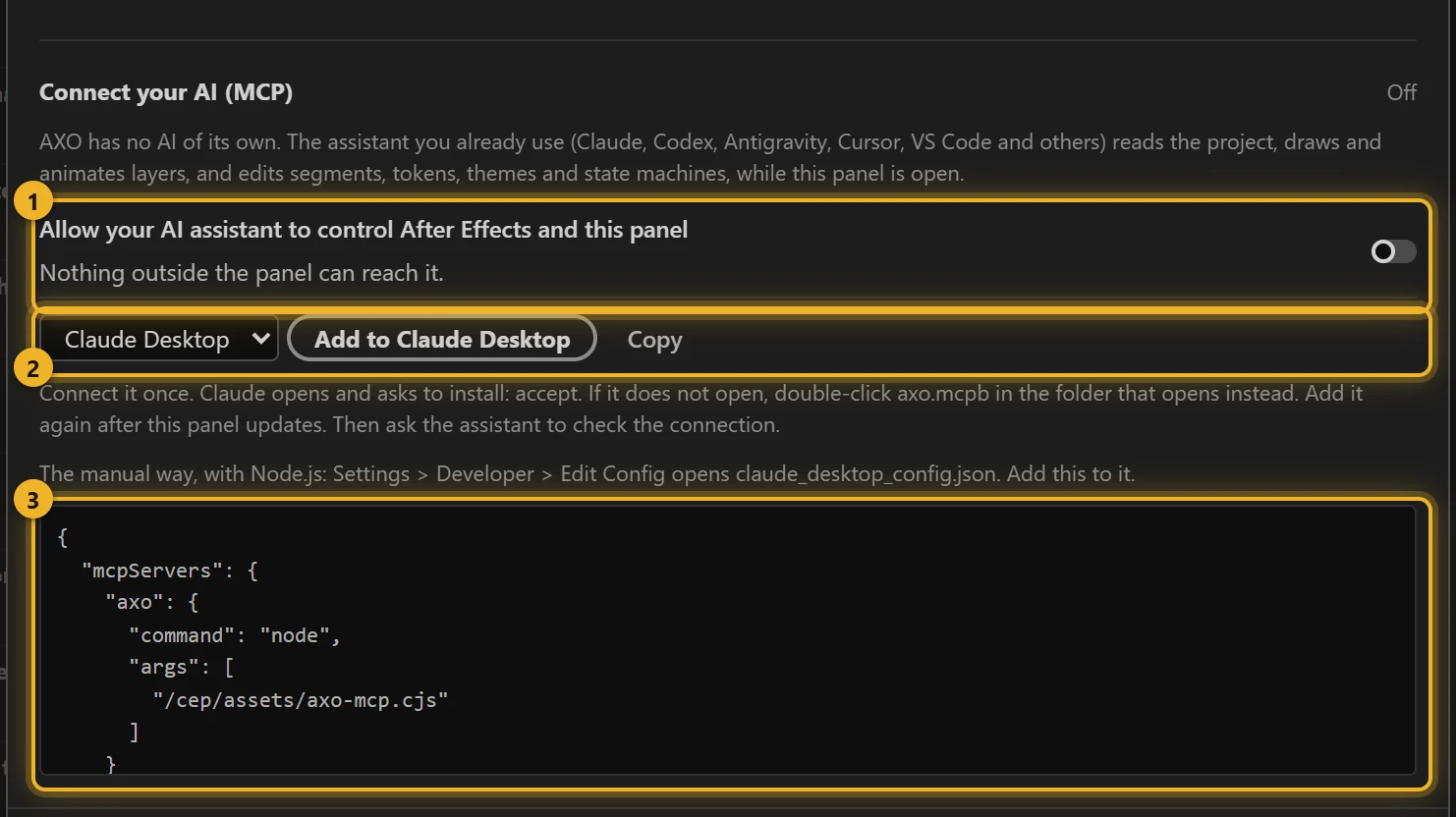
- In the panel: ≡ › Settings… › Connect your AI (MCP) → switch on Allow your AI assistant to control After Effects and this panel 1.
- Connect your assistant, once. Pick it in Assistant to connect 2 and take the one step the panel shows (the table below). The text for the manual way is under it 3.
- Ask the assistant to check the connection, or anything about your project: "What comps are in my After Effects project?" It answers with the comps of the open project.
| Assistant | The step |
|---|---|
| Claude Desktop | Add to Claude Desktop opens Claude with the install question: accept. If Claude does not open, a folder opens instead: double-click axo.mcpb there. After an AXO update the tools update on their own in a new chat (a chat that was already open keeps the old list); if the assistant says the connector is older than the panel, remove AXO in Claude's Settings › Extensions and add it again. |
| Cursor | Add to Cursor opens Cursor with the install question: accept. |
| VS Code | Open VS Code first. Then Add to VS Code shows the server's page there: press Install. |
| Claude Code | Copy, then paste into a terminal: it is one command. |
| Codex | Copy into .codex/config.toml in your home folder. |
| Antigravity | Copy into .gemini/config/mcp_config.json in your home folder, then restart Antigravity. |
| Other | Copy into the assistant's MCP settings. If it asks for a command: node, with the path from the text as its one argument. |
Every assistant also has the manual way: Copy gives the text for its config file, and the panel says which file. If the file already lists other servers, add the axo entry next to them instead of replacing the file.
The line under the switch says On. Waiting for an assistant., and counts the requests once the assistant starts working.
What the assistant can do
| It can | Notes |
|---|---|
| Read the project | Comps, the comp you have open, layers, markers, tokens, themes, machines, and the same problem list the Studio shows. |
| Read a comp's layers and keyframes | What each layer is, how shapes are grouped, what is animated and with which keys and easing. |
| See frames of a comp | After Effects draws the frames it asks for, so it can look at the artwork and check the motion. No file is kept. |
| Run the Audit and read its findings | What a player will not draw as After Effects does. It reads only: the fixes stay with you, in the Audit tab. |
| Draw artwork | An icon or an illustration, in a new comp or in yours: After Effects' own rectangles, ellipses, stars and polygons, paths, fills and strokes, gradients, Trim Paths, and live text layers. No images. One undo step. Save the project before Build so gradient colours reach the file. |
| Animate your artwork | It writes keyframes with easing on any layer or shape property: position, scale, rotation, opacity, colour, paths. It leaves the keyframes you made alone unless you ask it to change them. One call is one undo step in After Effects. |
| Manage layers and the comp | Rename, parent, reorder, duplicate, delete, hide, set when a layer is on screen, clip one layer with another (track matte), set a blend mode, centre an anchor point, add a null, precompose; remove a shape, an effect or a mask from a layer; change the comp's name, size, length, frame rate and backdrop, or delete a comp. One undo step. Locked layers are left alone. |
| Add, move, rename and remove segments | These are comp markers. One undo step in After Effects. |
| List what can become a token, and make one | The same list as Add a token in the Studio. A token's name is permanent, so the assistant picks it by role. |
| Create and change themes | Colours, numbers, positions, scales, text and gradient stops. |
| Build state machines | From any of the Studio's templates, or written from scratch, then checked with the Studio's own rules. |
| Switch a comp's Interactive on | So Build writes it as a .lottie with its themes and machines. |
Put several comps in one .lottie | It ticks the comps in Build, switches on One .lottie archive, names the file and sets what it opens on (animation, machine, theme); a machine can move between the comps' animations. The ticks are the panel's, as yours are: a panel reload clears them. |
It cannot write expressions, run scripts, read or save your files, import footage or build the export: you press Build yourself. It deletes only what you ask it to, or what it made itself. Lock a layer to keep the assistant away from it.
Which assistant
AXO gives every assistant the same tools and the same rules for drawing, timing and state machines; an assistant that skips the rules is sent them before its first change. How good the drawing and the motion look still depends on the model behind the assistant: a stronger model draws cleaner artwork and checks its own frames more carefully. If a result looks rough, try the same prompt with a stronger model before rewriting the prompt. For a small model, ask for one thing at a time: draw, look, then animate.
Good prompts
Prompts to copy, one job each: Prompts that work. The short version:
- Say which comp, or keep it open in After Effects and say "this comp".
- Say what happens where ("the bell rings in the second half"): the assistant reads the keyframes and looks at frames to find the exact range.
- Name the layers people will click or hover ("the layer called Heart").
- A flight or an orbit ("the plane circles the button and lands back in place"): the assistant writes it as one smooth path through a few points, with one ease for the whole trip, so nothing stops on the way. Something with a nose (a plane, an arrow) turns to face where it flies.
- To animate: say what should move and how it should feel ("the bell swings twice, quick and springy, when hovered"). If you do not like the result, Edit › Undo in After Effects takes the whole step back.
- Ask for one behaviour at a time, then test it in the Studio's Test player.
Safety
- The connection is off until you switch it on, and stops when the panel closes.
- Only programs on this computer can reach it, and only with a key the panel writes into your own
AXOfolder each time it starts. - The assistant gets a fixed list of actions, the ones in the table above. Nothing else in After Effects or on your disk is exposed.
- Marker and token changes can be undone in After Effects (Edit › Undo); themes and machines can be changed or deleted in the Studio.
If it does not connect
| The assistant says | Do this |
|---|---|
| After Effects is not reachable | Open After Effects and the AXO panel, and check the switch in Settings. |
The server failed to start / node not found | Install Node.js, then restart the assistant. |
| It worked, then stopped after an AXO update | Copy the text from Settings again: the panel's folder may have moved. |
| The AXO connector is older than the panel | Claude Desktop: remove AXO in Settings › Extensions, then press Add to Claude Desktop in the panel. Any other assistant: restart it. |
| It does not know a tool the guide names | Open After Effects with the AXO panel first, then start a new chat: the list comes from the panel. |